
Lieferung heute & morgen

Qualitätsgarantie

Willkommens-Angebote freischalten: KOSTENLOSE Lieferung | Bis zu 80 % RABATT | Kostenlose 30-Tage-JoyPlus-Testphase
App herunterladen
By Joybuy Product Recommendation Officer, July 28, 2026
Modern laptops like the MacBook Pro or Dell's XPS series are powerful and sleek, but their minimalism comes at a cost: a very limited number of ports. A USB-C hub is the go-to solution for connecting monitors, storage media, and peripherals. However, the market is crowded and full of products with hidden flaws that can quickly lead to a costly mistake.
Many users invest in a multiport adapter only to find that its performance doesn't live up to the promises. Before you make a decision, you should be aware of the three most common pitfalls:
To avoid these problems, it's crucial to examine the technical specifications closely. Focus on the following three core parameters to find a model that will reliably meet your needs.
The refresh rate, measured in Hertz (Hz), indicates how many frames are displayed per second on the screen. For a smooth and comfortable viewing experience, 60 Hz is the established standard.
If you plan to connect two monitors, you'll need a docking station for 2 monitors or a hub that supports Multi-Stream Transport (MST). Be sure to check compatibility with your operating system: while Windows systems with MST can typically display two different screen contents, many macOS systems will only mirror the image on both external monitors.
The Power Delivery feature allows you to charge your laptop through the hub while other devices are connected simultaneously. The specified wattage (e.g., 100W) refers to the maximum power input from the charger. The hub itself consumes a portion of this energy (around 5–15W) for its own operation.
Look for a hub that supports PD charging power of up to 100W. This ensures that even powerful laptops, serving as a MacBook Pro adapter replacement, receive enough power and that the battery charges reliably.
The speed of your peripherals depends directly on the hub's ports.
Based on the criteria above, we have identified a few models that are particularly well-suited for specific user groups.
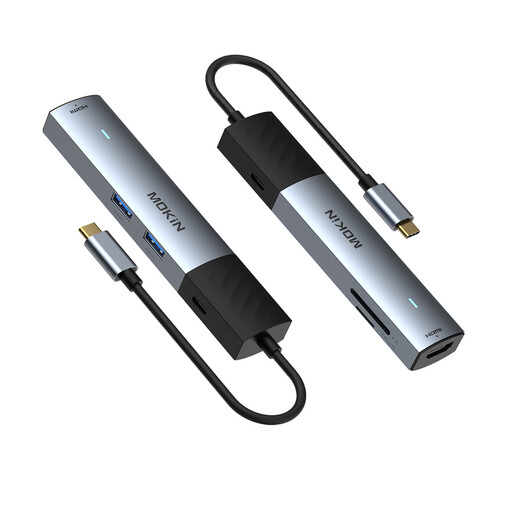
Why This Fits Their Persona: This model is compact and lightweight, ideal for use at university, in a café, or while travelling. It covers the most important everyday needs with HDMI, multiple USB-A ports, an SD/TF card reader, and Power Delivery.
It bypasses the 30 Hz trap by offering smooth 4K video output at 60 Hz. Support for 100W PD also ensures that even modern laptops are charged efficiently.
Excellent balance of portability and features. The ability to use the SD and TF card readers simultaneously is a practical detail.
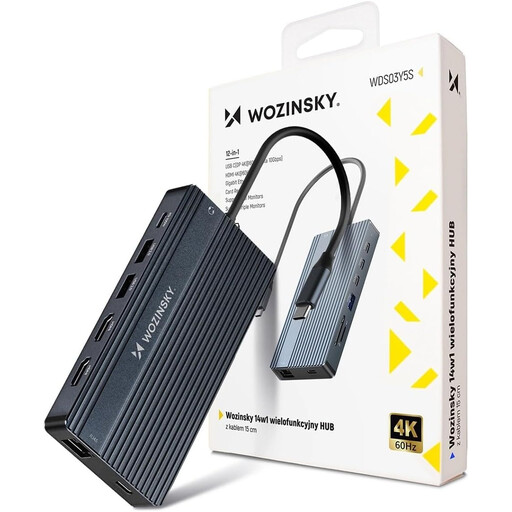
Why This Fits Their Persona: For users who want to turn their laptop into a full-fledged workstation. With 14 ports, including dual HDMI, DisplayPort, VGA, and Gigabit Ethernet, this hub is designed for complex multi-monitor setups and connecting numerous peripherals.
This hub makes no compromises. It offers comprehensive connectivity that avoids speed bottlenecks. Multiple video outputs and fast USB ports (up to 10 Gbps) ensure a smooth workflow.
Maximum port variety for complex workstations. Supports up to three external monitors (MST for Windows) and even includes a VGA port for older projectors.
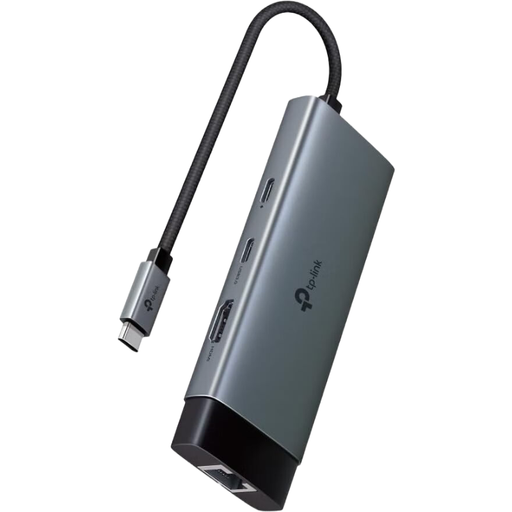
Why This Fits Their Persona: A reliable choice from an established brand. This hub focuses on the most important, high-performance ports for a modern workspace, rather than just the sheer number of ports. Ideal for users who value stability and quality.
This model delivers stable performance on the crucial features: 4K@60Hz, Gigabit Ethernet, and 100W Power Delivery. There are no hidden USB 2.0 ports; all data ports offer a fast 5 Gbps.
Reliable performance and high compatibility from a well-known networking brand. Its plug-and-play functionality across numerous operating systems makes setup straightforward.
We have compiled a complete, up-to-date list of products that fully meet these strict selection criteria and safety regulations.
Not necessarily. For video output, your laptop's USB-C port must support DisplayPort Alternate Mode (DP Alt Mode). To charge through the hub, the port must also support Power Delivery. Most modern laptops (especially models from Apple, Dell, HP, and Lenovo) with Thunderbolt 3/4 or USB4 ports meet these requirements. However, be aware of specific limitations, such as with Apple's base-level chips (M1/M2/M3), which often only support a single external monitor.
It's normal for USB-C hubs to get warm, especially under heavy load. When simultaneously driving a 4K monitor, charging a laptop at 100W, and transferring data across multiple ports, heat is generated as a byproduct of power and data management. Aluminium casings, used in many high-quality models, act as a heat sink to dissipate this warmth efficiently. As long as the hub doesn't become excessively hot, there's no cause for concern.
The choice depends on your workspace. A USB-C hub is typically compact, powered by the laptop (bus-powered), and designed for mobile use. A USB-C docking station is often larger, has its own power supply, and generally offers more ports and higher overall performance. It's the better choice for a permanent desk setup where many devices are connected long-term.