
Lieferung heute & morgen

Qualitätsgarantie

Willkommens-Angebote freischalten: KOSTENLOSE Lieferung | Bis zu 80 % RABATT | Kostenlose 30-Tage-JoyPlus-Testphase
App herunterladen
A USB-C hub can expand your laptop, tablet or smartphone with additional ports. In practice, however, models differ significantly when it comes to video output, data transfer speeds, charging capabilities and compatibility. If you only look at the number of ports, you could end up buying an adapter that doesn't work as expected with your device.
Three common buying mistakes crop up particularly often:
First, your computer's USB-C port must support the function you need. For a monitor, for example, you'll need a USB-C port with DisplayPort Alternate Mode or a comparable video output function. A USB-C port that only supports data or charging may not be able to transmit a picture via a USB-C hub with HDMI.
This applies to a USB-C hub for laptop just as much as a USB-C hub for MacBook, iPad or smartphone. So check the following:
A USB-C docking station with two HDMI ports can technically offer multiple displays. However, actual usage depends on the operating system, graphics unit and the specific USB-C standard.
With a USB-C hub with HDMI, don't just look for "4K" in the product description. Pay attention to the specific combination of resolution and frequency:
A USB-C hub 4K can only deliver the stated picture quality if the HDMI cable, monitor and source device also support that specification.
USB 3.0, or USB 3.2 Gen 1, reaches up to 5 Gbit/s depending on the product specification. USB 3.2 Gen 2 can support up to 10 Gbit/s. These values are theoretical interface speeds and can be reduced by files, cables, storage devices and the shared use of multiple ports.
For photographers and video editors, a USB-C hub with SD card reader and a microSD or TF slot are relevant. Check whether SD and TF can be used simultaneously and what read and write speeds are specified.
With a USB-C hub with Power Delivery, the input power of the charger should match the power consumption of your laptop. A USB-C hub with Ethernet is useful if you need a wired network connection of up to 1 Gbit/s. For permanently connected hard drives, a powered hub can work more reliably than a model that relies solely on bus power.
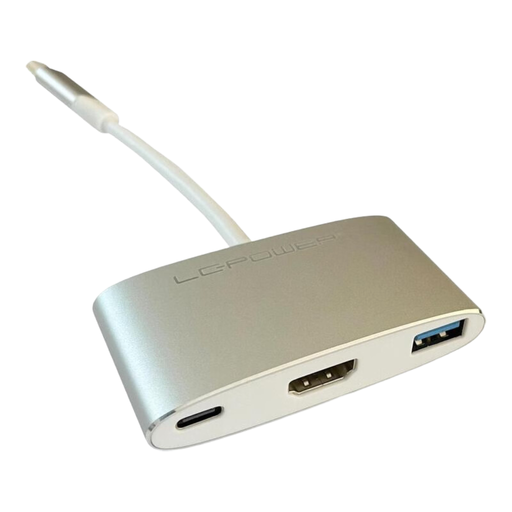
Why this product fits the profile: This compact adapter focuses on USB-A 3.0, HDMI and a USB-C PD port. At 61 g with a 0.85 m cable, it's ideal for mobile workstations and basic office tasks.
The ports and single monitor connection are clearly described. This means buyers don't have to pay for an extensive port selection when HDMI and one USB device are all they need.
USB 3.0 up to 5,000 Mbit/s, HDMI output and USB-C PD support up to 100 W according to product specifications.
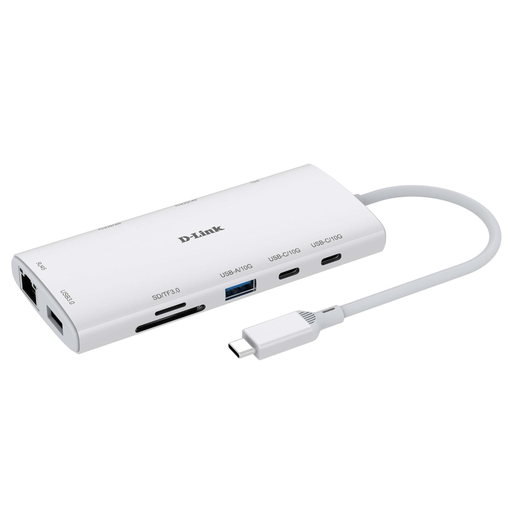
Why this product fits the profile: This model combines two HDMI outputs, USB-C and USB-A data ports, Gigabit Ethernet, plus SD and microSD readers for a well-organised office or creative workspace.
The specifications clearly differentiate between data transfer speeds, display connections and the network port. This makes it easy to check the features against your actual workspace needs.
Two HDMI ports, USB data transfer speeds up to 10 Gbit/s and 1 Gbit/s Ethernet according to manufacturer specifications.
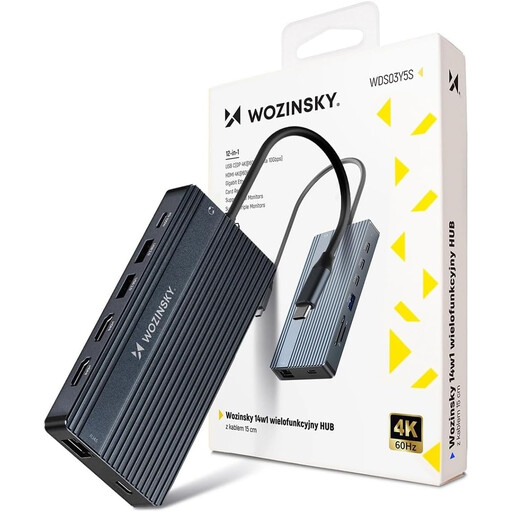
Why this product fits the profile: For multi-monitor workstations, video editing and lots of peripherals, this hub offers HDMI, DisplayPort, VGA, Ethernet, audio, plus SD and TF readers.
The product description lists supported display modes and highlights the differences between MST on Windows and SST on macOS.
Up to three 4K outputs according to product specifications, USB data transfer speeds up to 10 Gbit/s and USB-C PD up to 100 W.
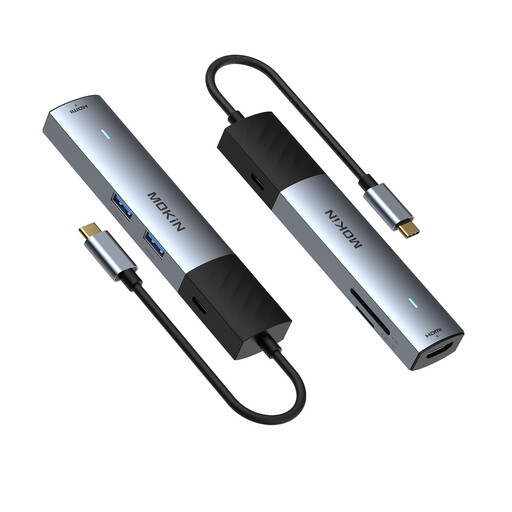
Why this product fits the profile: This 7-in-1 hub combines HDMI, two USB-A 3.0 ports, USB-C 3.0, SD, TF and PD in a portable format for laptop and tablet users.
SD and TF can work simultaneously according to the product specification. The stated card speeds help you assess performance more realistically.
HDMI with 4K at 60 Hz, USB data transfer up to 5 Gbit/s and USB-C PD up to 100 W according to product data.
We've put together a complete, regularly updated list of products that fully meet these strict selection criteria and the safety regulations in force in the EU.
No. For HDMI, your device's port must support video output. For Power Delivery, the hub's USB-C port must be designed as a PD input. You should check your laptop, tablet or smartphone's specifications before buying.
The lifespan depends on plug cycles, cable strain, heat generation and the devices connected. Using it in a dry, well-ventilated environment and safely ejecting storage media can help extend its life. If you notice unusual heat, damage or connection dropouts, stop using the hub.
A passive hub usually draws its operating power from the host device. A USB-C hub with Power Delivery passes power through from a connected charger. For multiple hard drives, monitors or power-hungry devices, a model with its own power supply may be more suitable. Check the specifications for maximum PD power and power distribution.