
Lieferung heute & morgen

Qualitätsgarantie

Willkommens-Angebote freischalten: KOSTENLOSE Lieferung | Bis zu 80 % RABATT | Kostenlose 30-Tage-JoyPlus-Testphase
App herunterladen
A USB-C hub expands a single port on your laptop, tablet or smartphone with additional USB, HDMI, SD or power connections. Whether you're working from home, studying, editing photos or travelling, it's a practical solution – provided the hub is actually compatible with your device.
Many poor purchases happen not because of missing ports, but because of misleading product specifications. Before you buy, it's worth checking which features your device supports and which connections you regularly need.
USB-C only describes the shape of the connector. Different standards can sit behind it: USB 2.0, USB 3.0, USB 3.2, USB4 or Thunderbolt. Video output and charging aren't possible with every USB-C port either.
A USB-C adapter with a USB-C connector may work with one device without simultaneously transmitting HDMI signals or charging a power bank. Check your laptop or tablet's user manual to see if the port supports DisplayPort Alt Mode, USB4 or Thunderbolt.
The specification "4K HDMI" doesn't tell you whether 4K is output at 60 Hz or just 30 Hz. For smooth mouse movements and video work, the refresh rate matters. What's more, your laptop, HDMI cable and monitor all need to support the same resolution and frequency.
With a USB-C hub with PD 100W, the wattage usually refers to the maximum pass-through. The hub itself may consume some of that power, and your charger also needs to deliver sufficient power. The actual charging speed may therefore be lower than the stated maximum.
A USB-C multi-port adapter typically uses a single connection to the host device. If you're using external SSDs, memory cards, HDMI and a network connection all at once, the available data rate gets shared across the connected functions. This is normal for compact hubs and something to bear in mind when transferring large files.
These figures are theoretical maximums. The file system, cable, connected device and internal hub architecture all affect the actual speed.
If you're looking for a USB-C hub 4K HDMI, pay attention to the exact specification: 4K at 60 Hz or 4K at 30 Hz. For a single monitor, a compact hub is often sufficient. For multiple displays, you may need a USB-C docking station with MST support or a Thunderbolt system.
On macOS, Windows and ChromeOS, the capabilities for multiple monitors can differ. So check the specifications from both your laptop manufacturer and the hub before buying a docking station.
Photographers and video creators should check which card types are supported. A USB-C hub with an SD card reader may also have a TF or microSD slot. What matters is whether SD and TF can be used simultaneously, and what read and write speeds are stated.
With Power Delivery, you should also consider the power source alongside the maximum wattage. A hub with a PD input doesn't replace a USB-C charger. Use a charger that matches your notebook and the power level you need.
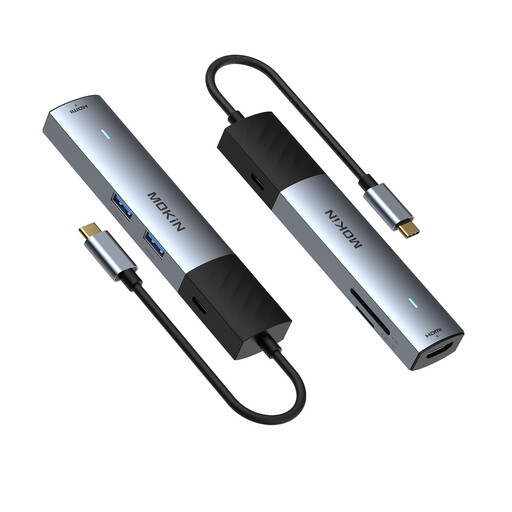
Why this product fits the profile: The 7-in-1 hub combines HDMI, two USB-A 3.0 ports, USB-C 3.0, SD, TF and a PD 3.0 input in one device.
The technical specifications state 4K at 60 Hz, up to 5 Gbit/s for USB-C and USB-A, and up to 100 W PD pass-through. The values are clear before purchase.
SD and TF can work simultaneously according to the product information; HDMI supports 4K at 60 Hz.
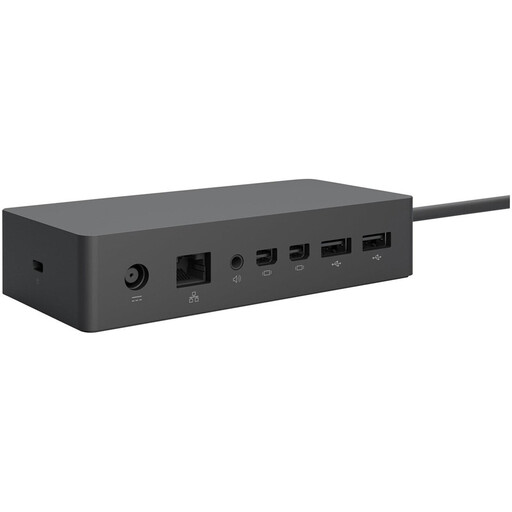
Why this product fits the profile: The docking station is designed for a fixed workstation with multiple peripherals, network connectivity and compatible monitors.
The connection is based on Thunderbolt 4 rather than an unspecified USB-C interface. Your device must support Thunderbolt 4 first.
Three Thunderbolt 4 and three USB-A 3.0 ports, Gigabit Ethernet and a 3.5 mm audio jack are specified.
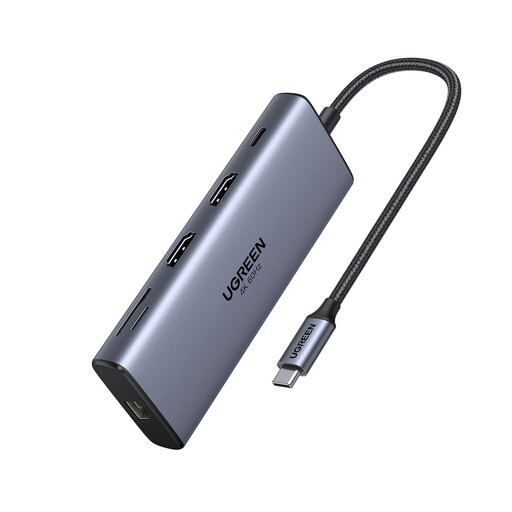
Why this product fits the profile: For home office, image editing and large file archives, multiple video, USB, card and network connections are available.
The specifications distinguish between USB-C 3.2 at up to 10 Gbit/s, USB-A at up to 5 Gbit/s and HDMI with 4K at 60 Hz.
Two HDMI ports, an SD/TF reader, Gigabit Ethernet and PD up to 100 W are combined in a 10-in-1 hub.
We've put together a complete, regularly updated list of products that fully meet these strict selection criteria and the safety regulations in force in the EU.
No. Basic functionality for USB devices is often compatible, but HDMI, Power Delivery and high data rates depend on your USB-C port's capabilities. Also check your operating system and the manufacturer's specifications.
A hub with a USB-C PD input can pass power through to the connected device. You'll need a suitable USB-C charger for this. The stated maximum power, for example 100 W, isn't automatically what actually reaches your laptop.
The lifespan depends on plug cycles, cable strain, heat build-up and the connected devices. Good ventilation, careful plugging and unplugging, and safely ejecting storage media all reduce typical wear. If you notice visible damage, unusual heat or unstable connections, stop using the hub.