
Lieferung heute & morgen

Qualitätsgarantie

Willkommens-Angebote freischalten: KOSTENLOSE Lieferung | Bis zu 80 % RABATT | Kostenlose 30-Tage-JoyPlus-Testphase
App herunterladen
A USB-C hub expands a laptop, MacBook or tablet port with additional connections. Depending on the model, you may get HDMI, VGA, USB-A, USB-C, SD and TF card readers or a Power Delivery port. This sounds straightforward, but it often leads to poor buying decisions.
Common pitfalls include:
First, decide how you plan to use the hub. For a keyboard, mouse and USB stick, a USB-A hub or USB-C multiport adapter with USB-A ports is often sufficient. For external hard drives and larger files, USB 3.x ports are more suitable than USB 2.0.
Important specifications:
The stated figures are theoretical maximum values. The file system, cable, storage device and simultaneous use of several ports all affect the result.
A USB-C hub with HDMI 4K is only suitable if the laptop or tablet supports video output via USB-C. Resolution and refresh rate should also be checked. A port supporting 4K at 30 Hz is technically different from one supporting 4K at 60 Hz.
VGA is an analogue video standard and is mainly needed for older projectors or monitors. Combined HDMI-VGA models may have limitations when both outputs are used at the same time. For example, the MOKiN 8-in-1 model specifies a mirroring mode of up to 1080p when two displays are connected. If you need an extended desktop, the specifications of the specific model are therefore crucial.
A USB-C hub with Power Delivery passes power from a separate USB-C charger to the host device. The specification “up to 60 W” or “up to 100 W” describes the hub’s maximum power pass-through, not necessarily the charging power delivered to the laptop. The hub itself and connected devices may draw power, reducing the amount available for charging.
You should also check for:
A USB-C car charger is a separate solution for powering devices on the go and does not replace a data hub.
The following models are assigned to different use cases based on their ports and stated technical specifications. Before buying, check your own device’s ports against the requirements of your peripherals.
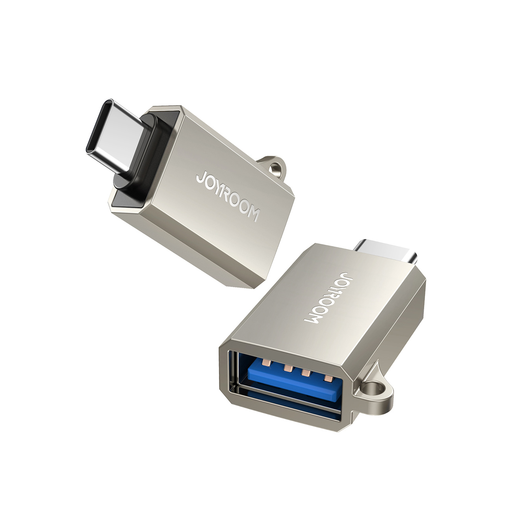
Why this product suits this profile: This compact USB-C to USB-A adapter is ideal if you want to connect individual USB-A devices such as a mouse, keyboard or USB stick.
It is clearly designed around a single USB-A port, without adding video or card-reader functions you may not need.
USB 5 Gbit/s according to the product specification, OTG support and a zinc-alloy housing.
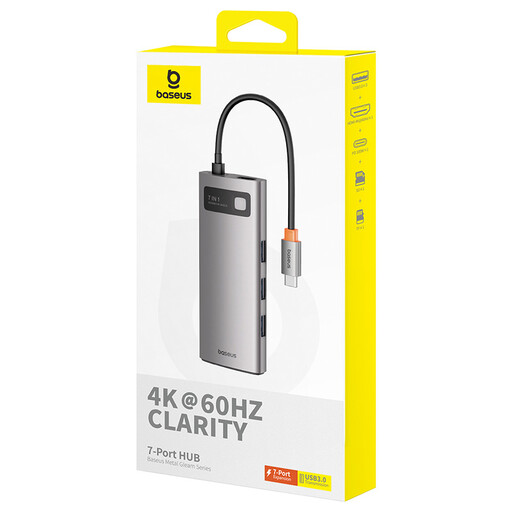
Why this product suits this profile: Designed for home working, creative work and MacBook users, this model combines HDMI, three USB 3.0 ports, SD/TF and Power Delivery.
The specifications state HDMI with 4K at 60 Hz, along with the individual data ports, rather than relying on a vague “high-speed” description.
7-in-1 design, SD and TF card readers, HDMI 4K@60Hz, three USB 3.0 ports and PD up to 100 W according to the product specification.
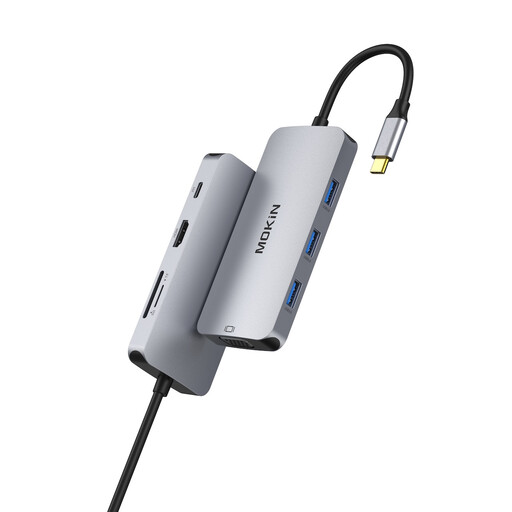
Why this product suits this profile: This 8-in-1 model is aimed at users with older VGA projectors, several USB devices and a need for SD or TF card readers.
The product specifications explicitly state 4K@30Hz via HDMI, 1080p via VGA and limitations when both outputs are used simultaneously.
HDMI, VGA, three USB 3.0 ports, SD/TF and USB-C power pass-through in one adapter.
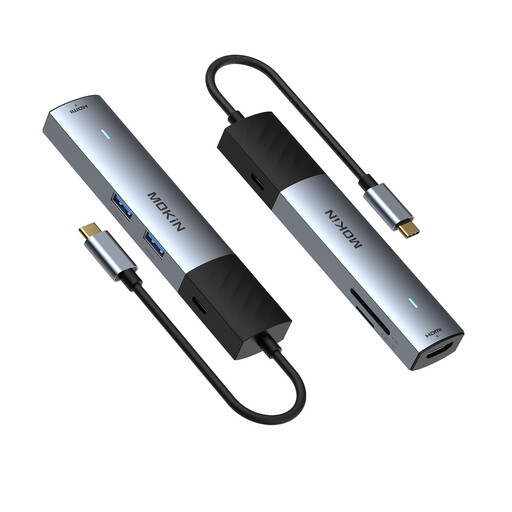
Why this product suits this profile: SD and TF cards can be used simultaneously according to the product specification. This is useful for importing photos and video files while on the move.
The card-reader data rates are specified clearly at 20–40 MB/s for reading and 10–30 MB/s for writing.
HDMI up to 4K@60Hz, two USB-A 3.0 ports, USB-C 3.0, SD/TF and PD up to 100 W according to the product description.
We have put together a complete, regularly updated list of products that fully meet these strict selection criteria and the safety regulations applicable in the EU.
Before using the hub for the first time, check whether your device’s USB-C port supports data, video and power. With a MacBook or Windows laptop, the available output of the power supply is also important. External hard drives with high power requirements may need an additional power source.
Memory cards should be ejected through the operating system before being removed. A hub may become warm during longer transfers. It should therefore not be placed under paper or fabric, or in a poorly ventilated area. When using a USB-C car charger in a vehicle, follow the specifications for 12- or 24-volt power supplies.
No. The computer or tablet’s USB-C port must support video output, usually via DisplayPort Alt Mode. A USB-C port that supports data only is not sufficient.
No. The PD port passes power through from a separate power supply. You need a compatible USB-C charger and a suitable cable for this. The hub’s maximum PD rating does not automatically represent the actual charging power delivered to your device.
Its lifespan depends on insertion cycles, cable strain, heat generation and the connected hardware. Using the hub in a dry, well-ventilated environment and plugging it in and unplugging it carefully can reduce mechanical stress. If you notice visible damage or unstable connections, stop using the accessory.