
Lieferung heute & morgen

Qualitätsgarantie

Willkommens-Angebote freischalten: KOSTENLOSE Lieferung | Bis zu 80 % RABATT | Kostenlose 30-Tage-JoyPlus-Testphase
App herunterladen
Modern laptops like MacBooks and Ultrabooks feature a slim design, which often comes at the cost of a reduced number of ports. For many professionals, students, and creatives, this presents a challenge: How do you connect an external monitor, a mouse, a keyboard, and an external hard drive at the same time when only one or two USB-C ports are available?
A USB-C Hub is the functional solution. It expands a single USB-C port into a multitude of connections, restoring connectivity for all your necessary peripherals. This guide will help you understand the technical features and make an informed choice that meets your specific needs.
Selecting the right adapter depends on your individual workflow. Instead of being swayed by marketing promises, you should base your decision on objective criteria.
Think carefully about which devices you connect daily. A good Multiport Adapter should offer the right connections.
Some USB-C hubs feature a dedicated USB-C port with Power Delivery (PD). This allows you to charge your laptop through the hub while using all the other ports simultaneously. This is especially important for devices with only one USB-C port. Look for the maximum power output (in watts, e.g., 100W PD) to ensure it is sufficient for your laptop model.
A compact and lightweight USB C Adapter made of aluminum is ideal for portable use, as the metal casing effectively dissipates heat. For a stationary setup, a larger Docking Station USB C with more ports and possibly its own power supply may be the more suitable choice.
Based on the criteria mentioned, we have compiled a selection of products that cater to different user profiles.
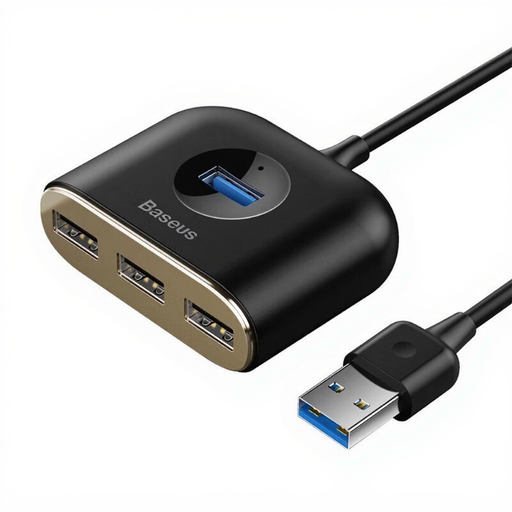
Why It Stands Out This adapter is a straightforward and simple solution for expanding USB-A ports. With its 1-meter cable, it offers flexibility in its placement on your desk.
Advantages
Who Is This Model For? This model is ideal for users who want to split an existing USB-A port on their computer or laptop into four ports. It is perfect for connecting a mouse, keyboard, USB drives, and other simple peripherals.
View Product: Baseus Reduction Square Adapter
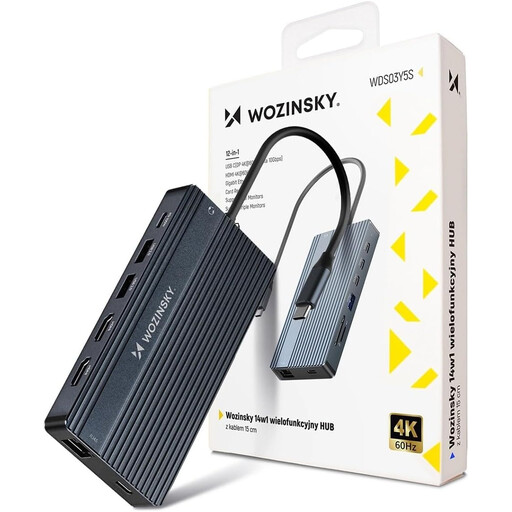
Why It Stands Out The Wozinsky hub is a comprehensive connectivity solution that transforms a laptop into a full-fledged workstation. With 14 ports, it covers nearly every conceivable use case, especially for complex multi-monitor setups.
Advantages
Who Is This Model For? This USB Splitter is aimed at power users, creative professionals, and home office users who need the maximum number of ports. It is the right choice for anyone looking for a powerful Docking Station USB C for a setup with multiple monitors and various peripherals.
View Product: WOZINSKY USB-C Hub 14-in-1
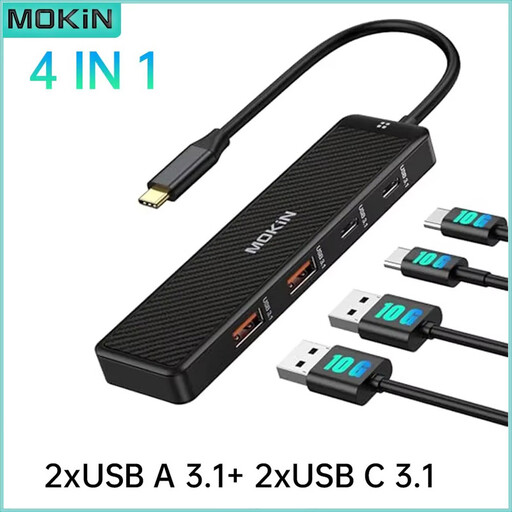
Why It Stands Out The focus of this Mokin hub is clearly on speed. It forgoes video outputs and instead concentrates on providing four high-speed data ports, all of which support the USB 3.1 standard.
Advantages
Who Is This Model For? This hub is designed for users whose priority is the rapid exchange of large amounts of data, for example, between a laptop and external SSDs or other fast storage devices. It is a great choice if you don't need video outputs or Power Delivery.
View Product: Mokin USB C Data Hub
The models presented cover common use cases, but requirements can be very specific. If you are looking for a different combination of ports or a different design, you can find more alternatives in our wider selection.
Discover our entire range of adapters and hubs in the Cable Accessories category.
1. What is the difference between a USB-C Hub and a Docking Station? A USB-C Hub is typically compact, bus-powered (drawing power from the laptop's USB port), and intended for mobile use. A Docking Station USB C is usually larger, often has its own external power supply, and is designed for a permanent desk setup where it remains connected to a monitor, network, and peripherals.
2. Does a USB hub slow down my devices? A hub shares the bandwidth of a single USB-C port among all connected devices. If you use multiple data-intensive devices (e.g., a 4K webcam and an external SSD) simultaneously, this can affect performance. Hubs with higher specifications like USB 3.1 (10 Gbps) offer more total throughput, but the bandwidth remains a shared resource. For everyday tasks, however, the effect is usually not noticeable.
3. Do I need a USB-C hub with Power Delivery (PD)? Power Delivery is essential if your laptop has only one or two USB-C ports, one of which must be used for charging. A PD hub allows you to charge your laptop and use the hub at the same time. If your laptop has a separate charging port or you have a free USB-C port for charging, PD is a useful but not strictly necessary feature.