
Lieferung heute & morgen

Qualitätsgarantie

Willkommens-Angebote freischalten: KOSTENLOSE Lieferung | Bis zu 80 % RABATT | Kostenlose 30-Tage-JoyPlus-Testphase
App herunterladen
A USB-C hub expands a single port on your laptop, MacBook, tablet or smartphone with additional interfaces. Depending on the model, you can connect monitors, USB sticks, keyboards, mice, external drives, memory cards and chargers. For home working, studying, photography and mobile workstations, the right USB-C multiport adapter can make your cabling much simpler.
However, your choice should not be based solely on the number of ports. What matters is which functions your device actually supports and whether the stated transfer rates are suitable for how you intend to use the hub.
The shape of the connector reveals little about the functions available. A USB-C port may support data transfer only, or it may also support charging, video output or Thunderbolt functions. For a USB-C hub with HDMI, the host device’s USB-C or Thunderbolt port will generally need to support DisplayPort Alt Mode.
Before buying, check the technical specifications of your laptop or tablet. On smartphones, video output via USB-C may be limited or unavailable depending on the model.
A USB-C hub 4K 60Hz requires the hub, HDMI output, cable and host device to provide suitable support. Some models output 4K at only 30 Hz. This may be sufficient for presentations or occasional video playback, but a higher refresh rate is often more comfortable for smooth movement, large spreadsheets or creative applications.
Therefore, look for the specific specification 4K at 60 Hz, rather than relying only on the general term “4K HDMI”.
A USB-C PD hub 100W may support a Power Delivery input of up to 100 W according to its product specifications. This does not necessarily mean that the full amount reaches the laptop. The hub itself uses some of the power, while the charger, cable and laptop also limit the actual charging power.
With a hub featuring PD, connect the USB-C charger to the adapter’s PD port. A separate power supply is required. A USB-C hub without PD pass-through will not charge the laptop through the hub while in use.
First, consider which devices you want to connect at the same time:
A 7-in-1 USB-C hub with HDMI, USB-A, USB-C, SD, TF and PD covers many everyday situations. If you only need additional USB ports, a simpler USB 3.0 hub can save both money and space.
For 4K at 60 Hz, several requirements must be met. These include a compatible USB-C port on the computer, a suitable HDMI standard, an appropriate HDMI cable and a monitor that supports the desired resolution. Additional limitations often apply when using two monitors. Some MacBook models, for example, support only certain external display configurations.
A designated laptop docking station with several video outputs is therefore not automatically suitable for every MacBook or Windows laptop. Before buying, compare the manufacturer’s compatibility list with your own model.
An aluminium housing can help dissipate heat, but it is no substitute for sufficient ventilation. A hub may become warm when HDMI, memory cards, external drives and PD are used at the same time. This can happen with compact designs, but it should not be accompanied by unusual heat, odours or connection dropouts.
Also look for:
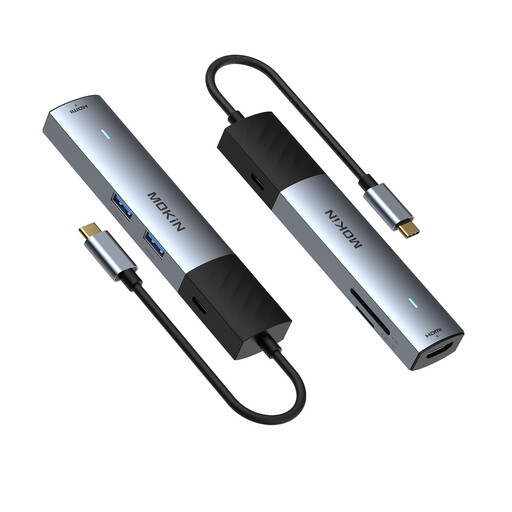
Why this product suits the profile: This 7-in-1 adapter combines HDMI, two USB-A 3.0 ports, one USB-C 3.0 port, SD, TF and USB-C PD in a compact design.
The product specifications explicitly state HDMI with 4K at 60 Hz, USB 3.0 data ports and SD/TF readers. The specifications should nevertheless be checked against the host device.
Up to 5 Gbit/s on the USB 3.0 ports, SD and TF can reportedly be used at the same time, plus PD 3.0 with up to 100 W input power.
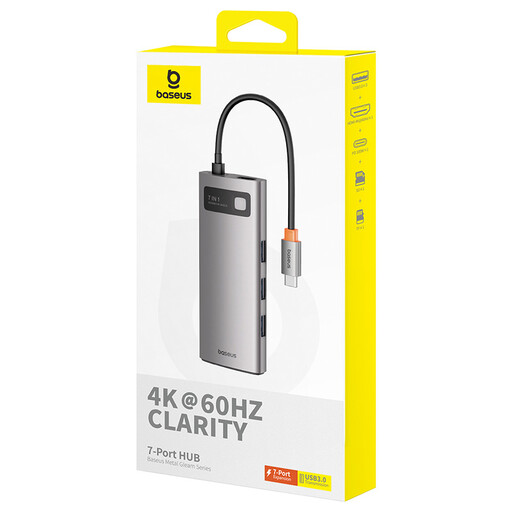
Why this product suits the profile: For home working, studying and hybrid workstations, this model offers seven functions, including HDMI, three USB-A 3.0 ports, SD/TF and PD.
The HDMI output is specified as 4K at 60 Hz. According to the product information, a separate power supply must be connected to the PD port to charge a laptop.
Three USB 3.0 data ports with speeds of up to 5 Gbit/s, HDMI at 4K and 60 Hz, and a stated PD input power of up to 100 W.
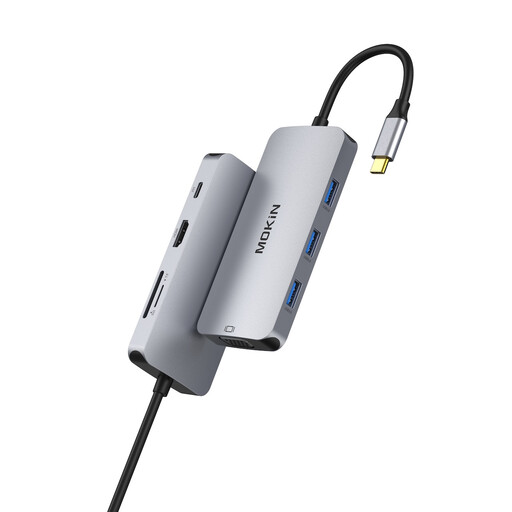
Why this product suits the profile: Photographers, presenters and users of older monitors get HDMI, VGA, three USB 3.0 ports and SD and TF card readers in one adapter.
The limitations are clearly stated: HDMI supports up to 4K at 30 Hz, while VGA supports up to 1080p. Using HDMI and VGA at the same time is limited to mirrored mode.
Up to 5 Gbit/s on the USB 3.0 ports, SD and TF card readers, plus Power Pass-Through. Compatibility with the host device must be checked in advance.
We have compiled a complete, regularly updated list of products that fully meet these strict selection criteria and the safety regulations applicable in the EU.
First, connect the hub to a compatible USB-C or Thunderbolt port. Then connect your monitor, storage devices and peripherals. With a PD-compatible model, plug the charger into the designated PD input. Wherever possible, use short, suitable cables for external hard drives, and safely eject storage media through the operating system before disconnecting it.
When several devices are active at the same time, they share the bandwidth of the host port. An external SSD, monitor and several USB devices may therefore achieve lower individual speeds than when used on their own.
No. For HDMI, the MacBook’s USB-C port must support video output. The processor and operating system may also limit the number of external monitors and whether extended display mode is available. Check the technical specifications for your specific MacBook model.
Its lifespan depends on the number of connection cycles, cable strain, heat generation and the devices connected to it. Gentle insertion and removal, sufficient ventilation and safely ejecting storage media help reduce typical wear. Technical specifications alone cannot guarantee a specific service life.
A passive hub draws power from the laptop or tablet. When several power-hungry devices are connected, this may limit the power available. A PD-compatible hub can supply power to the host while in use, but it requires a USB-C power supply to be connected. The actual charging power depends on the power supply, cable, hub and host device.