
Lieferung heute & morgen

Qualitätsgarantie

Willkommens-Angebote freischalten: KOSTENLOSE Lieferung | Bis zu 80 % RABATT | Kostenlose 30-Tage-JoyPlus-Testphase
App herunterladen
A USB-C hub can add essential ports to a laptop, MacBook, tablet or smartphone. In practice, however, models differ considerably when it comes to display output, data speeds, power supply and operating system support. If you only look at the number of ports, you could easily end up buying an adapter that is not suitable for your hardware in everyday use.
Not every USB-C port on a laptop supports external monitors. For HDMI or DisplayPort, the port generally needs to support DisplayPort Alt Mode or compatible Thunderbolt technology. Otherwise, a USB-C hub with HDMI may fit the port physically but still be unable to transmit a picture.
You should therefore check your computer’s technical documentation before buying. This is particularly important for budget laptops, tablets and smartphones. Even with a USB-C hub for MacBook, the available features vary depending on the model and chip generation.
A USB-C hub with 100 W Power Delivery usually refers to the maximum input power of the PD port. The hub itself requires some of that energy. The actual power reaching the laptop may therefore be lower. The charger must also support USB Power Delivery and provide sufficient power.
For example, the MOKiN docking hub specifies a PD input power of 100 W, while the output power is limited to 87 W according to the product details. This difference is relevant for high-performance laptops.
A USB-C multiport adapter with several USB ports, card readers and an HDMI output operates through a shared host connection. If you use an external SSD, memory card and monitor at the same time, the available bandwidth may be distributed across several functions.
You should therefore pay attention to the specific specifications:
For a mobile home-office setup, a compact hub with USB-C with USB-A, HDMI and PD may be sufficient. If you also need a wired internet connection, choose a USB-C hub with Ethernet. Gigabit Ethernet is specified at speeds of up to 1,000 Mbit/s and can provide a stable alternative to Wi-Fi for video calls, large downloads or online gaming.
Photographers and creatives can benefit from a USB-C hub with SD and TF card reader. Check whether the SD and TF slots can be used simultaneously. According to the product description, simultaneous operation is possible with the MOKiN 7-in-1; the AJAZZ AKP01E explicitly does not support it.
A USB-C hub 4K 60Hz is often more suitable for presentations, office work and media playback than a model offering 4K at 30 Hz. However, the higher refresh rate requires the laptop, hub, HDMI cable and monitor to support this combination.
With a multiport hub with dual HDMI, you should also check whether both outputs can deliver 4K at 60 Hz simultaneously. According to the product details, the UGREEN USB-C Dock CM639 features two HDMI ports supporting up to 4K at 60 Hz. With other devices, the resolution may be reduced when using dual monitors. macOS and Windows may also have different limitations when connecting multiple displays.
A basic USB-C hub is generally small, bus-powered and designed for use on the go. A USB-C docking station often offers more ports and is intended for a permanent desk setup. A Thunderbolt docking station uses Thunderbolt 3 or Thunderbolt 4 and can support higher data rates, multiple displays and daisy chaining. However, it is only worthwhile if the host computer and connected devices are compatible.
Before buying, check the following:
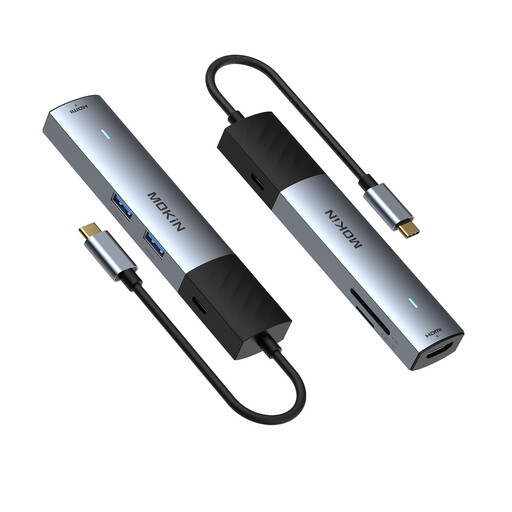
Why this product suits this profile: This 7-in-1 hub combines HDMI with 4K at 60 Hz, two USB-A 3.0 ports, a USB-C data port, SD, TF and PD in a compact design.
The key video, data and card-reader specifications are clearly stated; according to the product details, SD and TF can be used simultaneously.
Up to 5 Gbit/s on the USB 3.0 ports and a USB-C PD input of up to 100 W.
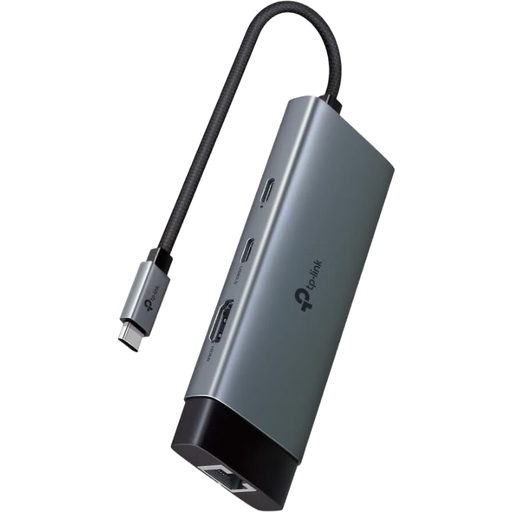
Why this product suits this profile: Designed for laptop workstations with a monitor, network connection and multiple peripherals, it includes HDMI, Gigabit Ethernet, plus USB-C and USB-A data ports.
The product details explicitly name the supported operating systems and highlight the need for a compatible USB-C port.
4K at 60 Hz, Gigabit Ethernet, three 5-Gbit/s data ports and PD pass-through of up to 100 W.
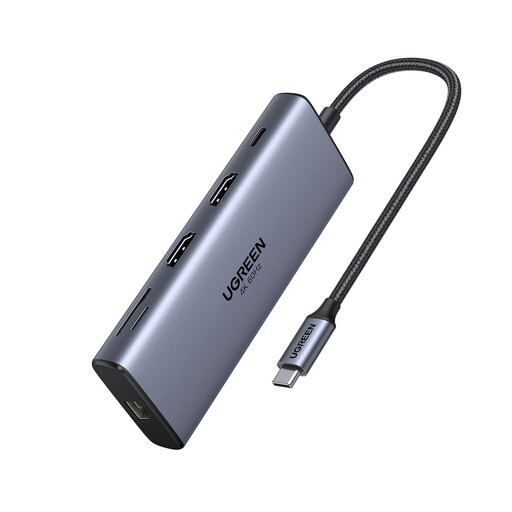
Why this product suits this profile: This 10-in-1 hub is designed for users with two monitors, high-speed storage devices, a wired network connection and a need for multiple ports at the same time.
The dual-HDMI function, MST support for Windows and compatibility details help when planning a multi-monitor workstation.
Two HDMI outputs supporting up to 4K at 60 Hz, USB-C and USB-A ports supporting up to 10 Gbit/s, plus SD and TF readers.
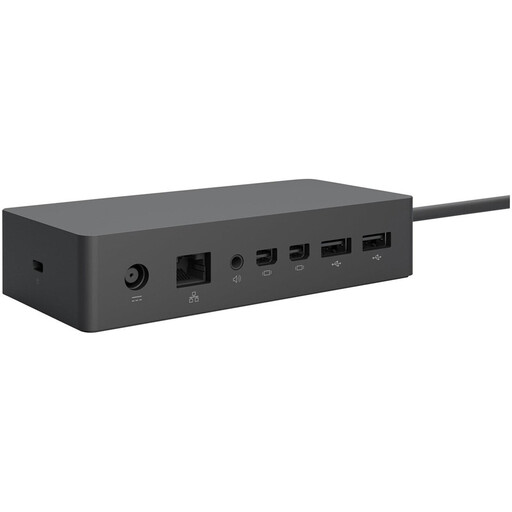
Why this product suits this profile: For a permanent Windows workstation with a Thunderbolt 4-compatible laptop, this docking station provides a central connection for displays, networking and peripherals.
Compatibility is clearly focused on Thunderbolt 4 and predominantly Windows devices. This makes it easier to check the host requirements before buying.
Three Thunderbolt 4 ports, three USB-A 3.0 ports, Gigabit Ethernet and a 3.5-mm audio jack.
We have put together a complete, regularly updated list of products that fully meet these strict selection criteria and the safety regulations applicable in the EU.
No. The USB-C port must support the required functions. For monitors, DisplayPort Alt Mode or Thunderbolt is required. For charging, the port must accept USB Power Delivery. The operating system, chipset and number of monitors may also limit what is possible.
Many models support this combination through a separate PD input. The charger is connected to the hub. However, the stated maximum power is not necessarily the same as the power that reaches the laptop. The charger, cable and host device must also be compatible.
It is not possible to specify a fixed lifespan in general. It depends on the number of connection cycles, heat generation, transport and the power of connected devices. Good ventilation, certified chargers and careful plugging and unplugging can reduce typical strain. For frequent mobile use, a robust casing and a sufficiently long, securely attached connection cable are practical selection criteria.