
Lieferung heute & morgen

Qualitätsgarantie

Willkommens-Angebote freischalten: KOSTENLOSE Lieferung | Bis zu 80 % RABATT | Kostenlose 30-Tage-JoyPlus-Testphase
App herunterladen
The widespread adoption of USB-C as the universal connector for laptops, tablets, and smartphones like the iPhone 15 has simplified data exchange. At the same time, file sizes are constantly growing, whether from high-resolution photos, 4K videos, or large project files. This makes a high-performance USB-C stick an indispensable tool for transferring data quickly, expanding the storage on mobile devices, or securely transporting sensitive information.
This article serves as your guide. It explains the key features of modern flash drives and presents a selection of models for various use cases to help you make an informed decision.
Choosing the right model depends on your individual needs. Three criteria are particularly important: compatibility, speed, and security features.
Modern workflows often require exchanging data between devices with different ports. A dual USB stick, which features both a USB-C and a classic USB-A connector, offers maximum flexibility. This allows you to seamlessly transfer data from a new MacBook to an older desktop PC or from an Android smartphone to a projector. For users of newer Apple devices, a USB stick for iPhone 15 with a USB-C port is a practical solution to quickly free up internal storage without relying on cloud services. Look for the USB 3.2 stick standard to benefit from high transfer rates.
When dealing with large amounts of data, a fast USB stick is essential. Speed is specified in megabytes per second (MB/s) for reading and writing.
Models described as SSD USB sticks use internal 3D NAND flash memory, similar to solid-state drives. These achieve significantly higher speeds than conventional sticks and are particularly suitable for professional users who regularly move 4K videos or large data archives.
If you transport confidential business or personal data, security features are a key criterion. An encrypted USB stick protects your files from unauthorised access. Models with AES-256 hardware encryption offer a high standard of protection. A fingerprint USB stick goes a step further, granting access only after biometric authentication.
In addition to data security, physical durability also plays a role. A metal USB stick with a zinc alloy or aluminium casing is more resistant to impacts, scratches, and daily wear and tear than a plastic model.
Based on the criteria mentioned, we have compiled a selection of USB-C sticks that cover different needs.
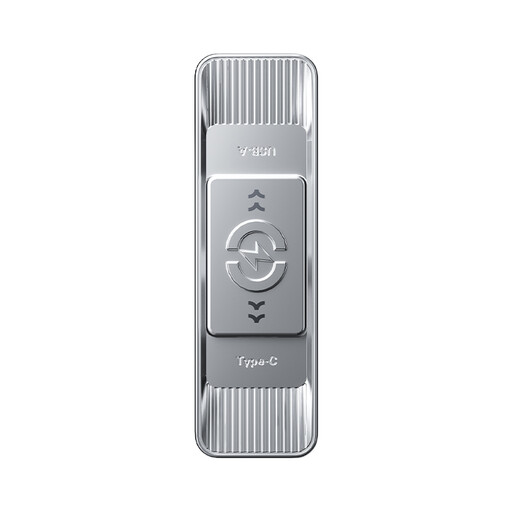
Why it stands out: This model is a versatile all-rounder. It combines a high storage capacity of 512GB with solid speed and a practical dual-interface design. The sliding mechanism protects the connector that is not in use.
Advantages:
Who it's for: Users looking for a reliable and fast storage solution for daily data transfer between different devices, from data backup to mobile storage expansion.
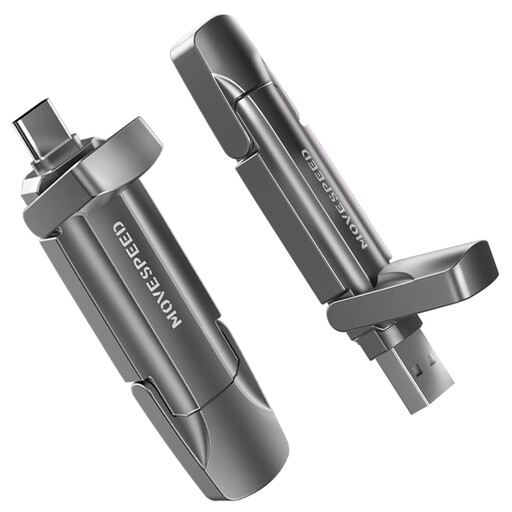
Why it stands out: This stick delivers SSD-level performance and is designed for the most demanding tasks. Its extremely high transfer rates make it the top choice for creative professionals and power users.
Advantages:
Who it's for: Photographers, videographers, and gamers who regularly move very large files and want to make no compromises on speed. Ideal for editing 4K footage directly from the stick.

Why it stands out: This model puts data security first. It combines fast SSD performance with advanced biometric encryption, making it a secure fortress for sensitive data.
Advantages:
Who it's for: Business professionals, lawyers, researchers, and anyone who needs to transport confidential or personal data securely without sacrificing speed.
The models featured here cover specific use cases. If you are looking for other capacities, designs, or price points, you can find a wider range of storage products on our category page.
? Discover our entire selection of PU Leggings
These terms describe different things. USB-C (or Type-C) refers to the physical shape of the connector—it's small, oval, and reversible. USB 3.2, on the other hand, is a technical standard that defines the maximum data transfer speed (e.g., USB 3.2 Gen 1 at up to 5 Gbit/s). A USB-C port can support various standards, so it's important to pay attention to both.
Yes, in most cases. Android smartphones with a USB-C port generally support the OTG (On-The-Go) function, which allows for the direct connection of flash drives. The iPhone 15 and newer models also feature a USB-C port, so a compatible flash drive for smartphones can be used directly for data backup or storage expansion without an adapter.
Write speed is very important if you frequently copy large files to the stick. A fast USB stick with a high write speed significantly reduces waiting times when creating backups, transferring movie libraries, or recording videos directly to the drive. For simply playing or opening files, however, read speed is more crucial.