
Lieferung heute & morgen

Qualitätsgarantie

Willkommens-Angebote freischalten: KOSTENLOSE Lieferung | Bis zu 80 % RABATT | Kostenlose 30-Tage-JoyPlus-Testphase
App herunterladen
The transition from USB-A to USB-C as the universal connection standard has changed how we charge devices and sync data. For owners of Apple devices with a Lightning port, a USB-C to Lightning cable has become an essential accessory to ensure compatibility with modern power adapters, MacBooks, and other USB-C-enabled devices. Choosing the right cable depends on specific technical requirements and its intended use case.
Your decision should be based on an analysis of objective criteria. The following technical parameters are crucial for functionality and longevity.
MFi (Made for iPhone/iPad/iPod) certification is a licensing program introduced by Apple. Cables bearing this seal contain an authentication chip that ensures compatibility with Apple devices. Using non-certified cables can lead to warning messages, restricted functionality, or potential incompatibilities after iOS updates. An MFi-certified cable is therefore an indicator of verified technical compliance with Apple's specifications.
A key advantage of USB-C is its support for the Power Delivery (PD) protocol. This allows for significantly higher power transfer than the older USB-A standard. A fast-charging iPhone cable, paired with a compatible USB-C power adapter (typically 20W or more), can dramatically accelerate the charging process. For instance, an iPhone battery can be charged to around 50% in approximately 30 minutes. The cable's maximum power rating (e.g., 20W, 30W) should be matched to the power adapter and the end device.
In addition to charging, the cable is also used for data transfer. Most USB-C to Lightning cables are based on the USB 2.0 standard, which offers a theoretical data transfer rate of up to 480 Mbps. This speed is sufficient for syncing photos, music, and other common file types. For professional users who regularly transfer very large video files, specialised cables with higher transfer rates might be relevant, but these are uncommon in the standard market segment. Such an iPhone data cable thus serves a dual purpose.
The cable's outer sheathing directly impacts its durability. Standard cables often use a TPE (Thermoplastic Elastomer) jacket, while more robust variants feature braided nylon. A nylon braid offers greater resistance to abrasion, kinks, and breakage. Reinforced stress points at the connectors are also a hallmark of a longer lifespan. The cable length (e.g., 1m, 1.2m, 2m) should be chosen based on the primary usage scenario—shorter cables for a desk or on the go, longer ones for more flexibility at home.
Based on the technical criteria mentioned, here is a selection of cables that cover different needs.
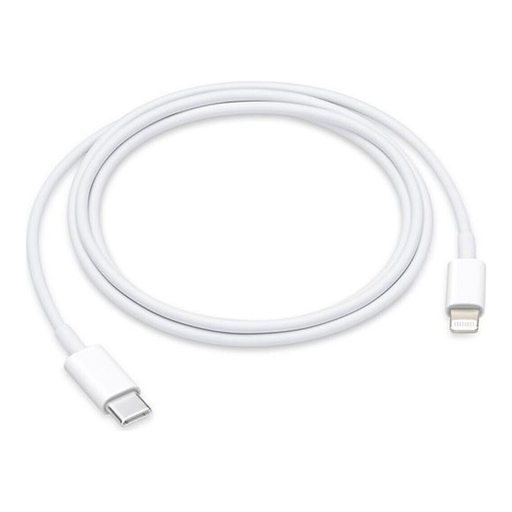
Why We Recommend It This Apple USB-C charging cable is the benchmark for compatibility and seamless integration into the Apple ecosystem. It is designed for use with all compatible iPhone, iPad, and iPod models, ensuring that all features, including fast charging via Power Delivery, function exactly as the manufacturer intended.
Pros
Best For Users who exclusively use original accessories and prioritise guaranteed functionality without any compromises on compatibility.
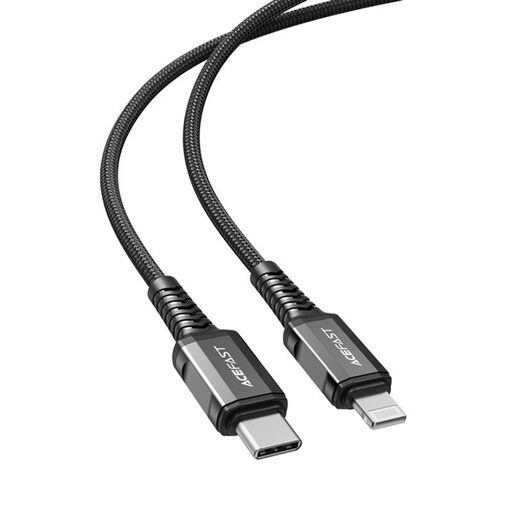
Why We Recommend It The ACEFAST C1-01 combines the security of MFi certification with a high charging capacity of up to 30W. Its slightly longer 1.2-meter length offers extra flexibility for daily use. It represents a technically sound alternative to the official Apple cable.
Pros
Best For Users looking for a certified cable with a higher power rating than the 20W standard and a bit more length for flexible use.
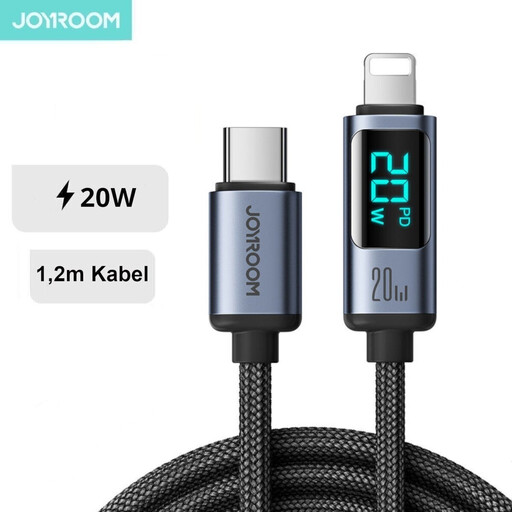
Why We Recommend It This cable from Joyroom stands out with two unique features: a durable nylon-braided jacket for enhanced longevity and an integrated LED display that shows the current charging power in watts. This allows for transparent, real-time monitoring of the charging process.
Pros
Best For Tech-savvy users who want visual feedback on their charging process and place a high value on a durable build for heavy daily use.
The models presented here cover specific use cases. If you are looking for other lengths, materials, or specific brands, you can find a wider selection in our main category. There, you can compare different models based on your individual requirements.
Explore more Lightning to USB Cables.
MFi ("Made for iPhone/iPad/iPod") certification is an Apple program that ensures third-party accessories meet Apple's technical specifications and safety standards. A certified cable contains a chip that verifies compatibility with the device, thus guaranteeing reliable charging and data functions.
Generally, yes. A USB-C to Lightning cable can be used with any USB-C power adapter. However, to use the fast-charging feature (Power Delivery) for an iPhone or iPad, you need an adapter that supports the PD protocol and provides sufficient power output (typically 20W or more).
The majority of cables on the market, including those from Apple and MFi-certified manufacturers, support the USB 2.0 standard with data transfer rates of up to 480 Mbps. This is sufficient for most everyday syncing tasks. Higher speeds (e.g., USB 3.0) are uncommon for this type of cable.