
Lieferung heute & morgen

Qualitätsgarantie

Willkommens-Angebote freischalten: KOSTENLOSE Lieferung | Bis zu 80 % RABATT | Kostenlose 30-Tage-JoyPlus-Testphase
App herunterladen
The transition from devices with traditional USB-A ports to new laptops, tablets, and smartphones with USB-C is in full swing. A USB-C and USB-A flash drive seems like the logical solution for seamless data transfer. However, the market is flooded with products whose advertised features often fall short in practice. Before you make a purchase, it's crucial to understand the common pitfalls that can lead to frustration and unnecessary expense.
As your Joybuy Product Recommendation Officer, I'm here to help you separate marketing hype from real-world performance. We'll focus on the objective criteria that truly matter.
The 3 Most Common Pitfalls When Buying a Dual USB Drive:
To avoid a bad purchase, you should focus on verifiable technical specifications. These three factors are crucial for the performance and longevity of your flash drive.
A dual USB drive physically has two connectors: the classic, rectangular USB-A plug and the new, oval USB-C plug. The latter is not only reversible but also the standard for modern devices like the iPhone 15 and Android smartphones.
More important than the shape, however, is the technical standard. Look for the USB 3.2 Gen 1 designation. This standard allows for theoretical transfer rates of up to 5 Gbit/s (approx. 625 MB/s) and is backward compatible with older USB versions. It was previously known as USB 3.1 Gen 1 or USB 3.0, which often causes confusion. A drive with this standard ensures you can actually leverage the speed of modern ports.
A high-speed USB drive is distinguished by strong performance in both areas:
For quickly backing up large amounts of data, especially on a 256GB USB drive, a high write speed is essential. Products that use SSD technology often offer more balanced and superior performance in this area compared to conventional flash memory.
The storage capacity you need depends on your use case. For documents and a few photos, 64 GB is often sufficient. However, if you regularly back up videos, large project files, or transfer data between your phone and PC, you should opt for at least 128 GB or 256 GB.
The casing material is an often-overlooked factor for longevity. A robust metal casing (e.g., made from a zinc alloy) not only provides better protection against bumps and scratches but also acts as a passive heat sink. During intensive use and high-speed transfers, heat is generated, and a metal casing dissipates it more effectively, which stabilises performance and extends the lifespan of the memory chips.
Here are some recommendations tailored to specific user needs that avoid the pitfalls mentioned.
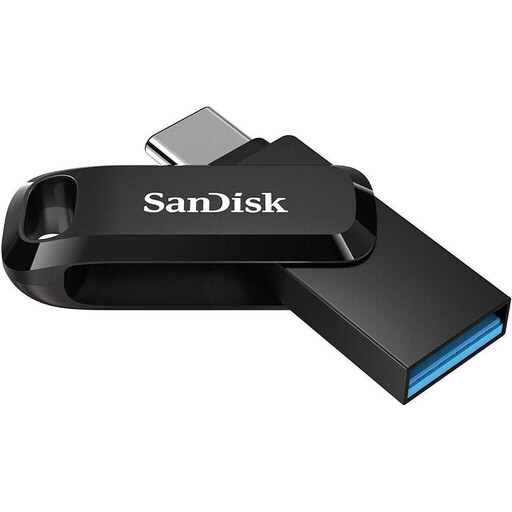
Why This Fits Their Persona: Ideal for students and professionals who need to easily exchange documents, presentations, and photos between an older work PC (USB-A) and a modern smartphone or tablet (USB-C).
This drive comes from an established manufacturer with widely tested OTG functionality and compatibility. The swivel mechanism is robust enough for daily use and reliably protects the connector that is not in use.
Offers a balanced combination of price, reliable performance (up to 150 MB/s read speed, according to the manufacturer), and broad device compatibility. The integrated loop for a keychain enhances its portability.

Why This Fits Their Persona: Perfect for content creators, videographers, and tech enthusiasts who regularly transfer large files like 4K videos, RAW photos, or extensive project archives between high-end devices.
This drive avoids the speed claim trap by delivering extremely high and, most importantly, consistent read and write speeds thanks to its 3D NAND flash memory. The robust zinc alloy casing also prevents physical defects.
Delivers SSD-level performance with read speeds up to 1090 MB/s and write speeds up to 1030 MB/s (according to the manufacturer). The metal construction ensures excellent heat dissipation and durability.

Why This Fits Their Persona: Designed for lawyers, consultants, managers, and anyone who needs to store sensitive corporate or client data securely on the go. Protection against unauthorised access in case of loss or theft is the top priority here.
This model solves the problem of unreliable software encryption with an integrated hardware solution. The biometric authentication is built directly into the drive and works platform-independently, minimising compatibility issues.
Combines high transfer speeds (up to 550 MB/s read, according to the manufacturer) with robust AES-256 hardware encryption and a fingerprint sensor. Up to 10 fingerprints can be stored.
We have compiled a complete, up-to-date list of products that fully meet these strict selection criteria and safety standards.
Will a dual USB drive work with any smartphone (iPhone 15, Android)? On Android devices, functionality depends on OTG (On-The-Go) support, which is enabled by default on most modern devices. For Apple devices, dual USB drives with a USB-C connector are compatible with the iPhone 15 and newer models, as well as iPads that have a USB-C port. Older iPhones with a Lightning port require special drives or adapters.
What is the difference between USB 3.2 Gen 1 and USB 3.0? Technically, there is no difference in speed. It's a rebranding by the USB Implementers Forum. Both designations represent a maximum transfer rate of 5 Gbit/s. Therefore, a product labelled as a USB 3.2 (Gen 1) drive is just as fast as one advertised as USB 3.0.
Why does my USB drive get hot when transferring large files? This is a normal physical process. At high transfer speeds, the controller chip and memory modules inside the drive work intensively and generate heat. A high-quality drive, especially one with a metal casing, uses its housing as a heat sink to dissipate this heat and prevent overheating. A noticeable warming is therefore often a sign of effective heat dissipation.