For wired headphones connected to a laptop, a suitable USB dongle is usually the most space-saving option. A desktop DAC makes sense if you genuinely need its extra connections, controls or power options, and can allow for the space and power supply it requires. Before you buy, check your laptop’s USB port, your headphone plug and, for headsets, the microphone connection. High audio format specifications alone don’t prove that you’ll hear a difference.
Which form factor is right for you?
If you’re short on desk space
If you want to connect wired 3.5 mm headphones to your laptop without adding much extra hardware, a compact adapter or dongle could be a good fit. Apple Germany lists compatible Mac models for its USB-C to 3.5 mm adapter, while FiiO describes the KA11 as a compact solution. Even so, check that the connections are compatible with your laptop and headphones.
If you have more demanding headphones
If you need a particular headphone plug or more amplifier power, compare the outputs and power ratings for the specific model and load. FiiO publishes specifications for the KA11 and K11, but you’ll still need to check that they suit your headphones.
If you use a headset for calls
For laptop calls, you’ll need a suitable microphone connection as well as audio playback. An easy-to-reach mute button may also be important. Creative documents a microphone mute button on the Sound Blaster PLAY! 4, while Fosi Audio notes that microphone use on the K5 Pro is limited in certain input modes.
What should you look for when buying?
First, make sure the USB connection and headphone plug are compatible. Then decide whether extra connections or controls are worth the additional space and cables.
| Buying priority |
What to check before buying |
Who should pay particular attention? |
| Connection and space |
Check that the laptop’s USB port and the headphone plug are compatible. For desktop units, also allow for the space they’ll take up, cable routing and a power supply. |
If desk space is limited, I want to connect my headphones without having to find room for another device and its cables. Around 36% of consumers prioritise a suitable connection that takes up as little space as possible. |
| Headphone output and drive |
Compare the plug and power ratings of the specific DAC with your headphone specifications. Only compare figures measured at the same load. |
If my headphones need a particular plug or suitable power ratings, I want to check those details before buying. Around 29% of consumers prioritise a suitable output and enough power to drive their headphones. |
| Microphone and muting |
Check the microphone input, whether you need a splitter and which input mode to use. Don’t assume that headset buttons will work. |
For laptop calls, I want to make sure my headset microphone works as well as my headphones. Around 21% of consumers prioritise the microphone connection and the option to mute it. |
| Controls and extra connections |
List the inputs, outputs and controls you need, then check whether they justify the extra space and cabling. |
If I want to adjust the volume or connect other audio devices directly, those features need to make the extra desk space worthwhile. Around 14% of consumers prioritise controls and expandability. |
Common buying mistakes
-
Assuming high sample rates prove you’ll hear better sound
Audio format specifications and manufacturers’ claims about sound quality don’t show whether a particular pair of headphones will sound noticeably better on your laptop.
Start by checking the connection, the features you need and the power ratings that suit your headphones. Treat claims about sound quality as manufacturers’ claims, not as independent comparisons.
-
Assuming a headphone socket also supports a headset microphone
A headphone output alone doesn’t prove that a headset microphone will work too. According to the manufacturer, the Fosi K5 Pro doesn’t support microphone use in optical or coaxial input modes.
Check the plug wiring, microphone input and operating mode. Fosi Audio says the K5 Pro comes with a headset splitter and requires USB as the input mode for microphone use.
-
Buying a desktop DAC without planning for space and connections
A desktop unit can take up more space and need more cabling than a dongle. According to FiiO, the K11 has a 6.35 mm headphone output and needs a separate 12 V/2 A power supply.
If you have 3.5 mm headphones, allow for a suitable adapter as well as space for the unit, cables and power supply.
Key brands to consider
Apple
Apple offers a USB-C to 3.5 mm adapter for compatible wired headphones. Apple Germany lists the Mac models it works with.
- A compact way to connect your headphones, with no extra controls.
- The listed Mac models don’t guarantee compatibility with every Windows laptop, and no specific amplifier power is stated.
FiiO
FiiO offers the compact KA11 dongle and the K11 desktop DAC, which has additional connections.
- Both models have model-specific connection and power specifications.
- According to FiiO, the K11 needs a separate 12 V/2 A power supply. Manufacturer specifications aren’t an independent sound test with your headphones.
Creative
Creative positions the Sound Blaster PLAY! 4 as an option for laptop calls using a wired headset.
- Creative documents a microphone mute button and includes a USB-A adapter.
- According to Creative, whether headset buttons work depends on how the headset is designed.
iFi audio
The GO link Max is a dongle with documented 3.5 mm and 4.4 mm headphone outputs.
- Both output types are listed on the product page.
- The manufacturer’s claims about audible sound improvements aren’t an independent comparison with your particular laptop.
Fosi Audio
According to Fosi Audio, the K5 Pro combines USB audio with a headphone output, a separate microphone input and other audio connections.
- The manufacturer’s manual lists a headset splitter as included.
- The manual says the microphone doesn’t work with optical or coaxial input. If desk space is limited, allow for its dimensions of 112 × 95 × 30 mm.
Joybuy products on this topic
This selection includes compact USB adapters for wired headphones, as well as a desktop DAC with additional connections.
 No image available
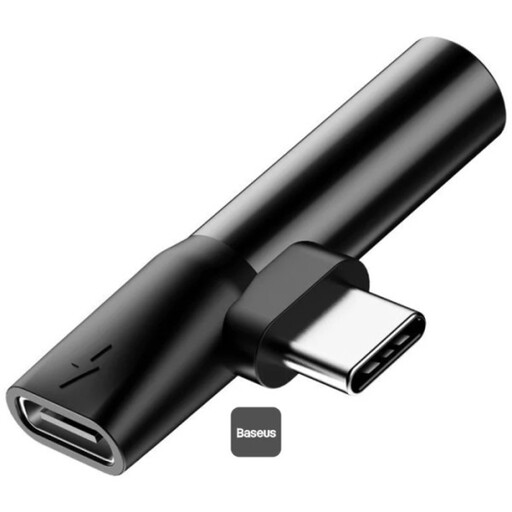
Baseus L41 Audio Converter 3.5mm Jack Adapter (Charge + Music) - Black
For USB-C devices, if you want to connect 3.5 mm headphones while charging via USB-C.
USB-C to USB-C and 3.5 mm connections; dimensions according to the product description: 4 × 2 × 1 cm.
View at Joybuy
 No image available
HOCO UPA32D Clever Audio Converter
For a laptop with a USB-A port and wired 3.5 mm headphones. The product description also mentions headsets with or without a microphone for calls.
USB-A to 3.5 mm connection, weighs 9.5 g and has a 15 cm cable, according to the product description.
View at Joybuy
 No image available
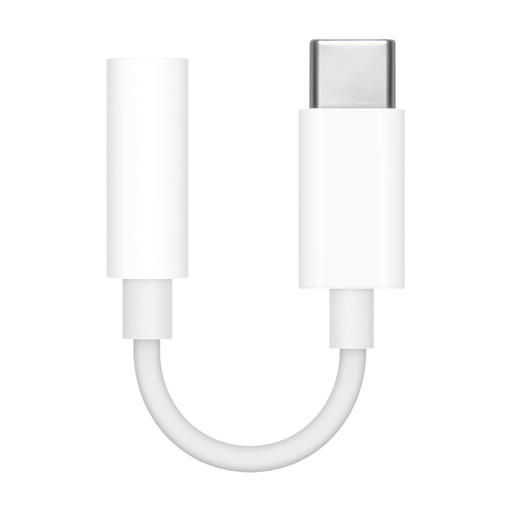
Apple USB-C to 3.5 mm headphone jack adapter
For wired 3.5 mm headphones or speakers connected to a compatible USB-C device.
USB-C and 3.5 mm connections; the product description specifies a compact plug-and-play design that doesn’t require charging.
View at Joybuy
 No image available
Nobsound Q4 USB Audio Gaming DAC
For a desk setup where you want extra inputs, outputs or sound controls alongside USB audio.
The product description lists optical and coaxial inputs, RCA outputs, treble and bass controls, and a headphone amplifier for 16–300 Ω. As a separate unit, it takes up more space and needs more cables than a dongle.
View at Joybuy
Frequently asked questions
What should I check before connecting it to my laptop?
Check that your laptop’s USB port and headphone plug match the inputs and outputs on the specific DAC. Once connected, you can select your preferred audio output device in Windows or macOS.
Will my headset microphone work automatically with any USB DAC?
No. A headphone output alone doesn’t confirm microphone support. Check the documented microphone connection and input mode: according to the manufacturer, the Fosi K5 Pro requires USB for microphone use, while Creative documents a microphone mute button on the Sound Blaster PLAY! 4.
What should I bear in mind when using it every day?
Start at a low volume and turn it up only as needed. The World Health Organization notes that both volume and listening time matter for your hearing; a more powerful DAC isn’t a reason to listen at higher volumes for long periods. If there’s no sound after connecting, check the selected output device and cable connection.
Does a USB DAC need a CE marking in Germany?
A CE marking is required when the specific product is covered by harmonised EU rules that explicitly require it. Electrical and electronic equipment can fall into the product groups covered; whether the rules apply to a particular model must be assessed for that product. CE is not an independent sound or quality certification.
Who should I contact if there’s a fault: the retailer or the manufacturer?
If a product is faulty, you have statutory rights against the seller. These are separate from any voluntary manufacturer’s guarantee. Keep your proof of purchase and the product’s exact name, and check any additional guarantee terms separately.


