Who is a USB DAC for?

Headset users who take calls

If you take calls at a shared desk, look for a suitable microphone input and a practical mute control, as well as good headphone audio. Creative lists these features for PLAY! 4; UGREEN says its USB-A sound card has separate connections for compatible headphones and a microphone.

People who move between desks

If you take your laptop, headphones and DAC with you after work, make sure the USB connection and cable are suitable and that it’s easy to set up. FiiO lists a detachable USB-C cable and physical volume buttons for the KA13.

Listeners with specific connection needs

If your headphones have a 4.4 mm or 6.35 mm plug, or you want to adjust the gain on the device, check the connections on the specific model. FiiO lists different outputs for the KA13 and K11; these details apply only to the model named.

What should you check before buying?

First, check that your laptop port and headphone plug match the DAC. Then decide whether you need a microphone for calls and whether the device will stay at your desk or travel with you regularly.

Buying priority What to check Who is it important to?
Compatible connections Check that your laptop’s USB port and headphone plug match the DAC’s connections. If you want to connect your headphones without an extra adapter, compatibility comes first; around 36% of consumers prioritise compatible connections.
Microphone for calls Check the microphone input, socket wiring and headset plug. If you take calls at a shared desk, you’ll also need a working headset microphone and a compatible mute control; around 29% of consumers prioritise call features.
Portability and space Consider the design, whether the cable is detachable and whether a power supply is required. If you regularly clear your workspace, your DAC should be quick to pack away; around 21% of consumers prioritise portability.
Output and gain Check that the specific model has the headphone output you need and, if required, adjustable gain. If your headphones need a particular plug or adjustable gain, these features are essential; around 14% of consumers put this requirement first.

Common misconceptions

  • A headphone output automatically means the headset microphone will work

    A headphone output doesn’t mean that the DAC can also receive a microphone signal. If your headset has a combined plug, it must also be compatible with the socket.

    For calls, check that the specific model has a microphone input and the right socket wiring. Then test whether your operating system and calling app are using the correct microphone.

    If the adapter isn’t compatible with your headset, you may need a different compatible connection device.

  • A 4.4 mm or 6.35 mm output fits every headphone plug

    These connection types aren’t interchangeable with an existing 3.5 mm plug. Power ratings also apply only to the specific combination of output and load stated.

    First, check which plug your headphones have. Only compare power ratings when the output, load and measurement conditions match.

    Depending on your headphones, you may need a suitable cable or plug adapter.

  • Every desktop DAC is powered solely via USB

    Power requirements vary by model. FiiO specifies an external 12 V power supply for the K11; iFi says the Uno receives power and audio data from the computer via USB-C.

    Before choosing a model, check how it’s powered and make room for the necessary socket and cable at your shared desk.

    The FiiO K11 also needs space for its external power supply and access to a power source.

  • USB-C charging guarantees USB audio compatibility

    The charging-port requirement for covered laptops doesn’t tell you whether a particular USB-C port will work with a USB audio DAC. The European Commission states that the requirement for covered laptops takes effect on 28 April 2026.

    Regardless of the charging port, check that your laptop and DAC support USB audio and that the headphone and microphone features you need are available.

Brands to consider

Creative

PLAY! 4 is designed for calls using wired headphones or headsets; the Sound Blaster G3 is a separate USB-C model for PC and Mac.

  • Creative lists a microphone mute button and Windows-specific SmartComms features for PLAY! 4.
  • The software features described are the manufacturer’s claims, not independent evidence of their effectiveness. Creative also says that headset button controls depend on the headset in question.

FiiO

The KA13 is a portable DAC with 3.5 mm and 4.4 mm outputs; the K11 is a desktop model with additional connections and its own power supply.

  • The documented connections and controls allow for different set-ups. FiiO lists a detachable USB-C cable for the KA13.
  • The K11’s stated maximum of 1,400 mW at 32 Ω applies to its balanced output. The information consulted doesn’t confirm a microphone input for either the KA13 or K11.

iFi audio

The Uno is a desktop DAC with additional RCA outputs; the GO link is a compact USB-C design for wired headphones.

  • iFi says the Uno receives power and audio data from the connected computer via USB-C.
  • iFi’s claims about audible improvements in sound are manufacturer statements. The information given doesn’t confirm a microphone function for these models.

AudioQuest

The DragonFly Black v1.5 is a USB stick DAC for listening to headphones on a laptop.

  • AudioQuest lists compatibility with Apple and Windows PCs, as well as an output level of 1.2 volts.
  • These model specifications don’t prove that it will improve sound on every laptop or support a headset microphone.

UGREEN

The external USB-A sound card found in the German product range has an audio output and a microphone input.

  • Its separate 3.5 mm connections may be useful if your laptop’s audio sockets are missing or unusable.
  • The model uses USB-A. If your headset has a combined plug, check the specific socket wiring; claims of improved sound quality come from the manufacturer.

Joybuy products

The selection below includes a desktop USB DAC and compact USB-A and USB-C audio adapters. If you choose a USB-C adapter, check that your laptop supports the audio function you need, and confirm microphone compatibility if you plan to make calls.

Nobsound Q4 USB audio DAC with Bluetooth and headphone amplifier

Nobsound Q4 USB audio DAC with Bluetooth and headphone amplifier

Described as a desktop unit with a PC USB input and headphone amplifier; it may suit you if the DAC can stay on your desk.

Listed features include RCA outputs, tone controls and a remote control; the product name also specifies 24-bit/192 kHz.

According to the product information, it requires an external DC power supply.

Joybuy
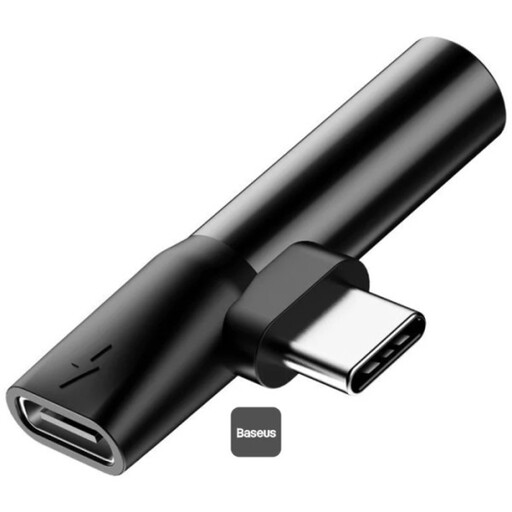
Baseus L41 audio converter with 3.5 mm jack, charging and music playback

Baseus L41 audio converter, 3.5 mm jack, charging and music playback, black

This compact adapter is described as connecting to USB-C devices, with a 3.5 mm headphone jack and pass-through charging.

The compatibility information refers to USB-C phones. Before buying, check that your laptop’s USB-C port supports audio; microphone functionality isn’t confirmed.

Joybuy

HOCO UPA32D USB-A to 3.5 mm audio adapter

HOCO UPA32D USB-A to 3.5 mm audio adapter

Described as an audio adapter for computers; the product information lists headphones and headsets with or without a microphone. Before making a call, check that the microphone works with your laptop and headset.

Features a 3.5 mm connection, a 15 cm cable and a stated weight of 9.5 g.

Joybuy

Frequently asked questions

My DAC is plugged into my Windows laptop, but I can’t hear any sound. What should I check?

In Windows sound settings, select the USB DAC as your output device and check that playback isn’t muted. Microsoft notes that an app may use a different output device from the system default, so check the audio settings in the app you’re using, too.

How can I test my headset microphone before an important call?

Use an adapter with an explicitly compatible microphone input and test the microphone before your call. In Windows, select the right device under ‘Input’ and start a microphone test; then check the settings in the calling app you’ll be using.

Does every USB desktop DAC need an extra power supply?

No, power requirements vary by model. FiiO specifies an external 12 V power supply for the K11; iFi says the Uno receives power and audio data from the computer via USB-C. Before choosing a model, check which connections and power sources are available at your desk.

Does the EU USB-C rule, in force since 2026, automatically make a USB DAC compatible?

No. The European Commission describes a charging-port requirement for covered laptops, which has applied since 28 April 2026. This doesn’t mean that a particular laptop supports USB audio or that a specific DAC will work with your headphones and microphone.

Is the CE mark an independent seal of sound or quality?

No. According to the European Union, the CE mark indicates that the manufacturer declares the product complies with the applicable EU product rules. It doesn’t certify sound quality or confirm that a DAC is suitable for your headset.