
Lieferung heute & morgen

Qualitätsgarantie

Willkommens-Angebote freischalten: KOSTENLOSE Lieferung | Bis zu 80 % RABATT | Kostenlose 30-Tage-JoyPlus-Testphase
App herunterladen
By Joybuy Product Recommendation Officer, 28 August 2026
Rising temperatures in the office or at home can significantly impact your concentration. A USB desk fan promises simple, personal cooling right at your workspace. However, the market is flooded with models whose performance claims often don't hold up in practice. Before you make a purchase, it's crucial to understand the common pitfalls that lead to disappointment and wasted money.
This guide will help you separate the good from the bad. We focus on the objective criteria that truly matter and show you how to find a reliable small fan with a USB connection that meets your needs.
Many products advertise impressive features, but a few common flaws leave users dissatisfied after a short time. Pay close attention to these three points:
To avoid a bad purchase, you should focus on verifiable technical specifications. These three features determine the real-world performance and everyday usability of your fan.
The type of power supply defines your fan's flexibility. There are two main types:
For a fan for the office or bedside table, noise level is a critical factor. A quiet fan for your desk should not exceed below 35 dB on its lowest setting. This level is roughly equivalent to a soft whisper. Models that reach around 50 dB are as loud as a normal conversation and can disrupt concentration. Look for specific dB ratings in the product's technical data sheet.
A solid build ensures durability and safe operation.
Based on the criteria above, we have identified a few models that represent a smart choice for specific user groups.
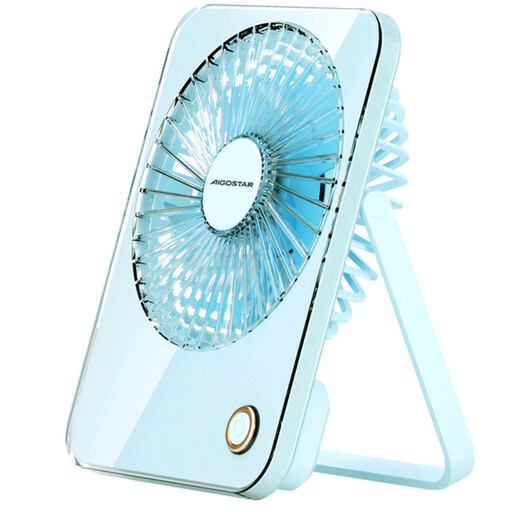
Why This Fits Their Persona: Ideal for students, commuters, or travellers who need a flexible and independent cooling solution. Its foldable design and light weight make it the perfect companion for the library, train, or café.
With a battery capacity of 3600 mAh, this model offers realistic, long-lasting performance, avoiding the trap of unrealistic runtime claims. The 180-degree foldable design is built for mobile use and feels robust.
High portability thanks to its folding mechanism and battery operation. Versatile placement options (standing or hanging).
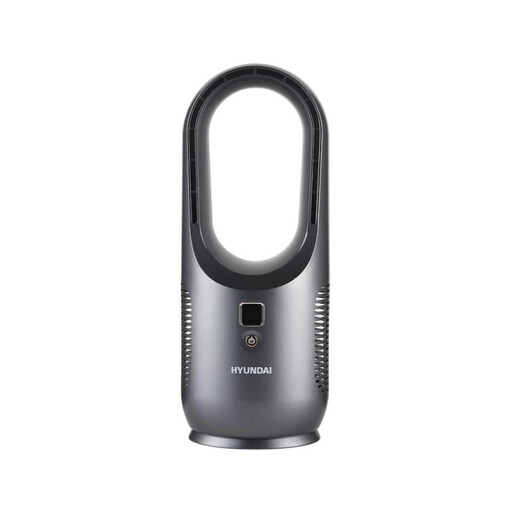
Why This Fits Their Persona: Suitable for users who value modern aesthetics and safety. The bladeless design fits seamlessly into a clean office or stylish living area and is safer in households with children or pets.
This model bypasses the unstable construction trap with a self-contained, stable tower design. The 2200 mAh battery allows for up to 6 hours of wireless operation (according to the manufacturer on the lowest setting), which is sufficient for a workday.
Bladeless design for enhanced safety and easy cleaning. Modern look with battery operation for flexible placement.
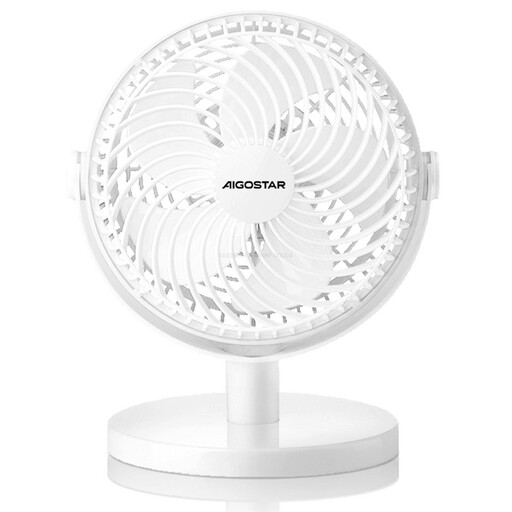
Why This Fits Their Persona: A straightforward and cost-effective solution for stationary use at a home office desk or in the bedroom. It focuses on the core function: generating a reliable airflow.
This model forgoes a battery, thus sidestepping the issue of unreliable runtimes. As a purely USB-powered device, its performance is consistent. The design, featuring a 360-degree tilt adjustment, is focused on functionality rather than complex folding mechanisms, which enhances stability.
Simple, low-maintenance operation due to being purely USB-powered. The head is flexibly tiltable to direct the airflow precisely.
We've compiled a complete, up-to-date list of products that fully meet these strict selection criteria and safety regulations.
The power consumption of a USB desk fan is very low. Most models have a power draw between 2.5 and 5 watts. For comparison, a large standing fan often requires 40 to 60 watts. Therefore, running it from a laptop or power bank has only a minimal impact on their battery life.
Yes, that is one of its major advantages. A rechargeable fan or a purely USB-powered model can easily be connected to a standard power bank. This makes you completely independent of wall outlets and is ideal for travel, camping, or outdoor use.
Always disconnect the device from the power source before cleaning. On most models, the front protective grille can be removed (often secured by a small screw or a click mechanism). You can then gently wipe the fan blades and grille with a slightly damp cloth or a soft brush to remove dust. Never submerge the device in water.