A USB drive can be used as a local copy of theatre recordings if the files you’ve measured will fit in the usable capacity and the devices involved can open them. For irreplaceable recordings, plan to keep another copy separately and check regularly that it can still be read. If you regularly transfer large files, the write speed of the specific version also matters; manufacturers’ maximum figures don’t automatically apply to every computer.
Who is a USB drive for theatre recordings suitable for?
Theatre group with one-off recordings
If you want to keep performances without using the cloud, plan to keep separate local copies and check that the files remain readable. The German Federal Office for Information Security recommends checking backups occasionally to make sure they are complete and readable.
Team with a growing video archive
If you’re bringing together several performances or edits, compare the file sizes with the actual usable storage on the specific version and allow for planned growth.
Team using different editing computers
If files are shared between devices, check the ports and supported file system. If people can be identified in the recordings, you should also decide who is allowed to access the files.
What should you look for when buying a USB drive?
First, list the files you already have and any planned edits. Then check your devices and file system. If you’ll be copying files often, compare the write speeds for the specific version.
| What matters |
What to check before buying |
Who is it important to? |
| Preservation and readability |
Plan to keep another local copy separately and check that the files open after copying. |
If you want to protect irreplaceable performances, keeping a separate copy that you can still read later is especially important. Around 31% of consumers put preserving their recordings first. |
| Space for your current files and future growth |
Add up the sizes of the files and edits you want to keep, then compare the total with the usable capacity of the specific version. |
If you’re adding more performances or new edits, you’ll need space for your measured collection and planned growth. Around 25% of consumers prioritise storage capacity. |
| Write speed |
Compare write speeds for the exact capacity you want and check that your computer supports the USB port specified. Manufacturers’ maximum figures depend, among other things, on the host device. |
If you regularly copy large video files, you’ll want to factor in how long writing them will take. Around 19% of consumers put write speed first. |
| Ports and file system |
Check for USB-A or USB-C ports on all your devices, as well as file system support. Microsoft Learn states that FAT32 has a maximum file size of 4 GiB; test compatibility with every device you plan to use. |
If you switch between computers with different ports, both the connector and file system need to work with your devices. Around 13% of consumers prioritise access across multiple devices. |
| Access to sensitive recordings |
Check how the security feature on the specific model is set up and which files it actually covers. |
If you want to limit access to recordings to certain people, look for an appropriate access restriction. Around 12% of consumers put confidentiality first. |
Common mistakes when archiving theatre recordings
-
Relying on a USB drive as your only archive copy
According to the German Federal Office for Information Security, the lifespan of a storage medium cannot be predicted precisely. A copy is only useful if the files remain readable later, too.
Keep another copy separately and check regularly that the files still open.
An additional local copy requires more storage; regular readability checks take time.
-
Confusing read speed with write speed
Backing up means writing data to the drive. Advertised maximum speeds depend, among other things, on the host hardware and how the drive is used.
Compare the write speed for the specific capacity and check your computer’s port.
-
Focusing only on total capacity for large individual files
With FAT32, each individual file is limited to 4 GiB, even if there is still space left on the drive overall.
Before copying, check the size of your largest video file, the file system and whether all your target devices support it.
Key brands to consider
Kingston
DataTraveler Max for large files you transfer frequently; microDuo 3C for switching between USB-A and USB-C.
- Kingston quotes read speeds of up to 1,000 MB/s and write speeds of up to 900 MB/s for the DataTraveler Max series. Speeds depend, among other things, on the host device; USB-A and USB-C models are separate versions.
- The microDuo 3C has both types of connector; Kingston quotes read speeds of up to 200 MB/s for this model.
SanDisk
A USB-A option for transferring large files, where the exact version and the devices you use are key.
- SanDisk lists a metal casing and a vault app for the 256-GB version of the Extreme PRO USB 3.2 Gen 1.
- These details don’t guarantee a particular write speed on your computer or make it suitable as your only long-term archive copy.
Lexar
The JumpDrive P30 is worth considering if you want to compare higher-capacity versions and a password-protected vault you can set up yourself.
- Lexar lists versions of up to 1 TB and read and write speeds of up to 450 MB/s; actual speeds may vary.
- The encryption described requires you to set up a password-protected vault and save the relevant file in it.
Samsung
When considering the BAR Plus, compare the exact model number and capacity.
- Samsung quotes sequential read speeds of up to 400 MB/s for the 256-GB MUF-256BE3/APC model.
- The read speed isn’t a write speed. Figures for how much video you can store are based on a specific test device and can’t necessarily be applied to every theatre camera.
USB drives for local video recordings
These USB drives could work for local copies of theatre recordings. Compare their capacity, connector and features with your files and devices.
 No image available
Kingston Technology DataTraveler Kyson 256 GB USB drive
The 256-GB version could suit you if your measured collection, including planned growth, fits in the usable storage space.
USB 3.2 Gen 1; metal casing. Quoted speeds are up to 60 MB/s write and 200 MB/s read.
View at Joybuy
 No image available
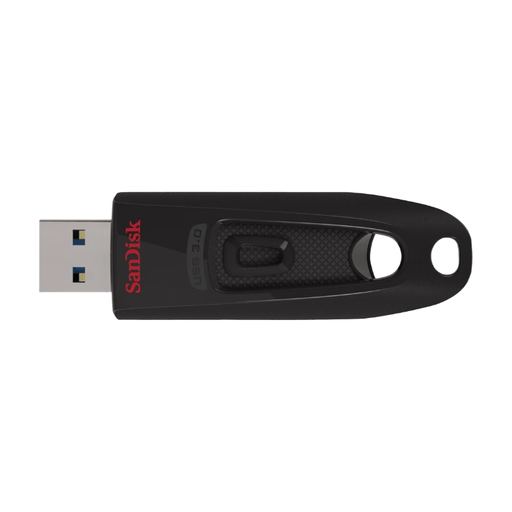
SanDisk Ultra 256 GB USB 3.0 flash drive
The 256-GB version could work for a local archive if you’ve checked your actual file sizes against the usable capacity.
USB 3.0. The description mentions SanDisk SecureAccess for setting up a password-protected vault; check how to set it up and make sure you save protected files in it.
View at Joybuy
 No image available
SanDisk Ultra 64 GB USB 3.0 flash drive
The 64-GB version is only suitable if your measured collection fits in the usable storage space.
The title specifies USB 3.0. The description mentions a retractable connector and SanDisk SecureAccess for setting up a password-protected vault.
View at Joybuy
 No image available
MOVESPEED YSUSP05-128GSR 128 GB USB drive
The two connector types listed could suit you if you switch between devices with USB-A and USB-C, provided they also support the file system.
USB 3.2 Gen 1 and USB-C. Quoted speeds are up to 570 MB/s read and 520 MB/s write; the description also mentions a zinc alloy casing. These maximum figures aren’t guaranteed on every computer.
View at Joybuy
 No image available
MOVESPEED YSUYC-256GSN 256 GB USB drive
The 256-GB version with USB-A and USB-C could suit you if you switch between these ports and can read the files on all your target devices.
Specifications include USB 3.2 Gen 1, read speeds of up to 550 MB/s and write speeds of up to 500 MB/s. The description mentions fingerprint access and AES-256 encryption; check the setup and access on the devices you plan to use.
View at Joybuy
Frequently asked questions about USB drives for theatre recordings
Is one USB drive enough for a long-term archive?
You shouldn’t rely on one USB drive as your only copy of irreplaceable recordings. The German Federal Office for Information Security points out that the lifespan of storage media cannot be predicted precisely. Keep another copy separately and check occasionally that the files are complete and readable.
What should I check before copying a long performance?
Check the size of the largest individual file and the drive’s file system. Microsoft Learn states that FAT32 supports files up to 4 GiB; exFAT supports larger files. Check whether your recording, editing and playback devices support exFAT.
What ongoing costs or services should I consider?
Allow for additional local storage to keep a separate copy. Kingston offers a five-year limited warranty and free technical support for the DataTraveler Max series. These details apply to the product series mentioned and don’t say anything about how long your files are guaranteed to be stored.
Can I simply record and share a theatre performance?
There’s no straightforward yes or no. Under Section 77 of the German Copyright Act (UrhG), performing artists have exclusive rights to record and reproduce their performances. If people can be identified, data protection issues may also arise. The rights and requirements that apply depend on the specific recording and how you plan to use it. Storing files locally rather than in the cloud doesn’t remove the need to check.


