What should you look for when buying?
First, check that the USB connector and operating system are compatible with your laptop. Then decide whether you need extra data ports, charging via USB-C or a higher network link rate.
| What you need |
What to check before buying |
Who should pay particular attention? |
| Wired connection |
Check for an RJ45 port, the right USB socket and support for your operating system version. An adapter won’t fix a faulty cable or a cable plugged into the wrong router port. |
If you want to connect a laptop without an Ethernet socket by cable when working from home, choosing the right LAN connection is the main priority. Around 31% of consumers cite this as their main requirement. |
| USB and system compatibility |
Check whether your laptop has USB-C or USB-A, then compare your installed operating system version with the details for the specific model. TP-Link says an extra driver is needed for the UE300C with certain older versions of Windows and macOS. |
If you want to avoid an adapter with the wrong connector or unexpected set-up, check the model and operating system together. Around 31% of consumers cite compatibility as their main requirement. |
| Extra ports or charging |
Check which ports provide USB data and whether USB-C charging is explicitly listed as a feature. If you need charging, look for Power Delivery and the stated power output. |
If you want to connect Ethernet and other devices at your desk, or charge your laptop at the same time, check exactly what each port does. Around 23% of consumers cite this as their main requirement. |
| Network speed |
For 2.5 Gigabit Ethernet, check your router, switch and, where relevant, the receiving device too. An adapter with a higher link rate won’t make a slower connection at the other end any faster. |
If you want to transfer large files across a suitably equipped home network, all the connections involved need to support the higher link rate. Around 15% of consumers cite 2.5 Gigabit LAN as their main requirement. |
USB Ethernet adapters and hubs at Joybuy
The range includes USB-to-Gigabit Ethernet adapters with a single port, as well as USB-C hubs with Ethernet for workspaces where you need extra connections or a charging option.
 No image available
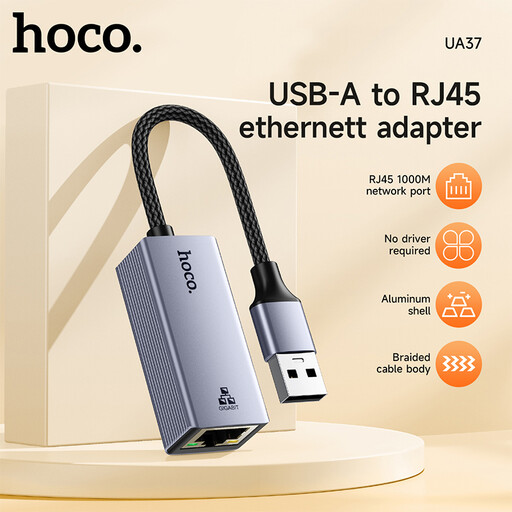
HOCO UA37 USB-to-Gigabit Ethernet adapter
A single-port adapter option if you want to connect your laptop by cable to a Gigabit Ethernet network.
The product title lists Gigabit Ethernet and support for Windows, Linux and Mac OS.
View at Joybuy
 No image available
HOCO UA37 Type-C Ethernet Adapter, 1000 Mbps
A single-port adapter option if your laptop has USB-C and you need a wired network connection.
The product details list Type-C, RJ45 and 10/100/1000 Mbps.
View at Joybuy
 No image available
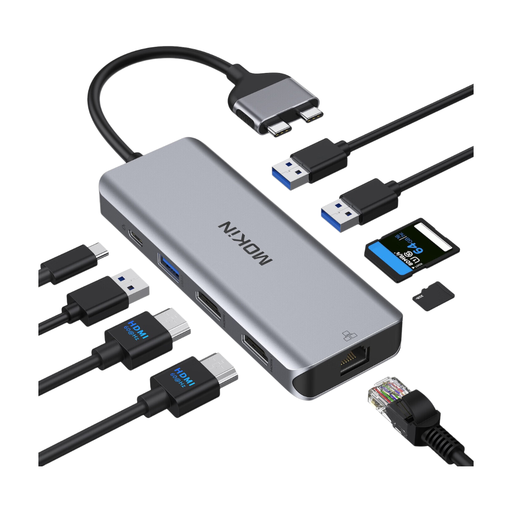
Mokin USB-C docking hub with RJ45 Ethernet
A hub option if you want to combine Ethernet with other connections at your workspace.
The product description lists Ethernet speeds of up to 1000 Mbps, HDMI, USB ports, a card reader and a PD port with input power of up to 100 W. According to the description, this model isn’t compatible with MacBook models featuring the standard M1, M2 or M3 chips; M Pro and M Max models are excluded.
View at Joybuy
 No image available
BASEUS Metal Gleam Series II 10-in-1 USB Hub, Cosmic Black
This hub is worth considering if you want to use Ethernet alongside extra data and other connections.
The product description lists an RJ45 port at 1000 Mbps, several USB ports, HDMI, an SD/TF card reader and USB-C Power Delivery of up to 100 W.
View at Joybuy
 No image available
WOZINSKY USB-C Hub Adapter 14 in 1
A hub option for a USB-C workspace where you need extra connections as well as Ethernet.
The product details list an RJ45 port at 1000 Mbps, USB, video and audio ports, and USB-C Power Delivery of up to 100 W.
View at Joybuy
Frequently asked questions
How do I connect my laptop, and what should I check if there’s no connection?
Connect the adapter to the right USB port, then plug the Ethernet cable into a LAN port on your router or switch. If you have connection problems, Microsoft recommends first checking that the cable is firmly connected and that you’re using the right router port. Apple explains how to set up the Ethernet service on a Mac under ‘System Settings > Network’. It may appear under the adapter’s manufacturer or model name.
Does a USB Ethernet adapter always need a driver?
No. It depends on the adapter model and the version of your operating system. TP-Link says the UE300C needs a driver download for Windows 7/8/8.1 and macOS 10.6–10.8. Check the details for the specific model before buying.
What are my rights if an adapter is faulty, and how does a manufacturer’s guarantee differ?
For a consumer purchase, your statutory rights against the seller are separate from a voluntary manufacturer’s guarantee. The Verbraucherzentrale explains the difference. Any voluntary guarantee is also subject to its own terms and conditions.
What should I look for on an electrical product’s labelling?
In its area of responsibility, the Bundesnetzagentur checks products for things including correct CE marking and clear manufacturer information. Check the labelling and product information for the specific listing. This general guidance doesn’t confirm that any individual adapter complies with the relevant requirements.
How should I dispose of an old USB Ethernet adapter?
In Germany, take the adapter to a collection point authorised to accept waste electrical equipment. According to the Bundesumweltministerium, this includes municipal collection points, manufacturers or retailers.


