First, choose a USB-to-RJ45 adapter that’s compatible with your laptop’s port and operating system. For a Gigabit network connection, a Gigabit model is sufficient; 2.5 Gigabit Ethernet is worth considering mainly if the rest of your network and the server also support that speed. The adapter alone won’t provide server permissions or establish a suitable connection to your garden office.
Who are the different adapters suitable for?
Laptop without an Ethernet port
If you want to connect your laptop in a garden office to a local server by cable for the first time, the adapter must be compatible with your laptop’s USB port and operating system. Also check whether you can run a network cable to the server or an existing network port.
Users working with large server files
If you regularly transfer large files, it’s worth looking at the entire network connection: the adapter, laptop port, cable, network ports and server drives all affect the speeds you can achieve.
Laptop with few ports
If you need additional ports or charging as well as Ethernet, a hub may suit you better than a standalone LAN adapter. Check the individual ports and compatibility with your laptop.
What should you consider when choosing?
First check your USB port and operating system, then confirm the network standard you need. Finally, decide whether a simple adapter or a hub is better suited to your connection needs.
| What you need |
What to check before buying |
Who should pay particular attention |
| Compatible laptop port |
Check for a spare USB-A or USB-C port, operating system support and a connection to your existing network. |
I want to connect my laptop in a garden office to the server by cable for the first time and need an adapter that fits the port I have. Around 40% of customers have this connection requirement. |
| Speed for large files |
Consider the USB data connection, cable run, network ports and server drives together. The manufacturer’s interface specifications don’t measure file-copy speeds. |
When transferring large files to my local server, I want to know whether the rest of the network connection also supports 2.5 Gigabit. Around 30% of customers are primarily concerned with transfer speeds. |
| Setup and access |
Check the compatibility information for your specific system version. The network connection, IP settings and permissions for the server share are separate things to check. |
I want to set up the adapter on my laptop easily and then access the server share. Around 20% of customers are mainly looking for a straightforward setup. |
| Additional ports |
Check the hub’s specifications against the peripheral ports you need and whether it explicitly supports charging. |
If you need peripheral ports or charging as well as Ethernet, a hub can combine several functions. Around 10% of customers say additional ports are their main priority. |
Which assumptions should I avoid?
-
Assuming 2.5 Gbit/s on the adapter guarantees that speed from the server
This figure refers to the connection speed supported by the adapter. Network ports, the cable run and server drives can all limit actual transfer speeds.
Before buying a multi-gigabit adapter, check the ports and the connection between your laptop and server.
A complete 2.5 Gigabit network may require additional compatible network components.
-
Checking only the plug
A USB plug that fits doesn’t necessarily mean the adapter will work with your laptop’s operating system and data port.
Check that the adapter is compatible with your laptop model and spare USB port.
-
Assuming an Ethernet connection means you can access the server
Even when a network connection is detected, network settings, a switched-off server or missing permissions can prevent you from accessing a share.
If you have problems, check the cable and network settings first, then the server status and share permissions.
Which brands are worth considering?
TP-Link
The UE300 and UE300C are standalone Gigabit Ethernet adapters. The UE300 is designed for USB-A, while the UE300C is designed for USB-C.
- TP-Link lists 10/100/1000 Mbit/s for the RJ45 port on both models.
- According to TP-Link, the UE300C’s plug-and-play support applies to the systems listed. Certain older versions may require a driver.
StarTech.com
The US2GC30 is a USB-C adapter for Ethernet connections of up to 2.5 Gbit/s.
- StarTech.com lists automatic negotiation at 2.5 Gbit/s, 1 Gbit/s or 100 Mbit/s.
- According to StarTech.com, the specified jumbo-frame feature isn’t supported on macOS. Your operating system and the port at the other end should be compatible with the connection you plan to use.
Belkin
The INC012btBK is a standalone USB-C adapter with an integrated 90-mm cable and 2.5 Gigabit RJ45.
- Belkin lists 10/100/1000/2500 Mbit/s, a status LED and USB-IF certification for this model.
- The connection speed specified by the manufacturer doesn’t guarantee file-copy speeds to the server.
UGREEN
The range includes products from a USB-C Gigabit standalone adapter to the Revodok Pro 7-in-1 hub with Gigabit Ethernet.
- The Revodok hub mentioned combines Ethernet with additional ports.
- The Ethernet port on this hub is specified at 1000 Mbit/s, not 2.5 Gbit/s. Compatibility details and plug-and-play information come from the manufacturer.
Joybuy products for connecting to a server
The selection includes USB-to-Gigabit Ethernet adapters and USB-C hubs with Gigabit LAN for a wired connection between a laptop and a local server.
 No image available
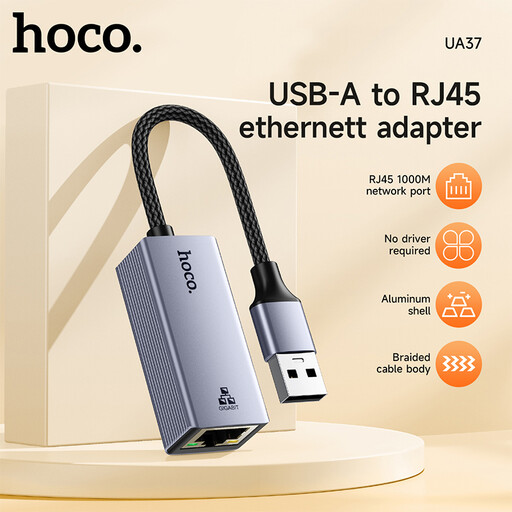
HOCO UA37 USB-to-Gigabit Ethernet adapter
An option if you want to connect a laptop to a server via USB using a Gigabit Ethernet connection.
The product title describes a USB-to-Gigabit Ethernet adapter. The description lists 10/100/1000 Mbps and support for the systems specified there.
View at Joybuy
 No image available
HOCO UA37 Type-C Ethernet Adapter (1000 Mbps)
A good fit if your laptop has a compatible USB-C port and you want to connect it to a server using Gigabit Ethernet.
The description lists 10/100/1000 Mbps and plug-and-play support for the systems specified. According to the description, Android support requires OTG compatibility.
View at Joybuy
 No image available
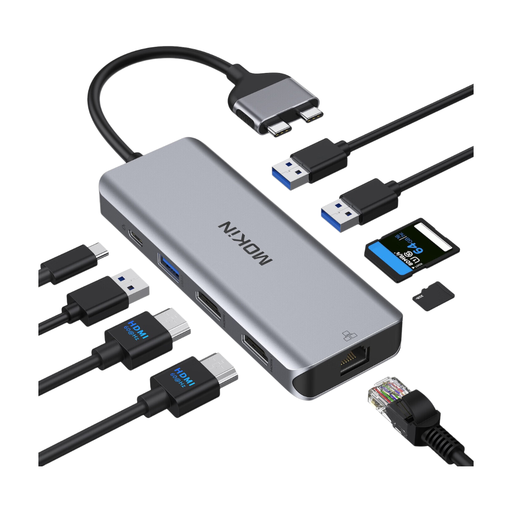
Mokin Docking Hub with Dual-Port USB-C and RJ45
A good option if you want to use additional connections alongside Ethernet through a USB-C port.
The product description lists HDMI, USB, SD/TF, PD and an RJ45 Ethernet port. It excludes MacBook models with standard M1, M2 and M3 chips, and lists Intel, M Pro and M Max models.
View at Joybuy
 No image available
BASEUS Metal Gleam Series II 10-in-1 USB Hub
A hub option if you need additional ports alongside Ethernet on a laptop with USB-C.
The product title lists HDMI, USB-A, USB-C, RJ45, SD/TF and USB-C PD, among other features. The description lists an RJ45 Ethernet port with 1000 Mb/s.
View at Joybuy
 No image available
WOZINSKY USB-C Hub Adapter 14 in 1
Worth considering for a laptop with a USB-C port if you need Ethernet and additional peripheral ports.
The product title describes a 14-in-1 USB-C hub. The product description lists RJ45 Ethernet, USB, display, audio, SD/TF and PD ports, among others.
View at Joybuy
Frequently asked questions
Is a USB Ethernet adapter all I need to connect to a local server?
No. As well as the adapter, your laptop needs a working network connection to the server. Even with an Ethernet connection, network settings, a switched-off server or missing permissions can prevent you from accessing a share.
How do I check the connection after plugging it in?
First check the cable connection, then your network settings. Apple Support explains that on macOS, the adapter may appear as a separate network service under the manufacturer or device type name. On Windows, the Ethernet settings and Microsoft Support’s troubleshooting guidance offer further steps to try.
Will a 2.5 Gigabit adapter always transfer my files faster?
No. The port at the other end and the rest of the network connection must also support 2.5 Gigabit. QNAP also recommends taking the network connection and storage devices at both ends into account when assessing transfer speeds.
What else might I need for a 2.5 Gigabit network?
If your existing network connection supports Gigabit only, you may need additional compatible network components. Also check the warranty and support terms for the specific model, as they can vary by product.
What labelling should I look for when buying a USB Ethernet adapter in Germany?
The German Federal Network Agency outlines retailers’ responsibilities when selling electrical and electronic equipment, including checking for correct CE marking and German-language usage information for non-commercial users. The European Union describes CE marking as the manufacturer’s declaration that applicable requirements have been met; it isn’t an independent quality mark for transfer speeds.


