Who is a USB Ethernet adapter for?

Students with a LAN socket in their room

If your laptop doesn’t have an Ethernet port, you can connect it to a working network socket using an adapter and the right cable. A guide from studierendenWERK BERLIN / Hotzone explains how to connect directly in a Berlin student residence; requirements may differ in other residences.

Students short on USB-C ports

If you need to use the same USB-C port for both networking and power, an adapter with power delivery can handle both. Belkin says the INC019btBK model supports USB-C Power Delivery passthrough up to 100 W. Check that it’s suitable for your device and power supply before buying.

Students with a USB-A laptop

If you have a free USB-A port, you can plug in a compatible adapter directly rather than needing an extra converter. TP-Link lists the UE300 as a USB 3.0 to Gigabit LAN adapter with a USB-A connector.

What should you look for when buying?

What you need What to check before buying Who it matters most to
A working LAN connection Check whether the network socket in your room is active and which cable you need. I want to check that the socket in my room works before buying; otherwise, even the right adapter won’t help. Around 27% of shoppers say a working room connection is their main concern.
The right USB connector Match the available USB port and your exact operating system version to the model specifications. If I want the adapter to fit directly, I’ll check the connector type and operating system rather than relying on a converter. Around 33% of shoppers say both are key considerations.
The right Ethernet speed Compare the adapter’s rated speed with the known speed of your network connection. I want a Gigabit port that suits my existing network connection, without assuming it guarantees a particular internet speed. Around 20% of shoppers prioritise a Gigabit connection that matches their setup.
Charging through the same USB-C port Check whether you need to charge your laptop through this port and whether the adapter and power supply can meet its charging requirements. If my laptop charges through its only available USB-C port, I need networking and power at the same time. Around 13% of shoppers say charging and LAN access are both important to them.
A working multi-gigabit connection Check whether the rest of your network connection can also support the higher throughput; TP-Link specifies at least Cat5e for the UE302C to reach its maximum performance. If I want to transfer data at faster than Gigabit speeds, I’ll check that the connection and cable can support the higher throughput. Around 7% of shoppers prioritise a multi-gigabit connection they can actually use.

Avoiding buying pitfalls

  • Buying an adapter before checking the room connection

    An adapter adds an RJ45 port to your laptop, but it won’t activate a network socket that isn’t working.

    Check your residence’s information and confirm that you can use the connection in your room.

  • Assuming USB-C and USB-A, or plug-and-play, are interchangeable

    Models have different connectors, and driver requirements can vary depending on the model and operating system version.

    Check the shape of your laptop’s port and its exact operating system version against the specifications for the full adapter model.

  • Assuming 2.5 Gigabit means faster internet in your student residence

    The adapter port’s rated speed doesn’t determine how fast your entire room connection will be. TP-Link also specifies at least Cat5e for the UE302C to reach its maximum performance.

    Choose multi-gigabit only if the rest of your network connection can support it too.

  • Choosing a LAN adapter without considering your only charging port

    A basic USB-C adapter takes up the port you may need to charge your laptop.

    Before buying, check whether you need to charge and use LAN at the same time, and whether you’ll need power delivery to do so.

Key brands to consider

TP-Link

The UE300C, UE300 and UE302C differ in their connector type and stated Ethernet speed.

  • TP-Link Germany lists an RJ45 port rated at 10/100/1000 Mbit/s for the UE300C and UE300. The UE300C has a USB-C connector, while the UE300 has USB-A.
  • The UE302C is a USB-C model with 2.5 Gigabit Ethernet. Its stated speed depends on a suitable network connection; TP-Link specifies at least Cat5e for maximum performance.

Belkin

The Connect INC019btBK adapter combines USB-C Gigabit Ethernet with power delivery passthrough.

  • Belkin says the model supports Power Delivery passthrough up to 100 W.
  • Power delivery passthrough is only useful if your device’s USB-C port is needed for both power and networking. Check compatibility with your device and power supply.

UGREEN

UGREEN offers a USB-C to Gigabit Ethernet adapter as a simple way to connect without a dock.

  • The manufacturer’s website provides operating system guidance for the model.
  • UGREEN says some older systems and Linux may require a driver. Check the details for your operating system version.

Anker

The PowerExpand A8313 is another USB-C to Gigabit Ethernet option.

  • Anker’s support page lists a 1 Gbit/s Ethernet port and two status indicators.
  • The port specification describes the adapter, not the speed of the network connection in your student room.

Joybuy products for connecting without a dock

This selection includes USB Gigabit Ethernet adapters for a wired laptop connection. Before buying, pay particular attention to the exact USB connector type and the port you have available. You’ll still need a working network socket and a compatible Ethernet cable.
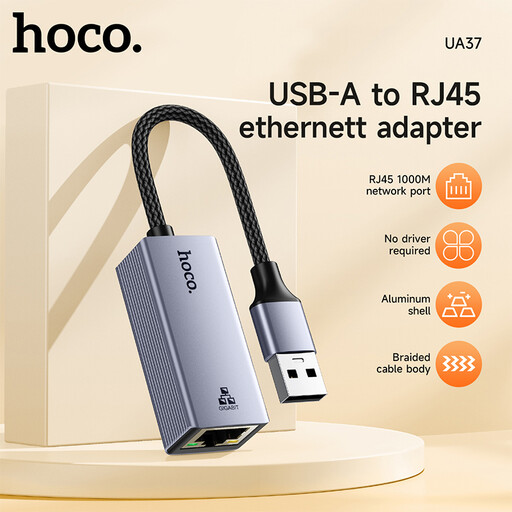
HOCO UA37 USB Gigabit Ethernet adapter

HOCO UA37 USB Gigabit Ethernet adapter

For shoppers looking for a USB adapter for Gigabit Ethernet.

The product title lists compatibility with Windows 98/ME/2000/XP/Vista/Win7/8/9/10, Linux and Mac OS.

You’ll also need a working network socket and a compatible Ethernet cable to connect.

View at Joybuy

HOCO UA37 Type-C Ethernet Adapter (1000 Mbps)

HOCO UA37 Type-C Ethernet Adapter (1000 Mbps)

For shoppers looking for a Type-C Ethernet adapter with a stated speed of 1000 Mbps.

The product title lists Type-C and 1000 Mbps; the product description lists 10/100/1000 Mbps and an RJ45 connector.

You’ll also need a working network socket and a compatible Ethernet cable to connect.

View at Joybuy

D-Link DUB-E130 USB Type-C Gigabit Ethernet Adapter

D-Link DUB-E130 USB Type-C Gigabit Ethernet Adapter

For shoppers looking for a USB Type-C adapter with an RJ45 connector for Gigabit Ethernet.

The product title lists 10/100/1000 Mbps and compatibility with Windows and macOS.

You’ll also need a working network socket and a compatible Ethernet cable to connect.

View at Joybuy

Frequently asked questions

Is the adapter alone enough to get online in a student residence?

No. You’ll also need a working Ethernet socket and a compatible cable. A guide from studierendenWERK BERLIN / Hotzone explains how to connect to the network socket and recommends automatic IP assignment via DHCP if you have connection problems. Check the requirements for your own residence.

Do I need to install a driver before setting it up?

That depends on the adapter model and your operating system version. TP-Link says the UE300C is plug-and-play on certain systems, but also provides driver information for older Windows and macOS versions. The UE300 also has guidance for older macOS versions.

What should I check if there’s no connection after plugging it in?

First, check the cable and network socket, and make sure your device recognises the adapter. For the connection described in the Berlin student residence guide, automatic IP assignment via DHCP may be relevant; other providers may have their own requirements.

What does the CE mark mean when you’re buying?

According to EU information, the CE mark is required on products when applicable harmonised EU rules expressly require it. It is the manufacturer’s declaration that the product complies with the relevant requirements, not an independent performance certification. The Bundesnetzagentur lists marking, manufacturer information and documentation as checks for market surveillance.

Is a manufacturer’s warranty the same as your statutory rights?

No. The Verbraucherzentrale distinguishes the statutory rights you have against the seller from a voluntary manufacturer’s warranty. If a product is faulty, the first step is for the seller to put things right by repairing it or providing a replacement.