Choose a USB Ethernet adapter with a connector that fits your mini PC and an operating system it supports. For a Gigabit connection, a Gigabit model is all you need. A 2.5 Gbit/s adapter is worth considering only if the rest of your connection can support it too. In a student hall, you’ll also need to check the provider’s access and set-up requirements, as an adapter alone won’t guarantee network access.
Which adapters are right for different needs?
Mini PC without an Ethernet port
If you want to use a wired connection in your student room, make sure the adapter has the right USB connector and an RJ45 port. Studierendenwerk Trier and Studentenwerk Leipzig outline additional sign-in or network settings for their halls.
Mini PC with a fast home network
If you transfer large files over your local network, you could consider an adapter with a higher link speed. TP-Link Deutschland lists the UE302C at a nominal 2.5 Gbit/s; the rest of your connection needs to support this speed too.
Mini PC with limited USB ports
If you need extra connections for peripherals as well as LAN, an Ethernet hub can bring several functions together. UGREEN describes the 60554 as having Gigabit LAN and three USB 3.0 ports.
What should you check before buying?
First check which USB port is available and how to access your student hall network. Then consider the link speed you need and whether you require extra USB ports.
| What you need |
What to check before buying |
Who is this important to? |
| Connector and operating system |
Check which USB port is free and compare your exact operating system version with the model’s specifications. TP-Link Deutschland lists the UE300 as a USB-A adapter and the UE300C as a USB-C Gigabit adapter. |
If I want to connect my mini PC using a free USB port, the connector and system version need to be compatible. Around 40% of shoppers mainly want to resolve connection or driver issues. |
| Access to the student hall network |
Check with your provider whether authentication or specific network settings are required. The guides from Studierendenwerk Trier and Studentenwerk Leipzig describe different requirements for their respective networks. |
In my student room, I want to know whether the network socket is active and what sign-in is needed. Around 30% of shoppers put access to their student hall network first. |
| Suitable LAN speed |
Take the connection, the other device and the cable into account. TP-Link Deutschland specifies a Cat5e cable or higher for the UE302C to reach its peak performance. |
For large file transfers on my local network, I’d only choose more than Gigabit if the rest of the connection can keep up. Around 15% of shoppers prioritise a higher LAN link speed. |
| Extra USB ports |
Check the number and function of the ports on the specific model. UGREEN says the 60554 has three USB 3.0 ports and a USB-C socket for power, not for charging a computer or transferring data. |
If I want to connect several devices at my desk, I’ll need extra USB ports as well as LAN. Around 15% of shoppers mainly need these additional USB connections. |
Which buying and connection mistakes should you avoid?
-
Assuming “2.5 Gbit/s” guarantees faster internet
The adapter’s nominal link speed doesn’t tell you what internet speed your connection will actually deliver. The manufacturer also specifies a Cat5e cable or higher for the TP-Link UE302C to reach its peak performance.
First check the speed of the network connection you’ll actually be using and the cable. Then choose an adapter with a suitable link speed.
-
Assuming the student hall network socket will give you instant internet access
The published guides from Studierendenwerk Trier and Studentenwerk Leipzig list different sign-in and network settings for their respective halls.
Get the guide from your provider and check which login details or settings you’ll need before connecting.
-
Assuming every USB-C socket on a hub supports data or computer charging
UGREEN describes the extra USB-C socket on the 60554 as a power input. It doesn’t support data connections or computer charging.
Check the specific model to see which socket connects to your mini PC and which ports provide data or power.
Which brands might suit your needs?
TP-Link
For mini PCs with USB-A or USB-C that need a Gigabit or 2.5 Gbit/s Ethernet connection.
- Strength: TP-Link Deutschland lists Gigabit Ethernet for the UE300 and UE300C, and a nominal 2.5 Gbit/s for the UE302C.
- Limitation: According to the manufacturer, the UE302C needs at least a Cat5e cable to reach its peak performance. Also check which system versions it supports.
UGREEN
For mini PCs with USB-A that need extra USB connections as well as Gigabit LAN.
- Strength: UGREEN describes the 60554 hub as having Gigabit LAN and three USB 3.0 ports.
- Limitation: According to UGREEN, the model’s extra USB-C socket is for power, not data transfer or computer charging.
Anker
For a more versatile USB-C workstation that needs extra connections as well as Ethernet.
- Strength: Anker Deutschland describes the 565 hub as having Ethernet, display outputs and additional data ports.
- Limitation: Anker says you’ll need an additional charger, which isn’t included, to use the advertised pass-through charging. Display functions depend on the connected computer.
USB Ethernet products at Joybuy
This selection includes USB-to-Gigabit Ethernet adapters for mini PCs, including USB-C options. Check your device’s port and your student hall network requirements.
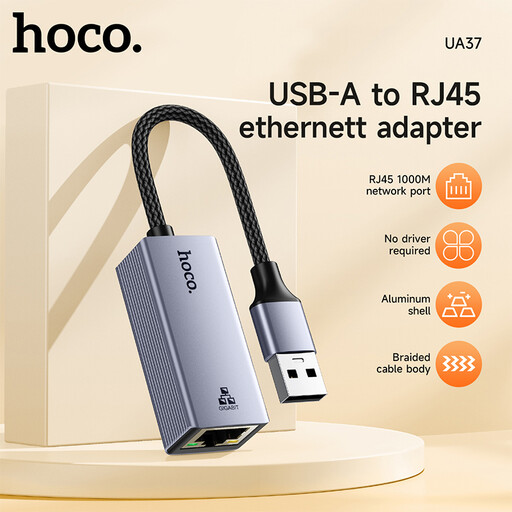 Image unavailable
HOCO UA37 USB-to-Gigabit Ethernet adapter
For an available USB port when you need a Gigabit Ethernet adapter.
Listed as compatible with Windows 98/ME/2000/XP/Vista/Win7/8/9/10, Linux and Mac OS. According to the product description, a driver download may be required for Windows 98 or XP.
View at Joybuy
 Image unavailable
HOCO UA37 Type-C Ethernet adapter (1000 Mbps)
For an available USB-C port when you need an Ethernet connection at the speed stated in the product name.
This version is listed as a Type-C Ethernet adapter with 1000 Mbps.
View at Joybuy
 Image unavailable
D-Link DUB-E130 USB Type-C Gigabit Ethernet RJ45 adapter
For an available USB-C port when you need a Gigabit Ethernet adapter with an RJ45 connection.
Listed in the product name: USB 3.0, RJ45, 10/100/1000 Mbps, and compatibility with Windows and MacOS.
View at Joybuy
Frequently asked questions
Is plugging in the adapter enough to get online in a student hall?
Not necessarily. The guide from Studierendenwerk Trier requires authentication for certain accommodation sites, while the guide from Studentenwerk Leipzig lists fixed network details and a sign-in process for its halls. These are requirements for the networks described, not standard rules across Germany. Check the guide for your own hall.
Do I need a USB-C port for Gigabit?
No. TP-Link Deutschland lists both the USB-A UE300 Gigabit adapter and the USB-C UE300C Gigabit adapter. The key thing is to use a free USB port on your mini PC that matches the adapter.
Can I put a broken adapter in my household bin?
No. The Federal Ministry for the Environment explains that waste electrical and electronic equipment must be handed in at authorised collection points or to take-back providers. Local collection points are one option; a particular retailer’s take-back obligation depends on the legal requirements.
What should I look out for when it comes to safety and complaints?
For the electronic products it covers, the Bundesnetzagentur lists checks including correct CE marking and manufacturer details. If a product is faulty, statutory consumer rights against the seller are separate from a voluntary manufacturer’s warranty.


