For a shared studio where you use different workstations, a directly connected USB-to-Ethernet adapter is a good choice, provided its USB connector and operating system are compatible with your device. For a Gigabit port, an adapter with the corresponding Gigabit specification is sufficient. A 2.5 Gbps model only makes sense if the studio port and the rest of the connection support that speed too. If you also need to use the same USB-C port for charging, consider a model that explicitly supports charging passthrough. The stated speeds are manufacturers’ specifications, not a measurement of the speed you’ll get in the studio.
Who are the different adapters suitable for?
For a laptop you use at different workstations
If you want to connect directly to an existing RJ45 socket without a dock, first check whether your laptop has a free USB-C or USB-A port and whether the specific operating system is supported. TP-Link Germany says the UE300C requires drivers for certain older operating systems.
For fast transfers on a local network
A 2.5 Gbps rated speed may be useful if the studio port and the rest of the network connection support it too. StarTech.com Germany and Belkin Germany list compatible models with this RJ45 rated speed.
If you also need to use the USB-C port for charging
If USB-C ports are in short supply, an adapter that explicitly supports charging passthrough could be a good solution. Belkin Germany lists this feature on the INC019btBK, with up to 100 W of power delivery.
What should you look for when choosing?
First check which USB port is free and which operating system you use. Then check the speed of the studio port, and finally consider whether you also need to use the same USB-C port for charging.
| What to consider |
What to look for |
Who it matters to |
| Connector and compatibility |
Check that you have a free USB-C or USB-A port, that it supports data transfer and that your specific operating system is compatible. Also check whether the model needs drivers. |
When I’m working at a different workstation, I need an adapter that matches the available port and my device’s operating system. Around 40% of consumers prioritise connector type and compatibility. |
| Gigabit connectivity |
Match the adapter’s rated RJ45 speed to the studio port; don’t assume the rated speed is the same as measured throughput. |
If I mainly need a wired connection for a Gigabit port at the studio desk, the right Gigabit rating is essential. Around 30% of consumers put Gigabit connectivity first. |
| 2.5 Gigabit Ethernet |
Before you buy, check that the studio port, the other device and the rest of the network connection support 2.5 Gbps. |
For large local file transfers, 2.5 Gbps matters to me, as long as the studio network supports that speed. Around 20% of consumers prioritise this multi-Gigabit capability. |
| Charging via the USB-C port |
Compare the model’s stated charging passthrough, the charging power you need and its rated Ethernet speed. |
If I also need to use my only suitable USB-C port for charging, I want to be able to use LAN and power at the same time. Around 10% of consumers prioritise this combination. |
Which common assumptions should I avoid?
-
Assuming the rated Ethernet speed is the same as the speed in the studio
The adapter’s stated speed alone doesn’t tell you how fast the connection will be in the studio. The network port and the rest of the hardware must also support the speed you want.
Before choosing a 2.5 Gbps model, check the speed of your assigned studio port and the device you’re connecting to.
-
Assuming USB-C automatically means charging passthrough
A USB-C plug tells you which connector the adapter uses, but doesn’t automatically mean it supports charging. Adapters with and without stated charging passthrough are different types of product.
If you need to charge through the same port, check that the specific model supports charging passthrough and provides the power you need.
Depending on your device, you may also need a separate power supply or another adapter.
-
Assuming it’s plug and play with every operating system
Driver requirements and compatibility vary by model and operating system version. For example, TP-Link says the UE300C needs drivers for certain older versions.
Before using the adapter in the studio, check the manufacturer’s details for your operating system and make sure they match the model and hardware version you have.
You may need to install a driver and set things up before your studio session.
Which brands are worth considering?
TP-Link
The UE300C and UE300 models offer Gigabit Ethernet with different USB connectors.
- TP-Link Germany lists a 10/100/1000 Mbps RJ45 port on both models.
- For the UE300C, TP-Link says drivers are needed for Windows 7/8/8.1 and macOS 10.6–10.8; check the details for your device.
StarTech.com
The US2GC30 is a standalone USB-C adapter with a specified RJ45 speed of up to 2.5 Gbps.
- StarTech.com Germany lists USB-C 3.2 Gen 1 at 5 Gbps, with automatic negotiation at 2.5 Gbps, 1 Gbps or 100 Mbps.
- You’ll need compatible network hardware to make use of the higher rated Ethernet speed; operating system details apply to the specific model.
Belkin
The INC012btBK and INC019btBK models cater for different USB-C needs.
- Belkin Germany lists an RJ45 speed of up to 2.5 Gbps and an LED indicator for the INC012btBK; the INC019btBK is specified with charging passthrough of up to 100 W.
- The INC019btBK is designed for Gigabit Ethernet, so it’s a different option from the 2.5 Gbps INC012btBK adapter.
UGREEN
UGREEN offers USB-C Gigabit adapters as a direct way to connect to Ethernet.
- UGREEN EU says the adapter listed there can be used without drivers on selected systems.
- UGREEN lists restrictions or driver requirements for certain Windows, Linux and ARM-based Windows systems; these details don’t automatically apply to every adapter from the brand.
USB-to-Ethernet adapters at Joybuy
This selection includes USB and USB-C adapters for Gigabit Ethernet, suitable when a connection of up to 1,000 Mbps matches the studio port.
 No image available
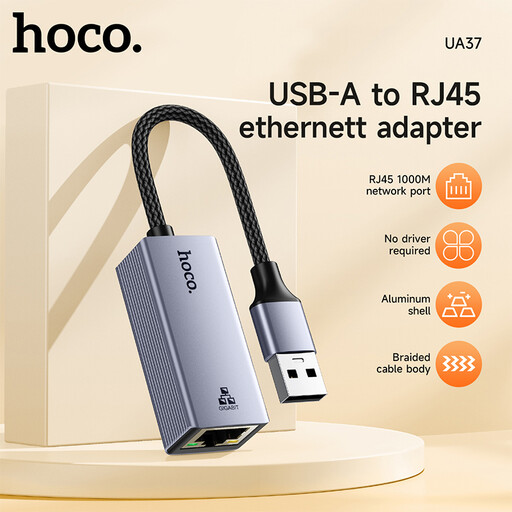
HOCO UA37 USB Gigabit Ethernet adapter
An option if you’re looking for a USB-to-Gigabit Ethernet adapter for a device without a suitable built-in Ethernet port.
The product details list 10/100/1000 Mbps Ethernet and compatibility with Windows 98/ME/2000/XP/Vista/Win7/8/9/10, Linux and Mac OS. The product description says that a driver may be required for very old operating systems such as Windows 98 or XP.
Joybuy
 No image available
HOCO UA37 Type-C Ethernet Adapter (1000 Mbps)
For a device with a free USB-C port, if Gigabit Ethernet is fast enough for the studio port.
The product details specify Type-C to RJ45 and 10/100/1000 Mbps; the stated weight is 23 g.
Joybuy
 No image available
D-Link DUB-E130 USB Type-C network adapter
A USB-C option for computers without an Ethernet port, if a Gigabit connection is suitable for the studio port.
The product name specifies an RJ45 port with 10/100/1000 Mbps and compatibility with Windows and macOS.
Joybuy
Frequently asked questions
Do I need to install a driver for a USB-to-Ethernet adapter?
It depends on the model and operating system. TP-Link Germany says the UE300C needs drivers for Windows 7/8/8.1 and macOS 10.6–10.8. Check the details for the specific model and hardware version you have.
How can I check that my LAN connection is working?
First check that the USB and RJ45 connections are secure, then check your computer’s network status. Belkin lists an LED indicator for the INC012btBK; other adapters may not have this feature.
What are my rights if an adapter I bought online is faulty or doesn’t fit?
When you buy from a business seller in the EU, goods are generally covered by a statutory guarantee of at least two years from the date you receive them; this is separate from any manufacturer’s warranty. For a distance-selling contract, you generally have the right to cancel within 14 days of delivery, subject to the applicable legal requirements.
What should I look for in an adapter’s safety information?
As part of its market surveillance, Germany’s Federal Network Agency checks details including CE marking, whether a product can be identified and whether the manufacturer’s details are correct. This does not confirm that a particular adapter complies with the requirements.
How should I dispose of a faulty USB-to-Ethernet adapter?
Don’t put electrical equipment in your household waste. Germany’s Federal Environment Agency lists recycling centres and suitable retailer take-back points as possible disposal options.


