Who is a USB Ethernet adapter for?

Garden offices with Wi-Fi dropouts

If you want to work on your laptop using an existing LAN connection instead of an unreliable Wi-Fi link, first check that a working network connection reaches your workspace. Ubiquiti provides guidance on suitable cables and surge protection for outdoor installations.

Laptops without a suitable LAN port

The adapter’s USB plug needs to match an available port on your laptop. Operating system support also varies by model: TP-Link specifies that the UE300C needs a driver on certain older systems and refers to hardware versions for the UE300.

Workspaces with additional requirements

If you transfer large files over your local network, or need to charge your laptop and connect other devices at the same time, consider your setup as a whole. A higher Ethernet speed requires a compatible device at the other end; extra ports are only useful if they meet your needs.

What should you look for when buying?

Requirement What to check when buying Who is this most relevant to?
LAN connection to the garden office Check whether there’s a working RJ45 connection at your workspace that’s connected to the network you want to use. Assess any outdoor cable run separately. If I first need to find out whether there’s a usable cable connection to my desk, that matters more than the adapter’s rated speed. Around 36% of consumers prioritise having a working LAN connection to their workspace.
USB and operating system compatibility Match USB-A or USB-C to an available laptop port and check the manufacturer’s information for your operating system and, where applicable, hardware version. If my laptop doesn’t have a suitable LAN port, I want to check that the USB plug and operating system are compatible with the specific adapter. Around 29% of consumers put compatibility first.
Suitable LAN speed Check the Ethernet ports on the device at the other end and the rest of the connection; don’t confuse a higher rated speed with faster internet. For large file transfers over my local network, I want to know whether the device at the other end also supports the speed I need. Around 21% of consumers prioritise higher LAN throughput when their infrastructure supports it.
Charging and additional ports If you need to charge your laptop, check USB-C Power Delivery passthrough and match the power output to your requirements; for peripherals, check the number and type of extra ports. If I also need to use the same limited USB-C port for charging or other devices, I check the adapter’s specific features. Around 14% of consumers prioritise charging or additional peripheral ports.

Common misconceptions

  • The USB adapter creates the connection between your house and garden office

    An adapter gives your laptop an Ethernet port. It doesn’t provide the network connection to your desk, though; without a working connection at the point of use, you won’t be able to get online.

    Check the existing cable or other network connection before buying. If the cable run is outdoors, assess its routing and protection separately from your choice of adapter.

    Depending on your setup, you may also need a network installation to connect your garden office.

  • A 2.5 Gbit/s adapter automatically means faster internet

    This figure describes a supported Ethernet speed, not your actual internet speed. A slower device at the other end or an unsuitable part of the connection can limit the higher speed.

    Before choosing a 2.5-Gbit/s model, check the device at the other end, the cable run and your needs, such as local file transfers.

  • An extra USB-C power input charges your laptop

    According to the manufacturer, the USB-C power input on the UGREEN Hub 60554 supplies power to connected peripherals; it doesn’t charge your laptop.

    If you want to charge your laptop through the same port, check that USB-C Power Delivery passthrough is explicitly listed and make sure the power output meets your laptop’s requirements.

Key brands at a glance

TP-Link

The UE300 and UE300C are standalone adapters with a Gigabit RJ45 port; the UE300 has a USB-A connector, while the UE300C has USB-C.

  • TP-Link says the UE300C requires a driver on certain older operating systems.
  • Download information for the UE300 may depend on the hardware version. Manufacturer information is not based on independent reliability testing.

StarTech.com

The C22G-USB-ETHERNET USB-C adapter is specified for Ethernet connections of up to 2.5 Gbit/s.

  • According to the manufacturer, the model supports several Ethernet speeds.
  • The higher rated speed requires a compatible device at the other end and a suitable connection throughout; it doesn’t guarantee a particular performance in your garden office.

Belkin

Features differ between the USB-C models INC012btBK and INC019btBK.

  • The INC012btBK is specified for Ethernet speeds of up to 2.5 Gbit/s; the INC019btBK combines Gigabit Ethernet with up to 100 W USB-C Power Delivery passthrough.
  • The stated maximum of 100 W isn’t guaranteed for every laptop and power supply combination. A feature listed for one model won’t necessarily be available on the other.

UGREEN

The Hub 60554 combines Gigabit Ethernet with three USB 3.0 ports, making it suitable for workspaces that need extra peripheral connections.

  • The extra USB ports can be useful if you want to connect USB-A devices as well as an RJ45 cable.
  • According to the manufacturer, the USB-C power input supplies peripherals and doesn’t charge your laptop.

USB Ethernet products for your garden office

These Joybuy products offer USB Ethernet or a USB-C hub with RJ45 for connecting a laptop to an existing wired network.
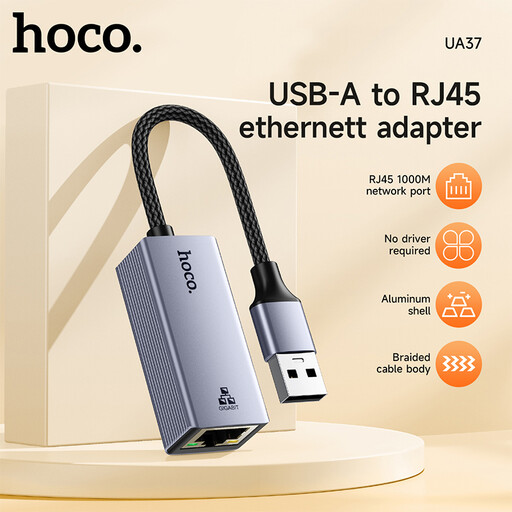
HOCO UA37 USB Gigabit Ethernet adapter

HOCO UA37 USB Gigabit Ethernet adapter

An option if your laptop has a suitable USB port and you need a Gigabit Ethernet connection.

The product title lists Windows 98/ME/2000/XP/Vista/Win7/8/9/10, Linux and Mac OS as supported systems. You’ll need a working LAN connection to your garden office already in place.

Joybuy

HOCO UA37 USB-C Ethernet adapter, 1000 Mbps

HOCO UA37 USB-C Ethernet adapter, 1000 Mbps

A good fit if your laptop has a spare USB-C port and you need Ethernet speeds of up to 1000 Mbps.

The product description lists RJ45 and 10/100/1000 Mbps, as well as Windows, macOS, Linux and Android with OTG support. Check the details for your specific device; the adapter doesn’t provide the LAN connection to your garden office.

Joybuy
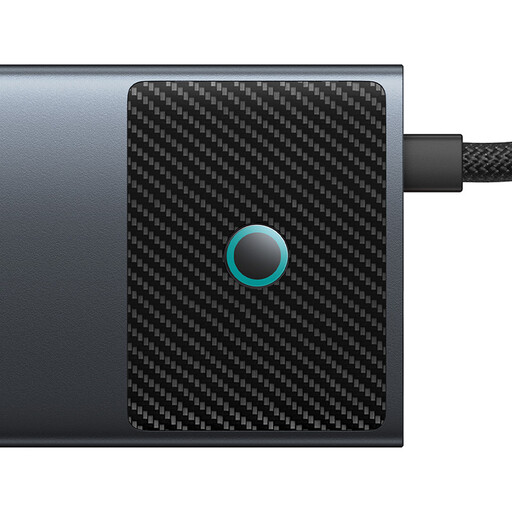
BASEUS Metal Gleam Series II 10-in-1 USB-C hub, Cosmic Black

BASEUS Metal Gleam Series II 10-in-1 USB-C hub, Cosmic Black

A hub option if you want to use additional ports as well as Ethernet with your USB-C laptop.

The product details list Gigabit Ethernet, USB-C PD and additional USB and HDMI ports. Check in advance which features and ports your laptop supports; the hub can’t replace a missing network connection to your workspace.

Joybuy

WOZINSKY 14-in-1 USB-C hub with 15 cm cable

WOZINSKY 14-in-1 USB-C hub

A good choice if you need several hub features as well as an RJ45 connection for your USB-C laptop.

The product details list RJ45 at 1000 Mbps, USB-C PD and a 15 cm cable. According to the title, additional connections include USB, HDMI, audio and SD and TF card readers. You’ll need a LAN connection to your garden office already in place.

Joybuy

D-Link DUB-E130 USB-C network adapter, 10/100/1000 Mbps

D-Link DUB-E130 USB-C network adapter

A compact option if your laptop has USB-C and you need a Gigabit RJ45 connection.

The product title lists 10/100/1000 Mbps, and the product description lists Windows and macOS. Check the system requirements for your device. You’ll also need a working wired connection in your garden office.

Joybuy

Frequently asked questions

Will the adapter be enough if there’s only Wi-Fi in my garden office?

No. A USB Ethernet adapter connects your laptop to an existing wired Ethernet network. You’ll also need a working network connection to your garden office; the adapter doesn’t provide one.

What can I check if there’s no LAN connection after I plug it in?

First check the plug, cable and network connection, then check the operating system and driver details for your exact adapter version. If plug-and-play doesn’t work or there’s a fault, TP-Link recommends using a suitable current driver for the UE300 or UE300C; this doesn’t mean every version needs manual installation.

Can I treat a cable run between my house and garden office like an ordinary indoor cable?

An outdoor cable run needs to be considered as a separate installation. Ubiquiti recommends suitable cables and surge protection for outdoor installations; this is the manufacturer’s advice, not a blanket requirement for every garden office connection. Have the cable route assessed to suit your building and setup.

What are my rights if an adapter is faulty in Germany?

Your statutory consumer rights are against the seller; a manufacturer’s guarantee is separate and voluntary. The Verbraucherzentrale explains that, if a product is faulty, your first recourse against the seller is to request that the fault be put right.

What should I look for on the markings of an electronic adapter?

As part of its market surveillance, the Bundesnetzagentur checks points including CE marking, product identification, manufacturer details and any required documentation in German. CE marking is a declaration of conformity for which the manufacturer is responsible; it isn’t an independent performance or quality mark. Requirements should be assessed for the specific product.