What should you look for when buying?
First, decide how you will organise separate archive copies and recover your files. Then choose a flash drive based on the amount of data, your writing workflow, available ports and security requirements.
| What you need |
What to check when buying |
Who is it important for? |
| Archive copies and recovery |
Work out the size of your projects, including the versions you need; plan separate copies and a recovery process you can test. |
If I need to reopen older work in future, saving a folder is not enough; around 33% of consumers put recoverability first. |
| Write speed for large files |
Check the write speed for the exact capacity and compare it with the USB interface on your computer and hub. Manufacturer figures are not guaranteed performance on your own device. |
If we often copy large project files, I want to know how long it might take; around 27% of consumers prioritise write speed. |
| Ports and file sharing |
Check whether your devices have USB-A or USB-C ports, and test the file system in real-world use. Apple lists exFAT as a formatting option for drives over 32 GB shared with Windows; formatting deletes existing files. |
If I move files between studio computers with different ports, I need a suitable connection and files that can be read; around 20% of consumers put device compatibility first. |
| Confidentiality and team access |
Check how sensitive the files are, which computers are supported, and who is responsible for passwords and recovery. The European Data Protection Board describes security measures for personal data that are appropriate to the risks involved. |
If the team needs access to confidential commissions, I want access rights and emergency access to be agreed in advance; around 20% of consumers prioritise access protection. |
Key brands at a glance
The product lines featured here offer a guide to different requirements. Their features do not apply to every product from each brand.
Transcend
The JetFlash 930C is designed for teams that need USB-A and USB-C, as well as frequent transfers of larger files.
- Transcend quotes read speeds of up to 420 MB/s and write speeds of up to 400 MB/s for this range. These are maximum manufacturer figures, not a guarantee for every file or model.
- According to the manufacturer, the two connectors cannot be used at the same time.
Kingston
DataTraveler Max is a product line built for speed; IronKey Vault Privacy 50 is a separate line for controlled, encrypted access.
- Kingston says the DataTraveler Max series requires USB 3.2 Gen 2 on the computer or hub for optimum performance. For the IronKey VP50, Kingston specifies XTS-AES-256 encryption, FIPS-197 certification and password roles.
- The IronKey VP50 specifications do not apply to all Kingston flash drives; the interface may limit the performance of the DataTraveler Max.
SanDisk
The Ultra Dual Drive Luxe can transfer files between devices with USB-A and USB-C ports.
- For model SDDDC4-256G-G46, SanDisk specifies 256 GB and both connector types.
- These specifications do not confirm write speeds in a studio or make it suitable as your only long-term copy.
Samsung
The BAR Plus is a USB-A option for computers with the right port.
- For the 256 GB model MUF-256BE3/APC sold in Germany, Samsung quotes sequential read speeds of up to 400 MB/s.
- The quoted read speed does not indicate a similar write speed; the model uses USB-A.
Hama
The 64 GB Classic is a straightforward USB-A option for smaller extra copies, provided its capacity is right for your data.
- The specification table lists USB-A, 64 GB and a read speed of 70 MB/s for item 00181053.
- One line in the description instead mentions USB-C. Before buying, check the connector type for the exact item number; no specific write speed is given.
USB flash drives at Joybuy
This selection includes USB flash drives for extra archive copies, sharing files between studio computers and handling confidential files. Capacity, connectors and security features vary by model.
 No image available
Kingston DataTraveler Kyson 256 GB
For an extra project copy, if 256 GB is right for your data and you have a USB-A port available.
256 GB; write speeds of up to 60 MB/s; USB-A; the product description mentions AES-256 software encryption.
One flash drive is no substitute for separate backup copies and recovery tests.
View at Joybuy
 No image available
SanDisk Ultra 256 GB USB 3.0
An option for larger extra copies on devices with USB-A, if the stated capacity is right for your project archive.
256 GB; read and write speeds of up to 100 MB/s according to the product description; USB 3.0; SanDisk SecureAccess with 128-bit AES file encryption.
One flash drive is no substitute for separate backup copies and recovery tests.
View at Joybuy
 No image available
MOVESPEED YSUSP05-128GSR 128 GB USB 3.2 Gen 1
For sharing files between devices with USB-A and USB-C, if 128 GB is enough for your copies.
128 GB; USB-A and USB-C; write speeds of up to 520 MB/s according to the product description.
One flash drive is no substitute for separate backup copies and recovery tests.
View at Joybuy
 No image available
MOVESPEED YSUYC-256GSN 256 GB
An option for larger copies with USB-A and USB-C, featuring fingerprint access as stated in the product description.
256 GB; USB-A and USB-C; write speeds of up to 500 MB/s; AES-256 encryption.
The product information warns that if both the password and fingerprint access fail, data in the secure partition cannot be recovered. One flash drive is no substitute for separate backup copies.
View at Joybuy
 No image available
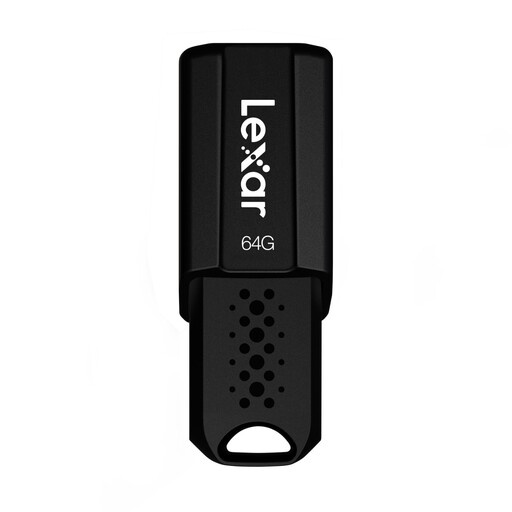
Lexar JumpDrive S80 64 GB USB 3.1 Gen 1
For an extra copy of a smaller project archive, if 64 GB is enough and you have a USB-A port available.
64 GB; read speeds of up to 150 MB/s; the product description specifies USB 3.1 Gen 1 and AES-256 encryption software.
One flash drive is no substitute for separate backup copies and recovery tests.
View at Joybuy
Frequently asked questions
Can I keep digital artwork on a single USB flash drive as a permanent archive?
Do not rely on a single flash drive. The BSI points out that the lifespan of storage media cannot be predicted precisely, and that a backup plan should include recovery. Also keep a record of the file context you will need to open your work in future.
What should I check before using the drive with Mac and Windows computers?
Check the ports and file system on the devices you will actually use. Apple lists exFAT as a formatting option for a drive over 32 GB shared with Windows. Formatting deletes existing files, so back them up elsewhere first.
Why doesn’t a fast USB flash drive always reach its quoted speed?
Your computer’s interface or an intermediary hub may limit transfer speeds. Kingston says the DataTraveler Max series requires USB 3.2 Gen 2 on the host or hub for optimum performance. Read and write speeds should be considered separately.
What does the studio need to organise when using encrypted flash drives?
Decide who manages passwords and how authorised people can regain access if they are locked out. Kingston describes an administrator role for the IronKey VP50; this product-specific feature is no substitute for keeping separate backups of your files.
Is an encrypted USB flash drive required for every art archive in Germany?
The requirements mentioned do not amount to a blanket obligation to use USB flash drives or hardware encryption for every art archive. If the studio processes personal data, the European Data Protection Board describes the GDPR requirements as appropriate technical and organisational measures proportionate to the risk. The right measures depend on the processing involved and the level of protection needed.


