Who should consider these options?

People responsible for membership data

When backing up personal club records, you need to consider confidentiality, controlled access and the ability to restore files together. The European Data Protection Board and the Federal Commissioner for Data Protection and Freedom of Information explain how personal data should be protected and why appropriate measures matter.

Volunteers responsible for backups

For a repeatable offline backup process, keep copies separately and check from time to time that you can restore them. The Federal Office for Information Security recommends disconnecting backup media from the device when they’re not being used for backups, and testing that files can be restored.

Teams using different club computers

If you use several computers, check their available ports and work out how much space you’ll need for your files and planned backup versions before buying.

What should you look for when buying?

First, decide on your backup process and the level of access protection you need. Then choose a capacity and connector to suit your files, backup versions and club computers.

What matters What to check before buying Who should pay particular attention?
Confidentiality and access Check how passwords are managed and what happens after repeated failed attempts on the specific model. If I store membership data on a flash drive, I want to limit unauthorised access and manage access when responsibilities change. For around 29% of consumers, access protection is the most important buying consideration.
Ability to restore files Allow space for separate backup versions and plan how you’ll restore them. If the backup is kept separately from the club computer, I want to be able to restore the files I need if something goes wrong. Around 29% of consumers put the ability to restore files first.
Storage capacity Check the size of your actual data and the number of versions you plan to keep against the capacity of the specific model. If club files and older versions are to be backed up together, I want to work out how much space I’ll need in advance. For around 24% of consumers, getting the right capacity is a priority.
Connector and copying time Check whether USB-A or USB-C matches the computers you use. Don’t assume stated write speeds guarantee a particular backup time. If I switch between club computers with different ports or copy larger amounts of data, I want a compatible connector and a realistic idea of copying time. Around 18% of consumers prioritise device compatibility and file copying.

What mistakes should you avoid?

  • Confusing encryption with an additional backup

    Access protection won’t prevent a device failing or your only copy being lost.

    Decide where copies will be kept and how you’ll restore them before choosing a flash drive. Disconnect the backup drive from the computer after copying, and test that you can restore the files. The BSI recommends these steps.

  • Not planning for failed attempts or handing over passwords

    According to the manufacturer, the Verbatim Store 'n' Go Secure Pro deletes the data after ten failed access attempts. For the Kingston IronKey Locker+ 50 G2, the manufacturer says an administrator can reset the user password; however, ten incorrect administrator passwords will result in the data being deleted.

    Before your first backup, decide who will manage passwords and how authorised people can regain access when responsibilities change. Check the failed-attempt rules for your specific model and test that you can restore the files.

  • Treating manufacturers’ peak speeds as a guaranteed backup time

    The connector, capacity option and computer you use all affect how well a flash drive fits your backup process. Manufacturers’ peak speed figures don’t guarantee how long a specific backup will take.

    Check the connectors and write speeds for the exact model, and run a full trial of your planned backup process.

  • Mixing an optional cloud feature into your offline plan

    According to Transcend, the Transcend Elite software for the JetFlash 930C also includes a cloud backup feature.

    If your club files are to stay local, use only features that suit this process and check the setup before you start using them.

Brands worth considering

Kingston

The IronKey Locker+ 50 G2 is an option for clubs looking for a specific model with hardware encryption and manageable passwords.

  • Kingston lists XTS-AES-256 hardware encryption, USB-A and Windows and macOS support for this model. According to the manufacturer, an administrator can reset the user password.
  • According to the manufacturer, the data is deleted after ten incorrect administrator passwords. The model is no substitute for a tested restore process or an additional copy.

Transcend

The JetFlash 930C may be worth considering for local copies between USB-A and USB-C devices, provided the capacity is right and access protection is managed separately.

  • Transcend lists two connectors and speeds of up to 420 MB/s for reading and 400 MB/s for writing.
  • These manufacturer figures don’t guarantee how long a specific backup will take. Transcend Elite software also includes a cloud backup feature, which isn’t part of the intended offline process.

Verbatim

The 64 GB version of the Store 'n' Go Secure Pro is worth considering if that capacity is sufficient and USB-A suits the computer you’ll use for backups.

  • Verbatim lists built-in AES-256 hardware encryption, which according to the manufacturer doesn’t require administrator rights on the host computer.
  • According to the manufacturer, the data is deleted after ten failed access attempts. Keep this rule in mind when handing over passwords and planning how to restore your files.

Samsung

The BAR Plus is a USB-A flash drive for a backup process where access protection is planned separately.

  • Samsung’s 2024 data sheet lists capacities from 64 to 512 GB and backward compatibility with USB 2.0.
  • Check the specific model and plan access protection to suit your club’s data. The listed capacities and connectors don’t indicate how long your backup will take to write.

USB flash drives for local club backups

The following Joybuy options are a good starting point for keeping local copies of club files. If you’re storing personal data, plan access protection separately and test that you can restore your files.

Kingston Technology DataTraveler Exodia M 128 GB, USB 3.2 Gen 1, black and red

Kingston Technology DataTraveler Exodia M 128 GB, USB 3.2 Gen 1, black and red

For a local copy of club files when 128 GB is enough for your planned backup.

128 GB; USB 3.2 Gen 1.

Joybuy

Kexin 2-in-1 USB flash drive, 32 GB, USB 2.0, USB-A and USB-C, pack of 2

Kexin 2-in-1 USB flash drive, 32 GB, USB 2.0, USB-A and USB-C, pack of 2

For local copies if you switch between compatible USB-A and USB-C devices.

USB 2.0; 32 GB; USB-A and USB-C; pack of 2.

Joybuy

SanDisk SDCZ50-032G-B35 Cruzer Blade USB 2.0, 32 GB

SanDisk SDCZ50-032G-B35 Cruzer Blade USB 2.0, 32 GB

For a local copy when 32 GB and USB 2.0 suit your files and computer. Plan any access protection you need separately.

32 GB; USB 2.0.

Joybuy

SanDisk Cruzer Blade CZ50 USB flash drive, 64 GB

SanDisk Cruzer Blade CZ50 USB flash drive, 64 GB

For a local copy when 64 GB is enough for your files and planned backup versions. Plan any access protection you need separately.

64 GB.

Joybuy
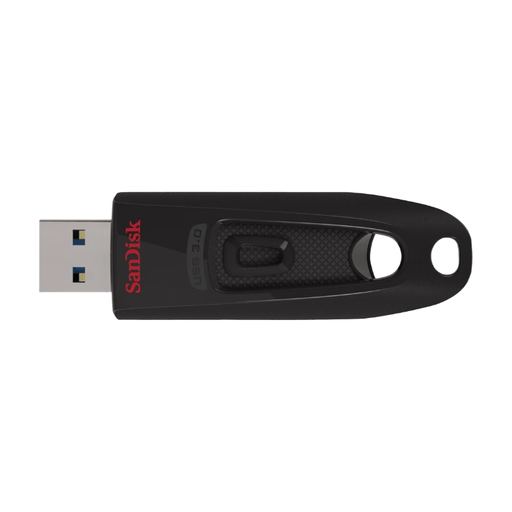
SanDisk Ultra USB flash drive, 64 GB, USB 3.0

SanDisk Ultra USB flash drive, 64 GB, USB 3.0

For a local copy when 64 GB and the connector suit your backup process. Plan any access protection you need separately.

64 GB; USB 3.0.

Joybuy

Frequently asked questions

Is one USB flash drive enough to back up all our club files?

No. A single flash drive isn’t a reliable backup plan. The BSI recommends disconnecting the backup drive from the computer after copying, keeping a copy separately and checking that you can restore the files you need. This doesn’t amount to a blanket recommendation to use a particular number of flash drives.

How should we set up the drive for several people responsible for backups?

Decide who can back up and restore files, and how people will access the login details when responsibilities change. According to the manufacturer, an administrator can reset the user password on the Kingston IronKey Locker+ 50 G2. Everyone responsible for the drive should know the rules for failed attempts. Test that you can restore the files.

Do membership records always have to be encrypted with a particular USB flash drive?

The GDPR applies to clubs too. It requires appropriate technical and organisational measures for personal data, proportionate to the risk; it doesn’t specify a particular USB flash drive for this purchase. Consider encryption as one possible safeguard alongside access, availability and the ability to restore files.

What happens if the drive fails? What about statutory rights and warranties?

If you buy as a consumer, your statutory rights against the seller are separate from any voluntary guarantee. If the club itself makes the purchase, check who the contracting party is, the terms of sale and any manufacturer’s guarantee offered for that specific product. Consumer rights can’t automatically be assumed to apply to every club purchase.