Add up the sizes of the originals and all the edited versions you want to keep, then choose a USB flash drive with enough usable storage. If you regularly back up large files, check the write-speed rating for the specific model and make sure it matches your computer’s port; manufacturers’ maximum speeds aren’t guaranteed for your setup. Germany’s Federal Office for Information Security also recommends keeping additional copies separately and checking that you can restore them. A single flash drive isn’t a complete backup strategy.
Who is a USB flash drive for family films suited to?
A family archive with multiple versions
You want to keep digitised originals and several edited versions at the same time, so you’re planning for the space needed by all your files. Germany’s Federal Office for Information Security recommends considering whether backed-up data can be restored, too.
Frequent project backups
You regularly copy large video folders and pay particular attention to the write speed of the specific model and your computer’s port. Kingston Technology specifies USB 3.2 Gen 2 as the interface for optimum performance with the DataTraveler Max.
Backups across multiple devices
You switch between USB-A and USB-C devices and check that the connectors and file system are compatible with all your target devices. Microsoft’s file system comparison can help you consider the limits of your chosen format when handling large individual files.
What should you look for when buying?
For digitised family films with multiple project versions, consider your total storage needs, the write process and the devices you’ll use later together.
| What matters when buying |
What to check |
Who is it important to? |
| Space for multiple versions |
Add up the sizes of your originals, project files and exports; compare the total with the usable storage on the specific model. |
If I want to keep originals, edited versions and exports at the same time, there needs to be enough storage for all the files. Around 29 % of consumers say storage capacity is their main buying consideration. |
| Write speed for backups |
Check the write-speed rating for the specific model and compare it with your computer’s port and, where relevant, any hub you use. |
When I regularly back up large video folders, the write speed of the specific model matters to me, not just a high read-speed rating. Around 23 % of consumers prioritise write speed. |
| Connections and file system |
Check whether your devices have USB-A or USB-C ports. Microsoft specifies a limit of 4 GiB per file for FAT32; larger files require a format supported by your target devices. |
If I want to use the flash drive with devices that have different connections, I also check that they can read its file system. Around 18 % of consumers prioritise device compatibility. |
| Restorable copies |
Keep additional copies separately. After backing up, open files from the flash drive and check that you can restore them. |
If the family footage is important, I don’t want to rely on a single copy and I want to be able to restore the files when needed. Around 18 % of consumers share this concern. |
| Confidentiality |
If you’re storing confidential footage or taking it with you, plan to use a suitable encryption method and keep the key safe. |
If I take the flash drive with me or store private films on it, I want to make it harder for anyone else to access them while ensuring I can still get to the data later. Around 12 % of consumers prioritise protecting their footage. |
Common mistakes when choosing
-
Choosing capacity based only on the finished film
Originals, edited versions and exports take up more space together. You also won’t have the full stated capacity available for files.
Check the size of every folder you want to keep, then compare the total with the usable storage on the specific model.
You may need a larger flash drive or additional separate backups.
-
Confusing read speed with backup write speed
Write speed matters when copying files to the flash drive. Manufacturers’ maximum speeds also depend on the host device and how the drive is used.
Check the write-speed rating for the exact model you want and make sure it’s compatible with your computer’s port.
-
Relying on a single USB flash drive as a complete backup
Germany’s Federal Office for Information Security notes that the lifespan of a storage medium can’t be predicted precisely and that backed-up data must be restorable.
Keep additional copies separately and regularly check that you can still open important files.
Separate copies require additional storage and time for checks.
-
Planning to store large video files on a FAT32-formatted flash drive
Microsoft specifies a maximum file size of 4 GiB for FAT32. This means you can’t store individual, larger video files as planned.
Check the file size and file system before copying. Choose a different format only if all your intended devices can read it.
Brands to consider
Kingston
The DataTraveler Max range is a USB-C option for large files you copy frequently, provided you have a compatible host device. The DataTraveler Kyson model comes with USB-A.
- Kingston Technology specifies speeds of up to 1.000 MB/s read and 900 MB/s write for the DataTraveler Max. For the documented Kyson model with 128–512 GB, the manufacturer specifies write speeds of up to 60 MB/s.
- These are manufacturer specifications. Performance depends on the host device, software and usage; the Max and Kyson differ in their connections and speed ratings.
Transcend
The JetFlash 920 is a USB-A option, while the JetFlash 930C has both USB-A and USB-C for switching between device types.
- Transcend specifies peak speeds of up to 420 MB/s read and 400 MB/s write for both ranges.
- You can’t use both connections on the JetFlash 930C at the same time. Mobile devices must support USB OTG; the speeds are manufacturer specifications.
Samsung
The BAR Plus is a USB-A range, with models up to 512 GB listed in its data sheet.
- Samsung specifies read speeds of up to 400 MB/s for models with 128–512 GB.
- The read-speed rating doesn’t tell you how long a video backup will take. For regular backups, compare the write-speed rating for the specific model.
USB flash drives for digital family films
This selection includes USB-A flash drives and models with both USB-A and USB-C for storing digitised videos. Compare the capacity, connections and write-speed rating of each model with your storage needs and devices.
 No image available
Kingston Technology DataTraveler 64GB 220MB/s Metal USB 3.2 Gen 1 SE9 G3
For a USB-A backup computer; if you regularly copy large files, check whether the write speed of up to 100 MB/s stated in the product description suits your computer’s port and your needs.
View on Joybuy
 No image available
Kexin 2-in-1 USB 2.0 32GB USB-A & USB-C, 2 Pack
For switching between USB-A and USB-C devices; the product name specifies USB 2.0 and a 2-pack. Check that the file system can be read by all your target devices.
View on Joybuy
 No image available
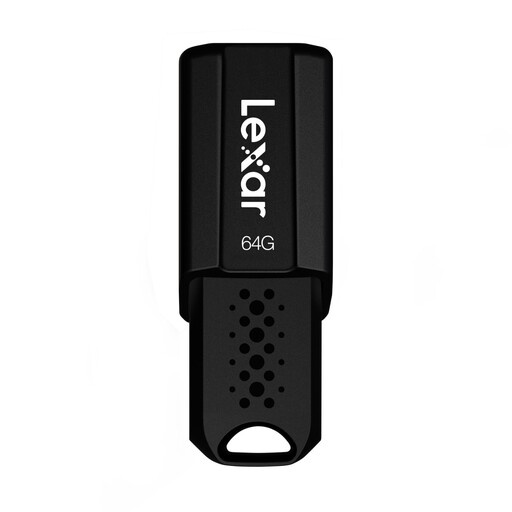
Lexar JumpDrive S80 USB 3.1 Flash Drive 64GB, up to 150MB/s read
For storing photo and video files on devices with a USB port; compare the stated capacity with the total space needed for your originals and project versions.
View on Joybuy
 No image available
MOVESPEED YSUSP05-128GSR 128GB USB 3.2 Gen 1 & Type-C
For USB-A and Type-C devices; the product name specifies 128 GB and read speeds of up to 570 MB/s. Check your storage needs and that the file system is compatible with all your target devices.
View on Joybuy
 No image available
MOVESPEED YSUYC-256GSN 256GB, Fingerprint Encryption, USB 3.2 Gen 1 + Type-C
For storing multiple project versions on USB-A or USB-C devices; the product name specifies 256 GB and write speeds of up to 500 MB/s. According to the product description, encrypted data can’t be recovered if both the password and fingerprint recognition fail.
View on Joybuy
Frequently asked questions
Which file system do I need for a single large video?
FAT32 isn’t suitable for a single file larger than 4 GiB: Microsoft specifies this limit for FAT32, while exFAT supports larger files. Before choosing or formatting a drive, check that all the devices you want to use to access the backup support exFAT.
How can I check that I’ll be able to use my backup later?
After copying your files, open a selection directly from the flash drive and check that you can restore any project files you need. Germany’s Federal Office for Information Security advises planning for how you’ll restore your data, too.
Is the manufacturer’s warranty enough protection when buying?
No. For consumer purchases in Germany, EU information states that you have at least two years of statutory rights against the seller from the date you receive the goods. An additional manufacturer’s warranty doesn’t replace these rights, and it isn’t a backup copy of films you’ve lost.


