Which solution is right for you?

Guardians of irreplaceable family recipes

If you want to be able to open handwritten or rare recipe scans in the future, keep separate local copies and test that you can restore the files. Germany’s Federal Office for Information Security and the consumer advice centre warn that storage media can fail.

Collectors with a growing scan archive

If you have lots of pages or several versions, the measured folder size is more useful than a rough estimate based on page count. Bear in mind that usable capacity may be lower than the stated capacity; Samsung notes this for its BAR Plus variant.

People using different devices

If you back up or read recipes on devices with different USB ports, check that the connector and file system are compatible with the devices you plan to use. SanDisk lists both USB-A and USB-C for the Ultra Dual Drive Go, while Microsoft Learn documents differences between file systems.

What should you look for when buying?

What matters What to check before buying Who should consider this?
Restorable copies Open the scans after copying them and test restoring them on the device you plan to use. Keep another local copy in a separate place. If family recipes matter to me, I want to be able to open a second copy kept separately at a later date. Around 36% of consumers are likely to prioritise being able to restore their files.
Space for scan folders Compare the total size, including the versions you want to keep, with the usable capacity. Microsoft Learn states that FAT32 has a 4 GiB limit per individual file. If my scan archive is growing, I want to allow for folder size and additional versions rather than choosing capacity based on page count. Around 29% of consumers are likely to prioritise having enough storage space.
Access on your devices Check the ports on the scanning, backup and recovery devices, and whether they support external drives and the file system. If I want to read recipes on devices with different USB ports, I need compatible connectors and a file system they can read. Around 21% of consumers are likely to prioritise device compatibility.
Protecting sensitive scans Check whether you need access protection, how the specific model is unlocked and how to store access details separately. If I take the drive with me or keep it somewhere outside my home, extra protection may matter to me. Around 14% of consumers are likely to prioritise protecting personal scans.

Common backup mistakes

  • Relying on the USB flash drive as your only remaining copy

    It’s impossible to predict exactly how long storage media will last. You also need to be able to open or restore your saved files in the future.

    Keep the original or another local copy in a separate place, and test that you can restore it.

  • Assuming stated capacity is the same as usable storage

    Available storage may be lower than the stated capacity. The file system may also limit the size of an individual file.

    Measure the folder and the largest individual file, allow for any versions you want to keep, and compare the totals with the storage actually available. Samsung notes that the usable capacity of its BAR Plus variant is lower than its stated capacity.

  • Confusing read speed with write speed

    Read-speed figures don’t tell you how long it will take to transfer recipe scans to a drive. Samsung lists read speeds for its BAR Plus variant, as does SanDisk for certain Ultra Dual Drive Go variants.

    If you regularly back up large folders, look for write-speed figures or tests for the exact variant you’re considering, and don’t confuse them with read speeds.

  • Choosing PIN protection without a recovery plan

    Verbatim says the Keypad Secure #49429 requires a security update and reformatting after 20 incorrect PIN entries.

    Test unlocking the drive before storing it, make sure it has the required update, and keep an independent copy.

Key brands and product ranges

Kingston

According to Kingston Technology, the DataTraveler Exodia M is a USB-A option available in documented 64, 128 and 256 GB variants.

  • Kingston lists a sliding cap, a five-year warranty and technical support.
  • The USB 3.2 Gen 1 specification doesn’t tell you how long it will take to write recipe folders; this model has a USB-A connector.

SanDisk

SanDisk says the Ultra Dual Drive Go is designed for devices with USB-A and USB-C ports and is available in several capacities.

  • The data sheet lists read speeds of up to 400 MB/s for variants from 128 GB to 1 TB.
  • This is a read-speed figure, not a guaranteed write speed for your scan folder.

Verbatim

The Keypad Secure #49429 is a USB-A model with PIN entry for people who want an extra layer of access protection.

  • Verbatim describes this model’s encryption as AES 256-bit; this is a manufacturer’s claim.
  • Verbatim says the drive requires a security update and reformatting after 20 incorrect PIN entries.

Samsung

The silver BAR Plus variant MUF-256BE3/APC is a USB-A model with a stated capacity of 256 GB.

  • Samsung lists sequential read speeds of up to 400 MB/s for this variant.
  • This figure applies to reading, not writing. Samsung also notes that usable capacity may be lower than the stated capacity.

USB flash drives for local recipe scans

This selection includes USB-A flash drives and USB-A/USB-C dual drives for local copies. Compare the stated capacity with the size of your files, and check the ports on the devices you’ll use to open the scans later.

Kingston Technology DataTraveler Exodia M 128 GB, USB 3.2 Gen 1, black and red

Kingston DataTraveler Exodia M, 128 GB, USB 3.2 Gen 1

For recipe scans that fit within the stated capacity and will be read on a device with a USB-A port.

Capacity: 128 GB.

Connector: USB 3.2 Gen 1, USB-A.

View at Joybuy

Kexin 2-in-1 USB 2.0, 32 GB, USB-A and USB-C, pack of two

Kexin 2-in-1 USB 2.0, 32 GB, USB-A/USB-C, pack of 2

For transferring recipe scans between devices with USB-A and USB-C ports, provided they support external drives.

Stated capacity: 32 GB.

Connectors: USB-A and USB-C; 360° swivel design.

Pack size: 2.

View at Joybuy
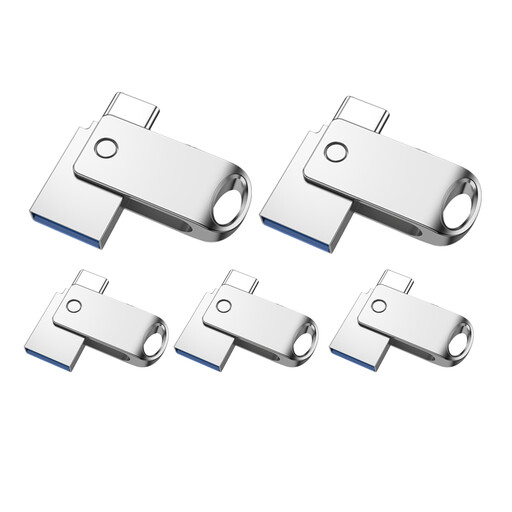
Kexin 2-in-1 USB 2.0, 32 GB, USB-A and USB-C, pack of five

Kexin 2-in-1 USB 2.0, 32 GB, USB-A/USB-C, pack of 5

For transferring recipe scans between devices with USB-A and USB-C ports, provided they support external drives.

Stated capacity: 32 GB.

Connectors: USB-A and USB-C; 360° swivel design.

Pack size: 5.

View at Joybuy

SanDisk SDCZ50-032G-B35 Cruzer Blade USB 2.0, 32 GB

SanDisk Cruzer Blade SDCZ50-032G-B35, 32 GB, USB 2.0

For recipe scans that fit within the stated capacity and will be read on devices with a compatible USB-A port.

Capacity: 32 GB.

Connector: USB 2.0, USB-A.

View at Joybuy

SanDisk 64 GB CZ50 Cruzer Blade USB flash drive

SanDisk CZ50 Cruzer Blade, 64 GB

For recipe scans whose measured total size fits within the stated capacity, and for devices with a compatible USB-A port.

Capacity: 64 GB.

Connector: USB-A.

View at Joybuy

Frequently asked questions

Is a USB flash drive enough as the only archive for family recipes?

No, not if preserving your scans matters. Germany’s Federal Office for Information Security notes that it’s impossible to predict exactly how long storage media will last. Keep a separate local copy and test that you can open and restore the files.

How can I check my backup after copying the files?

Open a selection of scans directly from the drive and try restoring them on the device you plan to use. Don’t leave the drive as your only remaining copy.

Why can’t I copy a large file when there’s still space available?

The file system may limit the size of an individual file. Microsoft Learn gives the FAT32 limit as 4 GiB per file. For a large scan or archive file, check both its size and which file systems your devices support.

What should I bear in mind with a PIN-protected drive?

Check that you can unlock the model on your devices, and keep another copy separately from the drive. For the Keypad Secure #49429, Verbatim specifies a security update and reformatting after 20 incorrect PIN entries; this requirement applies to that specific model.

What capacity do I need for my recipe scans?

Measure the size of the folders you want to back up, and allow for additional versions and your largest individual file. Compare your files with the usable capacity of the drive you choose, and check that its file system and your devices support large individual files.