Who should consider these options?

People responsible for dialect archives

If you’re archiving irreplaceable recordings, keep a separate backup and test the restoration process with sample files. The Federal Office for Information Security points out that it’s important to make sure data can be restored successfully.

People handling confidential interviews

For recordings of identifiable people, you need to consider both the risk of losing the drive and access to the files on a shared computer. The Federal Commissioner for Data Protection and Freedom of Information notes that encryption won’t protect your data if a device is already unlocked.

People using different computers

If you transfer backups between devices with USB-A and USB-C ports, check that the connectors are suitable and that the files can be read on the device you’ll use to restore them. Having the right connector alone doesn’t guarantee you’ll be able to open the files.

What should you look for when buying?

Buying priority What to check before buying Who is this especially important to?
Backups you can restore Choose enough capacity for your files and backup versions; test that you can read them on the device you intend to use. If I need to open my dialect recordings again after a failure, I want to test the restoration process beforehand. Around 29 % of consumers prioritise being able to restore their files.
Keeping recordings confidential Check the extent of the encryption and how the drive is unlocked, as well as access rules on the shared computer. If you store identifiable voices on a portable drive, you’ll want to understand who can access them if the drive is lost or when it’s connected to a work computer. Around 29 % of consumers put protecting confidential recordings first.
Access across different devices Check whether the devices you use have USB-A or USB-C ports; test the file system and make sure the files can be read. If I need to restore a backup on devices with different ports, I check the connector and make sure I can access the files on both. Around 24 % of consumers say switching between devices is their top priority.
Storage space and copying time Work out how much space you need for your files and backup versions; check the write speed for the specific variant. If I have a large archive or make frequent backups, I want to allow enough space and pay attention to write speed, not just read speed. Around 18 % of consumers prioritise capacity and copying time.

Common buying and usage pitfalls

  • Relying on a USB flash drive as your only archive

    A storage device can fail. Even backup files are only useful if you can open or restore them when you need to.

    Keep another copy separately and test the restoration process with real sample files. The Federal Office for Information Security recommends making sure that data can be restored successfully.

  • Confusing password protection with protection on an unlocked computer

    Encryption won’t prevent access to files that are left open on a shared computer after the drive has been unlocked.

    Check which data is actually encrypted, how access can be restored and what access rules apply on the computer. For the Verbatim Keypad Secure, you should also note the manufacturer’s advice about an available security update.

  • Assuming the USB standard or read speed guarantees fast backups

    Write speed matters when copying files to a drive. COMPUTER BILD rated the write speed of the SanDisk Ultra Dual Drive Luxe 128 GB it tested as very slow; this assessment applies to the variant tested.

    Compare the stated write speeds for the specific capacity variant, and check which model was tested when looking at review results.

  • Leaving file system and restoration checks until there’s an emergency

    The right connector doesn’t guarantee that the device you use for restoration can read your backup files. FAT32 limits individual files to 4 GiB; Microsoft Learn lists this limit in its file system comparison.

    Check the size of your largest individual file and test that you can open the backup on the device you intend to use before relying on it.

Key brands to consider

Verbatim

According to Verbatim, the Keypad Secure range includes a USB-A drive with a keypad and encryption. A separate dual-USB model is designed for switching between USB-A and USB-C.

  • For the Keypad Secure 128 GB, Verbatim specifies encryption for drive data and on-device unlocking with a passcode.
  • The manufacturer advises that a security update is available. The dual-USB model’s connector flexibility doesn’t mean it offers the same encryption.

Kingston

DataTraveler Kyson is a USB-A range for transferring files. According to Kingston, the IronKey Keypad 200 series is designed for encryption and on-device unlocking.

  • Kingston specifies write speeds of up to 60 MB/s for Kyson variants with 128–512 GB capacity.
  • The IronKey series includes USB-A and USB-C variants; this doesn’t mean every drive has both connectors. Remember to plan for PIN management and account recovery.

SanDisk

According to SanDisk, the Ultra Dual Drive Luxe 128 GB has both USB-A and USB-C connectors on one model. The separately tested Extreme Pro 128 GB is discussed in the review source in relation to write speed.

  • The manufacturer specifies dual connectors for the Ultra Dual Drive Luxe. They can make it easier to switch between devices, provided those devices have compatible ports.
  • COMPUTER BILD rated the write speed of the Ultra Dual Drive Luxe 128 GB it tested as very slow. This verdict doesn’t apply to all SanDisk drives.

USB flash drives for backups

These USB flash drives may be suitable for backing up dialect recordings. Make sure the connector and file access are compatible with the shared computer and the device you intend to use for restoration.

Kingston DataTraveler 64 GB 220 MB/s Metal SE9 G3

Kingston DataTraveler 64 GB 220 MB/s Metal SE9 G3

An option for backups, provided it’s compatible with the ports on the computer you use and the device you’ll use for restoration.

64 GB; USB 3.2 Gen 1; metal casing; 220 MB/s stated in the product name.

View at Joybuy

Kexin 2-in-1 USB flash drive, 32 GB, pack of 2

Kexin 2-in-1 USB flash drive, 32 GB, pack of 2

For switching between devices with USB-A and USB-C, provided both connectors are compatible with the devices you intend to use.

USB 2.0; USB-A and USB-C; 32 GB, pack of 2.

View at Joybuy

Kexin 2-in-1 USB flash drive, 32 GB, pack of 5

Kexin 2-in-1 USB flash drive, 32 GB, pack of 5

A multipack for storing copies separately, provided the connectors and access are compatible with the devices you use.

USB 2.0; USB-A and USB-C; 32 GB, pack of 5.

View at Joybuy

SanDisk Cruzer Blade SDCZ50-032G-B35, 32 GB

SanDisk Cruzer Blade SDCZ50-032G-B35, 32 GB

A compact capacity option for backups, provided it suits your data and is compatible with your computer’s port.

32 GB; USB 2.0.

View at Joybuy
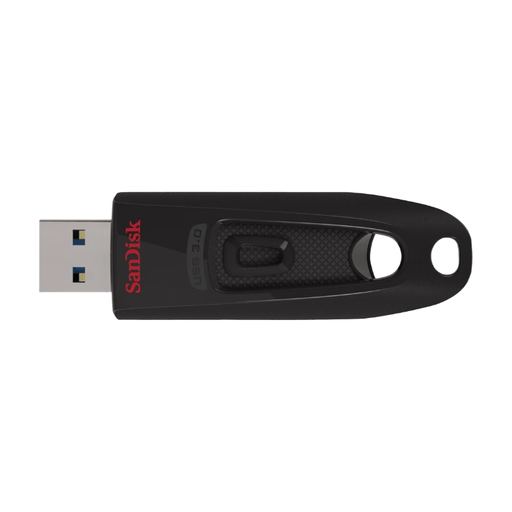
SanDisk Ultra 64 GB USB 3.0

SanDisk Ultra 64 GB USB 3.0

An option for storing files and backups, provided it’s compatible with your computer’s port and you can open the files on the device you’ll use for restoration.

64 GB; USB 3.0.

View at Joybuy

Frequently asked questions

Is it enough to copy the recordings to a USB flash drive once?

No. A single drive isn’t a sufficient separate backup if you need the files to remain available after a failure. Keep another copy separately and check that you can open or restore the recordings. The Federal Office for Information Security stresses that it’s important to make sure data can be restored successfully.

Can I use an encrypted drive on a shared computer?

It depends on the model and the computer’s access rules. Manufacturers describe keypad models as unlocking directly on the device; once it’s unlocked, encryption won’t protect files left open on the computer. Test access using the account you intend to use.

What should I test before making my first backup?

Check the connector and file system, then test copying and reading the files back using a sample recording. For the Verbatim Keypad Secure, you should also note the manufacturer’s advice about an available security update. Verbatim states that the bundled Nero backup software is compatible with Windows only.

What ongoing maintenance should I plan for?

Keeping another backup separately requires extra storage and regular maintenance. If you choose a drive with a PIN, check what happens if you forget your access details. Don’t keep your only copy on a device if you can’t recover access to it.

Can I record and back up dialect interviews in Germany without any further steps?

No, it’s not possible to give a blanket yes. Section 201 of the German Criminal Code (StGB) covers, among other things, the unauthorised recording of another person’s non-public spoken words and the use of such a recording. If people are identifiable, processing their data also requires a legal basis under Article 6 of the GDPR. Consent is one possible basis, but not the only one. The requirements for a particular recording depend on the circumstances. Refer to the legislation at Gesetze im Internet and the data protection information provided by the Federal Commissioner for Data Protection and Freedom of Information.