What should you consider when buying?
First, work out how much storage you need for your original files and project versions, and how you’ll check a separate copy. Then compare connectors, access protection and write speed with your workflow.
| Consideration |
What to check before buying |
Who needs to consider this? |
| Recoverable copy |
Choose a separate storage location and check that you can read files back and open them. |
If you need to keep originals and earlier versions readable independently of the first drive, recoverability is a priority. Around 25 % of consumers put this first. |
| Space for project versions |
Add up the file sizes of all the versions you want to keep and compare the total with the available space on the specific model. |
If you want to keep originals and several edited versions, you won’t want to delete old files to make room for new ones. Around 25 % of consumers prioritise space for different versions. |
| Confidentiality and access |
Check the encryption, unlocking method on your target devices and secure management of access details. |
For confidential meeting content, it’s important to restrict access while the drive is being transported or stored, while still ensuring it can be unlocked when needed. Around 20 % of consumers put confidentiality first. |
| Device compatibility |
Check the connectors, supported file systems and, where applicable, unlocking method on all target devices. |
If you need the same project files on devices with different connectors, the drive must work with all of them. Around 15 % of consumers prioritise compatibility when switching devices. |
| Write speed |
Compare write speeds or tests for the exact model and take your computer’s interface into account. |
If you regularly transfer large folders of recordings, pay particular attention to the write speed rather than just the read speed. Around 15 % of consumers prioritise transfer times. |
Joybuy products for meeting recordings
This selection from Joybuy includes USB-A drives, a PIN-protected model and USB-A/USB-C drives for storing files and switching between devices. Match the capacity and file system to your files and target devices; a single drive is no substitute for a separate backup.
 Image unavailable
Kingston DataTraveler 64 GB USB 3.2 Gen 1 SE9 G3
An option if your calculated archive needs fit within 64 GB and you’ll use the drive with a USB-A device.
Kingston quotes read speeds of up to 220 MB/s and write speeds of up to 100 MB/s.
View at Joybuy
 Image unavailable
Kingston IronKey Keypad 200, 32 GB
An option for confidential files if entering a PIN on the drive suits your unlocking process. Remember to plan how you’ll manage the access details and keep a separate copy.
This model is listed with 32 GB and an integrated keypad for PIN access. Kingston specifies XTS-AES-256 hardware encryption for the Keypad 200 series. Encryption is no substitute for a backup and does not protect a drive while it is unlocked.
View at Joybuy
 Image unavailable
Kexin USB-A and USB-C, 2-pack with 32 GB each
The two drives may suit file transfers between devices with USB-A and USB-C connectors. Check that each target device supports them.
USB 2.0, OTG support and two 32 GB flash drives are listed.
View at Joybuy
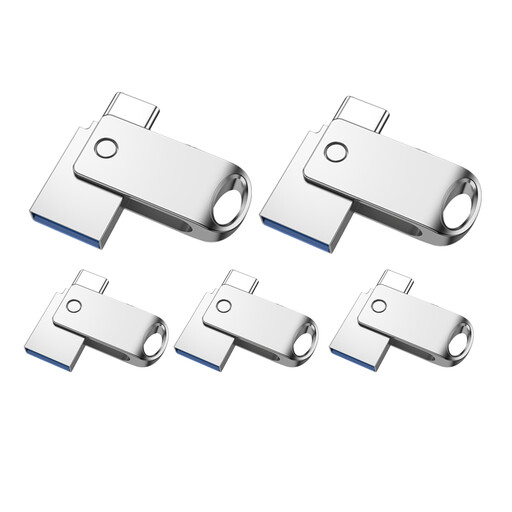 Image unavailable
Kexin USB-A and USB-C, 5-pack with 32 GB each
If you transfer files between devices with USB-A and USB-C connectors and want to spread project files across several drives, check your devices are compatible first.
USB 2.0 and OTG support are listed; the drives are described as colour-coded 32 GB models.
View at Joybuy
 Image unavailable
Kexin USB-A and USB-C, 5-pack
A multipack for transferring files between devices with USB-A and USB-C connectors. Check that the supported file systems suit your target devices.
USB 2.0, OTG support and five coloured drives are listed.
View at Joybuy
Frequently asked questions
Is one USB flash drive enough for long-term archiving?
For important recordings, plan a separate backup and regularly check that you can read the files back. The German Federal Office for Information Security points out that the lifespan of storage media cannot be predicted precisely.
What should I check before archiving files for the first time?
Check the available space, the largest individual file, whether files can be read on your intended devices and that a test copy works. FAT32 limits individual files to 4 GB. If a recording is larger, you’ll need a different file system supported by your devices. Microsoft Learn gives this limit for FAT32.
Are recordings on an encrypted drive always protected?
No. The Federal Commissioner for Data Protection and Freedom of Information explains that full-disk encryption protects a locked drive, but not files on an unlocked device. Make sure you also set rules for using the drive and storing access details.
Can I record and archive a meeting in Germany if the drive is secure?
A secure drive alone does not make a recording lawful. Section 201 of the German Criminal Code (StGB) covers, among other things, the unauthorised recording of other people’s spoken words that are not intended to be heard in public, and the unauthorised use of a recording made in this way. For content containing personal data, you must also consider the legal basis, purpose and safeguards for processing. Whether a specific recording and retention period are lawful depends on the circumstances.
What extra steps are involved in keeping a separate backup?
You’ll need a second suitable storage location and should regularly check that you can read and open the files. With PIN-protected models, you’ll also need to manage the access code securely and follow the manufacturer’s guidance for the specific model.


