Which buying criteria matter most?
First, check that your devices support the flash drive’s connector and file system. Then weigh up capacity, write speed and design based on your recordings and workspace.
| What matters to you |
What to check before buying |
Who it matters most to |
| Restoring recordings |
Allow for your existing files, expected growth and a separate copy; open a test file from that copy. |
If my recordings can’t be replaced, I want to be able to restore them from a separate copy after a fault or loss. Around 36% of consumers prioritise storage that can be recovered. |
| Opening files on multiple devices |
Check the USB-A and USB-C ports and supported file systems on all your devices; with FAT32, bear in mind the 4 GiB per-file limit. |
If I move recordings between my computer and recording equipment, both need to be able to read the files. Around 29% of consumers prioritise compatibility with their devices. |
| Copying large amounts of recordings quickly |
Check the write speed for the exact model and capacity; with performance-focused models, check your computer’s interface too. |
If I regularly transfer large recording folders, write speed matters to me, not just the read speed. Around 21% of consumers put shorter transfer times first. |
| Taking up little desk space |
Check the design, connector orientation, clearance from neighbouring ports and the position of the port on your device. |
If there’s little room around the port, I want to use a flash drive that doesn’t stick out far or block other ports. Around 14% of consumers prioritise a space-saving design. |
USB flash drives at Joybuy
The Joybuy options below include USB flash drives with capacities from 64 to 256 GB. Choose one to suit your storage needs, then check that its connector, file system and write speed work with your devices and transfers.
 No product image available
SanDisk CZ50 Cruzer Blade, 64 GB
The product description highlights its compact design and 4 cm length, which may be useful if desk space is limited.
64 GB; USB 2.0; length: 4 cm.
View at Joybuy
 No product image available
MOVESPEED YSUSP05-128GSR, 128 GB
The product description lists USB-A and Type-C for switching between devices with these connectors; also check that they support the file system.
128 GB; USB-A and Type-C; USB 3.2 Gen 1; up to 570 MB/s read and 520 MB/s write, according to the product description.
View at Joybuy
 No product image available
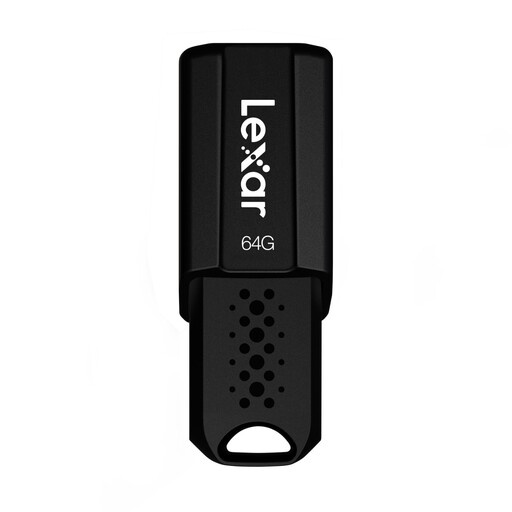
Lexar JumpDrive S80, 64 GB
The retractable design may be useful when carrying it around; the product description says it protects the connector when not in use.
64 GB; USB 3.1 Gen 1; read speeds of up to 150 MB/s; retractable connector.
View at Joybuy
 No product image available
SanDisk Ultra Flair, 128 GB
Write speed matters if you regularly transfer large amounts of data: the product description lists a speed of 4 MB/s for this version.
128 GB; read speeds of up to 150 MB/s according to the product title; write speed of 4 MB/s according to the product description.
View at Joybuy
 No product image available
MOVESPEED YSUYC-256GSN, 256 GB
The two connector types may be useful when switching between compatible devices. If you enable encryption, make sure you plan how to regain access and keep a separate copy.
256 GB; USB-A and Type-C; fingerprint access and encryption; up to 550 MB/s read and 500 MB/s write, according to the product title.
According to the product information, data in the encrypted partition cannot be recovered if both the password and fingerprint access fail.
View at Joybuy
Frequently asked questions
Can I record directly to a USB flash drive on my recording equipment?
That depends on the specific recording equipment. Check its manual to see whether USB storage is supported as a recording destination, which connectors and file systems are permitted, and whether the device only transfers files to a computer via USB. A USB-A or USB-C port alone doesn’t confirm that direct recording is supported.
What should I bear in mind with a very large WAV file?
Microsoft states that FAT32 has a maximum file size of 4 GiB. If a single file reaches this limit, check whether all the devices involved support another suitable file system, and back up any existing files before formatting.
How can I keep my backup usable day to day?
Keep a separate copy and check that you can reopen backed-up recordings. For Windows, Microsoft recommends safely removing USB drives before disconnecting them to avoid data loss.
What extra steps should I take with a code-protected flash drive?
Store the code securely and keep an independent copy. For the Verbatim Keypad Secure #49429, the manufacturer lists a security update; the model may also be reformatted after 20 incorrect code entries.
Can I copy music recordings to a USB flash drive in Germany?
Under certain conditions, Section 53 of the German Copyright Act (UrhG) allows individuals to make single copies of a work for private, non-commercial use; this does not include copies made from an obviously unlawful source, among other exceptions. The provision does not give blanket permission to distribute the copies or play them in public. Whether you may make or share a particular recording depends on the rights associated with it and how you use it. The wording of Section 53 UrhG on Gesetze im Internet is authoritative.


