Studio computers with different connections
You copy presentations between computers with USB-A and USB-C ports and want to avoid using an adapter wherever possible.


First, check the connections on both devices and whether the destination computer allows USB storage. If you need both USB-A and USB-C, a dual USB flash drive can save you from needing an adapter, while a USB-A drive may be all you need for devices with the right ports. Matching the capacity and file system to your files and the destination device can help avoid unnecessary problems when handing files over. If you regularly copy large files, the write speed of the exact model variant is what matters. For confidential content, you’ll also need to consider suitable access protection and how the shared computer is used.
You copy presentations between computers with USB-A and USB-C ports and want to avoid using an adapter wherever possible.
You hand over presentations with large media files or several project versions, so you need to balance storage capacity, individual file size and transfer time.
You carry non-public presentations through a shared studio and need to consider access protection and your organisation’s rules.
For handing over presentations in a shared studio, the priorities may be connections, file compatibility, write speed or confidentiality, depending on your needs. Microsoft Learn gives FAT32 a limit of 4 GiB per file; Apple Support notes that formatting erases files stored on the drive.
| What matters | What to check before buying | Who it matters most to |
|---|---|---|
| Connections and access | Check the ports on the source and destination devices, and whether external USB storage is permitted. | If I switch between studio computers with different ports, I want to copy files without an adapter wherever possible; around 33% of consumers put the right connection first. |
| Capacity and file system | Check the size of the complete folder and the largest individual file; make sure the file system is compatible with the destination device. | If the complete project folder, including its largest file, needs to work on the destination device, I check the capacity and format; around 27% of consumers prioritise these file and format requirements. |
| Write speed | Compare the write speeds for the exact model and connection variant, not just the read speeds or USB generation. | If I regularly copy large presentation files, the time spent waiting matters to me; around 20% of consumers prioritise write speed. |
| Confidentiality and handover | Consider the level of protection needed, studio rules and access for authorised recipients; keep an additional backup of important files. | If I’m handing over confidential presentations, I want to consider access protection and a reliable process together; around 20% of consumers put confidentiality first. |
The USB specification describes connection rates; it doesn’t automatically tell you the write speed of a specific flash drive. And figures given for a product range don’t necessarily apply to every capacity and connection variant.
Compare the stated write speeds for the exact variant you want, and take the studio computer’s connection into account too.
With FAT32, an individual file may exceed the 4 GiB limit even if there’s still space available on the drive overall. Microsoft Learn documents this file limit; formatting erases files already stored on the drive.
Before handing over the drive, check the largest individual file and the destination device’s file system. Back up any files you need before formatting a drive.
Having to copy files again or reformat the drive can delay the handover.
Access protection on the flash drive and the security of the computer you use are separate issues. The German Federal Office for Information Security also notes that USB flash drives can play a role in spreading malware.
Follow the studio’s rules, and don’t open confidential files on just any computer simply because the drive is described as having an encryption feature.
Depending on the model, the DataTraveler range offers USB-A or both USB-A and USB-C. The IronKey Keypad 200 is a separate option with a PIN and hardware encryption.
The JetFlash 930C is designed for switching between USB-A and USB-C devices.
The Dual USB flash drive has both USB-C and USB-A connectors; the specified 64-GB version is listed as USB 3.2 Gen 1.
The described 128-GB version of the Ultra Dual Drive Go USB Type-C is listed with both USB-A and USB-C.
The models below cover handovers using USB-A and USB-C, a range of storage capacities and products with specified access protection.
 No image available
For confidential handovers, when PIN entry and hardware encryption meet the studio’s requirements.
32 GB; alphanumeric keypad; XTS-AES-256 hardware encryption.
Encryption doesn’t replace the need to check whether the shared computer is suitable for the files.
 No image available
For transfers between USB-A and USB-C devices; check whether the destination computer supports external storage.
USB 2.0; USB-A and USB-C; two drives, each with 32 GB; 360° swivel design.
 No image available
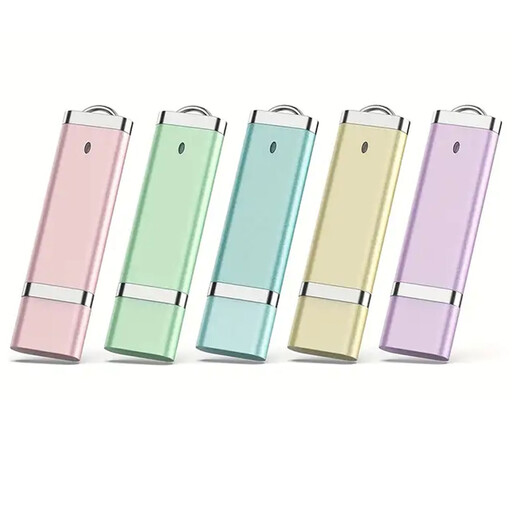
For multiple storage or handover needs, when 64 GB per drive is right for the amount of data.
USB 2.0; five drives, each with 64 GB.
 No image available
For multiple handovers between USB-A and USB-C devices; check that the destination device supports external storage.
USB 2.0; USB-A and USB-C; five drives, each with 32 GB; retractable design.
 No image available
For presentation files, if the computer you’re using has a USB-A port and 64 GB is enough for the handover folder.
USB 2.0; 64 GB; the product information lists SanDisk SecureAccess with password protection and 128-bit AES encryption.
exFAT can be an option for external drives used with different systems; also check which format the specific destination device can read. Microsoft Learn gives FAT32 a limit of 4 GiB per individual file. Apple Support notes that formatting erases files stored on the drive.
On Windows, Microsoft recommends safely removing USB flash drives before disconnecting them to avoid data loss. Then check that you can open the files you need on the destination device.
The official information referenced here doesn’t establish a general requirement to encrypt every USB flash drive used for presentations. If data controllers process personal data, Article 32 of the GDPR requires appropriate technical and organisational measures that are proportionate to the risk. The protection needed in a specific studio depends on the data and the requirements that apply. The German Federal Office for Information Security describes software and hardware encryption as technical options.
If you need to recover important files after they’re lost or the drive fails, keep a separate backup. The German Federal Office for Information Security recommends backing up data regularly.