Teachers with lots of project versions
If you regularly update your materials, your flash drive should have enough room for all the versions you want to keep. Microsoft’s version history can help you find and restore earlier versions of files.


Choose a capacity that can hold all the project versions you want to keep, then check that the connector and write speed are suitable for the computers you use. A USB flash drive provides an extra backup, but it is no substitute for keeping a separate copy and regularly testing that you can restore your files. The German Federal Office for Information Security (BSI) notes that the lifespan of storage media cannot be predicted precisely. If your files contain pupils’ personal data, you must also take local requirements and suitable access protection into account.
If you regularly update your materials, your flash drive should have enough room for all the versions you want to keep. Microsoft’s version history can help you find and restore earlier versions of files.
If you use your materials on devices with different connectors, check that the plug is compatible with the computers you use and that you can open the backed-up files on the devices you intend to use.
If project folders may contain pupils’ personal data, check your school’s requirements and choose a suitable way to protect and unlock the files before copying them. The Rhineland-Palatinate data protection authority outlines security measures for encryption.
First, work out how many project versions you want to keep. Then check that the connectors, write speed and, where relevant, level of protection suit your devices and files.
| What matters when buying | What to check | Who is it important to? |
|---|---|---|
| Room for several project versions | Add together the folder sizes of all the versions you want to keep; check the usable capacity of the specific model. | If I want to keep older versions alongside the current one, I need enough storage space. This is a priority for around 28% of consumers. |
| Restoring older versions | Decide how to keep versions separate; try opening an older file from the backup. | If I may need to open an earlier project version later, it is essential to have a readable copy stored separately. Around 28% of consumers prioritise being able to restore their files. |
| Write speed | Compare the write speeds of the specific model with the computer’s USB port; remember that maximum figures are quoted by the manufacturer. | If I regularly back up larger folders, I want to keep an eye on how long it takes to write them. Around 17% of consumers prioritise shorter copying times. |
| Connectors for several devices | Check the USB-A and USB-C ports on your devices; open a sample file on the computers you intend to use. | If I switch between computers with different connectors, I want the flash drive to work with the devices I use. Around 16% of consumers prioritise compatibility across devices. |
| Confidential pupil data | Check the type of data and your school’s requirements; review the level of protection, unlocking method and product updates for the specific model. | If my project files contain personal data, I need to check access protection before copying them. Around 11% of consumers place particular importance on confidentiality. |
Several versions kept for future reference will take up space. The usable capacity may differ from the stated capacity.
Work out the size of all the versions you plan to keep and check the usable capacity of the model you choose.
Backing up files means writing them to the flash drive. The manufacturer’s maximum figures also depend on the devices used and how they are used.
Compare the write speeds of the specific model with the computer’s USB port.
Access protection and casing features cannot prevent you from losing a project version or being unable to restore a backup.
Keep a separate copy and regularly check that you can open files from it.
A password-protected file area is not automatically the same as encryption of the entire drive. For the Verbatim Keypad Secure #49429, the manufacturer also specifies a security update and reformatting after 20 incorrect code entries.
Check the level of protection, how to unlock the drive and the manufacturer’s guidance for the specific model and the computers you intend to use.
The Extreme PRO range is worth considering if write speeds matter when transferring larger files.
The DataTraveler Max is a USB-C option for frequently transferring larger folders.
The documented models cater for different needs: the Dual USB Drive #49967 has USB-A and USB-C connectors, while the Keypad Secure #49429 has a keypad.
The BAR Plus MUF-256BE4/APC is a USB-A option with a metal casing for general teaching materials.
The JumpDrive P30 is an option if you want to compare capacity models and a protected file area.
The options below include a keypad model, USB-A and USB-C flash drives, and USB 2.0 sets. Compare the stated capacity of each model with the space needed for the project versions you want to keep.
 No image available
An option if you’re looking for a flash drive with a keypad and encryption for teaching materials.
The product name specifies 32 GB and AES-256 encryption.
 No image available
An option if you want to transfer materials between devices with USB-A and USB-C ports.
The product name specifies USB 2.0, 32 GB and a pack of 2.
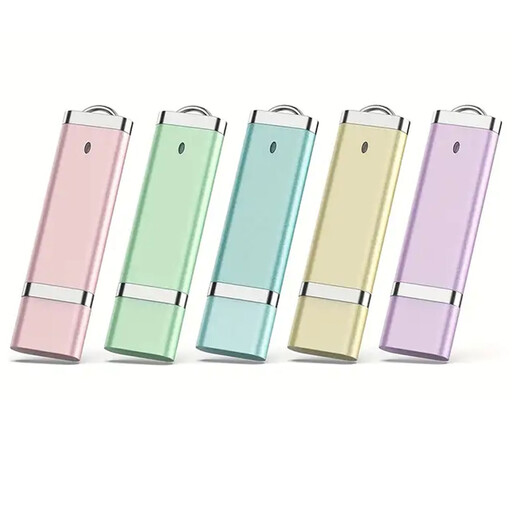 No image available
A set to consider if you want to divide your materials between several flash drives.
The product name specifies USB 2.0, 16 GB and five flash drives.
No image available
A set to consider if you want to divide your materials between several flash drives.
The product name specifies USB 2.0, 32 GB and five flash drives.
No image available
A set to consider if you want to divide your materials between several flash drives.
The product name specifies USB 2.0, 64 GB and five flash drives.
No. Versions are not created simply by using a USB flash drive. Windows File History can save and restore older file versions on an external drive. Check how it is set up and try opening an earlier version.
Open a backed-up file and an older version from the device you intend to use. The BSI recommends planning for recovery, and the lifespan of a storage medium cannot be predicted precisely.
Allow time for setup, managing your code and testing that you can restore your files. For the Verbatim Keypad Secure #49429, the manufacturer also specifies a security update and reformatting after 20 incorrect code entries.
That depends on the specific data and your school’s requirements. Before copying these files, check with the relevant authority that this type of processing is permitted. The Rhineland-Palatinate data protection authority explains security measures, but this does not mean that personal USB flash drives are automatically permitted in every situation in Germany.