For presenting designs
If you’re explaining details, pay particular attention to how easily you can position the microphone and how clearly your voice comes across when people are talking nearby.


For an important design discussion in a noisy office, look for a headset with an adjustable microphone and clearly specified microphone noise cancellation. If you also need to hear questions more clearly, consider how much the ear cups isolate you from your surroundings: a mono headset leaves one ear free, while stronger isolation can mask important sounds in the room. Make sure the USB connection and Teams or UC version are compatible with your computer and meeting app.
If you’re explaining details, pay particular attention to how easily you can position the microphone and how clearly your voice comes across when people are talking nearby.
If you need to hear questions and changes clearly despite office noise, consider how much the ear cups isolate you from your surroundings. Think about which sounds in the room you still need to hear.
For longer calls, clear voice transmission is important, along with a comfortable fit, easy-to-reach mute controls and a connection that works with your computer.
First, consider separately what you want the other person to hear and what you need to hear yourself. Then look at comfort and whether the connection is right for your computer.
| Priority | What to look for | Who will find this most important? |
|---|---|---|
| Making your voice heard | An adjustable microphone boom and clearly specified microphone noise cancellation. If possible, make a test call in similar conditions. | When I’m explaining a design, I want my voice to come across clearly despite nearby conversations. Around 33% of consumers prioritise voice transmission. |
| Hearing questions | Consider passive isolation, ANC in the ear cups and whether one ear is left free. Think about which sounds in the room need to remain audible. | When I need to understand feedback despite background conversations, isolation around the ears is important. Around 27% of consumers prioritise what they can hear themselves. |
| Comfort during longer calls | Check the adjustability, fit and padding, and try the headset for a realistic length of time if possible. | When I’m in longer meetings, I want the headset to feel comfortable and not distract me. Around 20% of consumers put long-term comfort first. |
| Connection and controls | Check that the USB connection, any adapter you may need, mute controls and the right meeting version are compatible with your computer and app. | If my computer has specific USB ports or I need to mute myself briefly during a call, the connection and controls are essential. Around 20% of consumers prioritise these features. |
Microphone noise cancellation, passive isolation from the ear cushions and ANC in the headphones each affect a different part of the conversation. One feature doesn’t automatically replace another.
Check each feature for the exact model variant. Consider separately what you want the other person to hear and what you need to hear yourself.
A stereo headset can mask important announcements or warning signals in the room. A mono headset leaves one ear free, but more office noise will also remain audible.
Before choosing a style, consider which sounds you need to be able to hear in your working environment.
Connections, Teams or UC versions and ANC can vary between models and variants. Features of a newer model won’t necessarily be available on an older model with a similar name.
Check the full model name against your computer’s connection, meeting app and the items included in the box.
A headset won’t change the noise levels in the room. If noise is a persistent distraction, workplace organisation or acoustic improvements may also be worth considering.
If noise is a long-term problem, consider your working environment as well as your choice of headset.
The wired Zone Wired is described as having microphone noise cancellation. Logitech lists the separate Zone Wired 2 for Business with adaptive hybrid ANC, and Teams and UC versions.
Jabra describes the Evolve2 40 SE as a wired range with passive isolation. The Evolve2 50 is a different model, which Jabra lists with ANC in mono and stereo versions.
The Blackwire 3200 Series includes wired USB models in different wearing styles. The Blackwire 8225 is a separate model with hybrid ANC specified by the manufacturer.
The UH48 is a wired USB headset for which Yealink specifies hybrid ANC. Teams and UC versions are listed separately.
The IMPACT 860T ANC is a dual-ear wired USB headset in the IMPACT 800 range. EPOS describes it as having adaptive ANC and Teams certification.
The Joybuy products below are headsets for calls on your computer, including stereo and mono versions.
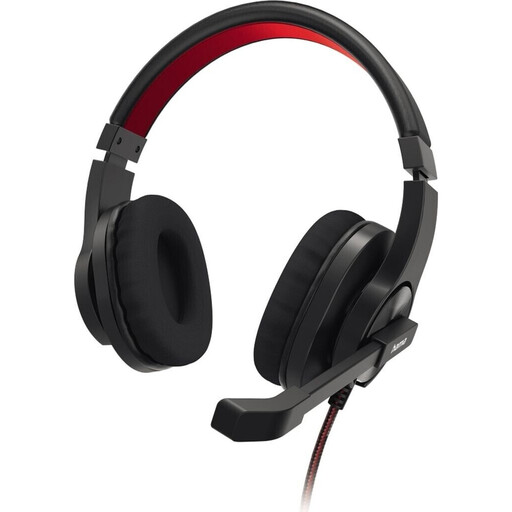 No image available
A good option for calls on your PC if a microphone boom and mute control are important to you.
Listed as a stereo headset in black.
 No image available
For USB conference calls when you want an adjustable noise-cancelling microphone and stereo sound.
With an integrated equaliser, on-ear controls and a mute indicator.
 No image available
For conference calls on a PC, Mac or laptop when you want stereo sound and a noise-cancelling microphone.
USB connection, 2.4 m cable, black.
 No image available
The mono design leaves one ear free. This can be useful if you need to hear sounds in the room, although more office noise will also remain audible.
Microphone, volume control and mute with an LED indicator on the cable.
 No image available
The mono design leaves one ear free, so you can still hear sounds around you. However, more office noise may be distracting when people are talking nearby.
Designed for VoIP and softphone calls, with passive noise cancellation and call controls.
No. ANC in the ear cups and microphone noise cancellation are separate features. Manufacturers specify them separately for some models. To check whether your voice comes across clearly in your particular office, try a test call in similar conditions.
Connect the USB-A or USB-C version that matches your computer. Then select the headset as the input and output device in your computer’s audio settings or meeting app, and test the microphone and mute control before your call.
The German Social Accident Insurance (DGUV) recommends considering features such as volume control and mute when choosing a headset, and highlights the importance of remaining aware of your surroundings. Make sure you can hear any necessary warning signals, and don’t treat a headset as a substitute for measures to reduce disruptive noise in the workplace.
In Germany, your statutory rights against the seller are separate from any voluntary guarantee. For ordinary consumer goods, section 438 of the German Civil Code (BGB) generally sets a two-year limitation period for claims relating to defects, starting from delivery of the goods.
The official regulations mentioned here don’t generally require a particular headset or ANC. The Workplace Ordinance requires noise levels in workplaces to be kept as low as possible, depending on the business and the work being carried out. Under section 5 of the Occupational Health and Safety Act (ArbSchG), employers must assess risks arising from work. The measures required depend on the specific workplace.