If you’re leading the planning meeting and speaking often, look for a suitable USB connection, an adjustable microphone and an easy-to-reach mute button. If your main concern is hearing clearly despite the noise in your shared house, stereo ear cushions or, on models specifically advertised as having it, headphone ANC are additional factors to consider. Microphone noise cancellation solves a different problem. Check the exact variant, then test the microphone and speakers in the meeting app you use.
Which headset is right for you?
Meeting chairs who speak often
If you’re chairing the meeting and speaking frequently, look for a microphone you can position and an easy-to-reach mute button. The best way to judge whether your voice will remain clear amid the usual noise in a shared house is to test it in your normal surroundings.
Listeners distracted by noise in a shared house
If conversations in the room make it hard to follow what people are saying, consider the noise isolation around your ears separately from the microphone’s noise cancellation. Mono and stereo designs also affect how much you can hear from your surroundings.
People who use different computers
If you use your headset with different computers, check the connection on the specific model and whether an adapter is included. Also select your preferred microphone and speaker in the meeting app.
What should you look for when buying?
First, work out whether room noise is more likely to affect how well others hear you or how well you can hear them. Then compare the connection, controls and fit for the way you’ll use the headset.
| What matters |
What to check before buying |
Who will find this especially important? |
| Making sure others can understand you |
Check the microphone position and mute button, and make a test recording amid typical noise in your shared house. |
If I’m chairing the meeting and speaking often, I want to be able to position the microphone precisely and mute it quickly. Around 33 % of consumers put clear voice transmission first. |
| Blocking out conversations in the room |
Check whether the headset has stereo ear cushions, a mono design or explicitly advertised headphone ANC. |
If conversations in my shared house distract me while I’m listening, I look for noise isolation around my ears, regardless of what the microphone filters out. Around 27 % of consumers prioritise uninterrupted listening. |
| Connection and controls |
Check whether it uses USB-A or USB-C, whether an adapter is included and how easy the mute button is to reach. |
If I switch between computers or mute myself often during meetings, the connection and controls need to fit the way I work. Around 20 % of consumers prioritise easy set-up and control during calls. |
| Comfort during longer meetings |
Check the ear cushions, fit and whether you want a mono or stereo design. |
If the planning meeting runs long, I want a model that feels comfortable and suits how much I want to hear of my surroundings. Around 20 % of consumers put comfort first. |
Common buying and usage mistakes
-
Buying “noise cancellation” without checking what it means
Noise cancellation on the microphone affects how your voice is transmitted. Headphone ANC and passive ear cushions, on the other hand, affect what you hear.
Work out whether your main priority is transmitting your voice clearly or reducing room noise while you listen. Check that the specific model explicitly lists the feature you need.
-
Assuming the USB connection from the product range name
A product range may include variants with different connections. An adapter isn’t necessarily included with every model.
Before choosing a variant, check the full model name, your computer’s port and what’s included in the box.
-
Expecting a personal headset to work as a microphone for the whole room
A headset is designed for one person and their voice. That doesn’t mean it will pick up what several people in the room are saying clearly.
Check whether you’ll be the only person chairing the meeting online or whether several people need to speak through the same computer. If it’s the latter, plan your audio set-up separately.
Key brands at a glance
Logitech
The H390 is a wired option for PC meetings, with a microphone boom and in-line controls.
- Logitech lists microphone noise cancellation and a mute function as features.
- The product page offers USB-A and USB-C options, while the descriptive section refers to USB-A. Check which variant you’re actually choosing; these details aren’t evidence of an independent test in a shared-house setting.
Jabra
The Evolve2 30 SE range includes wired variants for calls.
- Jabra describes memory foam ear cushions that help isolate noise, as well as two microphones.
- Check whether the model is mono or stereo, which USB connection it uses, and whether it’s a Teams or UC variant. Manufacturer information isn’t a comparative real-world test.
HP Poly
The Blackwire ranges include wired headsets in different configurations.
- HP lists a mono variant in the Blackwire 3200 range. For the separate Blackwire 8225, HP specifies headphone ANC and a noise-cancelling microphone.
- The Blackwire 8225’s features don’t apply to every Blackwire 3200 model. Check the connection and configuration separately.
EPOS
The IMPACT 100 MS Stereo USB-C+A is a wired model specified for Microsoft Teams.
- For the stereo model, EPOS lists in-line controls, a directional microphone, a weight of 76 g and a USB-C-to-USB-A adapter in the box.
- The stated weight and manufacturer’s description don’t prove that it will be comfortable for you or that its noise cancellation has been independently measured.
Trust
The Ayda USB-ENC for PC is an on-ear option for meetings, with a fold-up microphone.
- Trust lists an on-ear volume control and a noise-cancelling microphone.
- The product page describes USB or USB-C connection options. Check the exact connection before buying; the manufacturer’s claim isn’t an independent measurement in a shared-house setting.
USB headsets at Joybuy
This selection of Joybuy products includes USB headsets for calls on a computer. Check whether the connection and features of each variant are right for your planning meeting.
 No image available
Logitech G PRO X Gaming Headset, Black, USB
Could be an option for a wired USB meeting on a PC if you’re considering a gaming headset.
The product title specifies USB and the colour Black. Check that the connection on this particular model works with your computer and meeting app.
View at Joybuy
 No image available
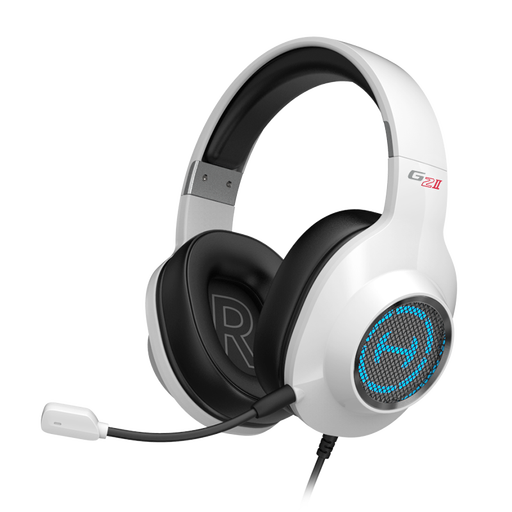
EDIFIER G2II Gaming Headset, White
The USB model specified in the product title may be suitable for a wired meeting on a computer.
The title lists PC, PS4, Mac and USB, as well as the colour White. Check that the connection and your intended use are compatible with your meeting app.
View at Joybuy
 No image available
Jabra Evolve2 30 SE, variant 23189-999-779
Could be worth considering for a planning meeting if you’re looking for a model in the Evolve2 30 SE range.
The product name specifies variant 23189-999-779. Before buying, check the connection and whether it’s a Teams or UC model.
View at Joybuy
 No image available
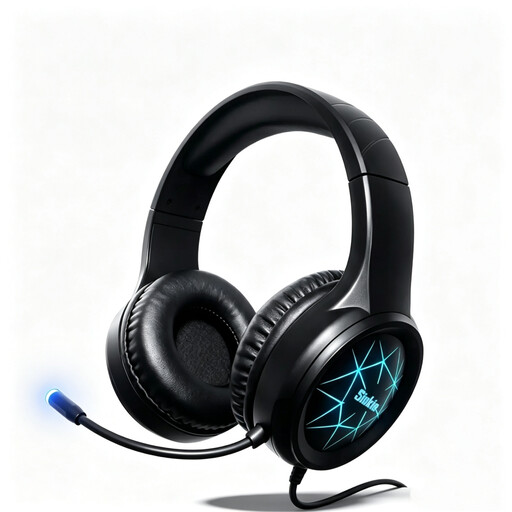
Siukie CH25 Gaming Headset, USB and 3.5 mm jack
The USB connection specified in the title may be useful for a wired planning meeting on a PC.
The product title lists USB and a 3.5 mm connection. Check which connection your computer and meeting app require.
View at Joybuy
 No image available
Logitech H570e Mono Headset
A mono model may suit you if you want to keep one ear free to hear what’s going on in the room during the meeting.
The product title specifies USB and PC and Mac compatibility. Bear in mind that a mono design covers only one ear, so it offers less isolation on both sides while you’re listening.
View at Joybuy
Frequently asked questions
How do I set up my USB headset before the meeting?
Connect the right model and select the headset as your microphone and speaker in the meeting app. Microsoft explains how to do this in Teams before and during a meeting. The settings may differ depending on the app and your organisation’s administrative policies.
Does Teams noise cancellation mean I don’t need a suitable microphone?
No, not necessarily. Microsoft describes Teams noise cancellation as applying to audio transmitted while the microphone is on. Test the setting with a recording in your shared-house environment. It doesn’t guarantee that other people’s voices will be filtered out, nor does it provide headphone ANC.
What should I bear in mind when caring for my headset and using it for long periods?
Adjust the headband to fit and position the microphone close to your mouth. Jabra recommends this for the Evolve2 30 SE. Follow the care and cleaning instructions for the specific model you choose.
What are my rights if my headset is faulty or I bought it online?
For a consumer purchase from a business in Germany, claims for defects generally expire two years after receipt; the seller is your first point of contact. Goods bought online generally come with a 14-day right to cancel. When this period starts and whether any exceptions apply depends on the specific circumstances. A voluntary manufacturer’s guarantee is separate. This information is based on guidance from the Baden-Württemberg Consumer Portal.
Can I put an old USB headset in my household rubbish?
No. The German Environment Agency says that waste electrical equipment must be collected separately. Municipal recycling centres accept it free of charge; whether you can return it to a shop depends on the requirements of the specific take-back point.


