If you’ll be speaking and listening on your own at a computer, a wired USB headset with an easy-to-reach mute control could be a good choice. Check that the connector is right for your computer, and decide whether you’d prefer mono or stereo. If several people will be joining the call together in a small room, a conference speaker is a better fit. For a personal headset, the microphone controls, how much you want to hear from the room and how it fits will help you choose the right option.
Who’s joining the call?
Joining on your own
If you’re joining from a computer on your own, look for a microphone you can position comfortably, an easy-to-reach mute control and the right USB connector. Logitech lists these controls for the H390, and EPOS does the same for the PC 8 USB.
Family gathered round the same table
If several people in the room will be listening and speaking together through one computer, decide before you buy whether you need a personal headset or a speakerphone. Jabra describes the Speak2 40 as a speakerphone for this type of group call.
Keeping in touch with the room
If you’re joining the call on your own but also want to stay aware of people in the room, a headset that leaves one ear uncovered may be worth considering. HP Poly offers mono and stereo wearing styles in the Blackwire 3200 series, so check the specific model.
What should you look for?
First, decide whether one person or several people will be joining from the table. If you’re choosing a personal headset, then consider the microphone controls, wearing style and USB connector that will suit you.
| What matters |
What to check before you buy |
Who is this important to? |
| Your voice and the mute control |
Check the microphone position and where the mute control is; test how clearly your voice comes through in the room you’ll be using before the call. |
If I’m speaking, I want to be able to position the microphone properly and mute myself quickly during the call. Around 40% of consumers give this the highest priority for a family call. |
| Joining in together from the room |
Decide in advance whether one person or several people will be listening and speaking through the same computer; test how clearly everyone can be heard from the seats you plan to use. |
If several people at the table need to speak and listen, I need a solution for joining in together rather than a personal listening station. Around 30% of consumers put this first. |
| Listening while staying aware of the room |
Choose mono or stereo depending on how much you want to hear from the room, and check the fit for yourself. |
If I want to stay aware of people in the room during the call, I might prefer a headset that leaves one ear uncovered. If I want to listen with both ears, I’ll check for a stereo model. Around 20% of consumers prioritise this trade-off. |
| USB connection and getting started |
Check whether your computer has USB-A or USB-C and match it to the specific headset; test the microphone, speakers and mute control before the call. |
If I want to get started without any connection or device-selection issues, I’ll check the connector and audio settings before the call. Around 10% of consumers put ease of setup first. |
Common buying mistakes
-
Expecting one personal headset to work for everyone at the table
A headset is designed to be worn by one person. If several people are joining a family call through the same computer, you’ll also need to consider how their voices will be picked up and played back in the room.
Before choosing a product, work out how many people will be speaking and listening through the same computer. For a group call, try a speakerphone from the seats you plan to use.
-
Confusing microphone noise cancellation with blocking out noise when listening
A microphone’s noise-cancellation specification doesn’t automatically tell you how much of the room noise you’ll hear through the earcups.
Check the microphone features and wearing style separately, and test how clearly everyone can be heard in the room where you’ll be taking the call.
-
Checking the model name but not the USB connector
The Logitech H390 is available with USB-A and USB-C connectors, so the connection type is part of your choice.
Before ordering, compare the connectors on your computer with those on the specific headset model.
Brands to consider
Logitech
The H390 is a wired stereo option for one person, available with USB-A and USB-C connectors.
- Logitech lists a rotating microphone boom and in-line volume and mute controls.
- Choose the right connector for your computer. The manufacturer’s noise-cancellation claims aren’t a substitute for testing the headset in your own room.
EPOS
EPOS describes the PC 8 USB as a stereo USB headset for PC or Mac, designed for online calls.
- EPOS lists in-line volume and mute controls, as well as a microphone with noise cancellation.
- The microphone specification doesn’t mean the headset actively cancels noise at your ears, or guarantee clear calls in every room.
Jabra
Jabra’s Evolve2 30 is a range of wired personal headsets. The Speak2 40 is a separate speakerphone for several people in the room.
- Jabra describes the Evolve2 30 as having a two-microphone system and passive noise isolation.
- Make sure you distinguish between the UC and Teams versions. The manufacturer’s comparisons are based on its own calculations, not independent real-world tests.
HP Poly
The Blackwire 3200 series includes wired USB headsets in mono and stereo wearing styles.
- Choosing between a headset that leaves one ear uncovered and a stereo model may help you stay as connected to the room as you’d like.
- Check the connector and what’s included with the specific Blackwire model.
Trust
The Ayda USB PC headset is another personal USB option for computer calls.
- Trust lists an on-ear volume control and a flip-up microphone that mutes when raised.
- The manufacturer’s comfort claims are no substitute for checking that the headset suits the person wearing it.
Joybuy products for family calls
These Joybuy products are personal, wired USB headsets for computer calls. If several people in the room will be joining in together, consider a speakerphone instead.
 No image available
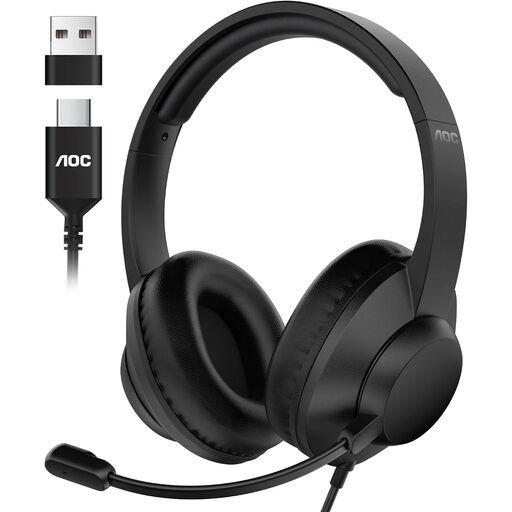
AOC wired over-ear USB headset with microphone
For one person speaking at a computer who wants to mute the microphone using the boom arm.
The description lists USB-A and USB-C, plus a 6-foot cable. Flip the microphone up to mute it.
View at Joybuy
 No image available
Logitech H540 stereo USB headset with microphone
For one person who wants to listen and speak in stereo at a computer.
The description lists an adjustable microphone boom, plus on-ear volume and mute controls.
View at Joybuy
 No image available
Logitech 960 stereo USB headset with microphone
For one person who wants to use a wired stereo headset for conference calls on a computer.
The description lists a 2.4 m cable, an adjustable microphone boom, and in-line volume and mute controls.
View at Joybuy
 No image available
Logitech H570e mono USB headset with microphone
For one person making calls on a computer who wants to keep one ear free to hear what’s happening in the room.
The described model has USB-A and in-line volume and mute controls with an LED indicator. As a mono headset, it doesn’t play sound in stereo through both ears.
View at Joybuy
 No image available
Jabra Evolve 20 SE mono headset with USB-C/A
For one person who wants to keep one ear free to hear the room and control calls from the headset.
The description lists USB-C/A, an adjustable headband and a controller with a mute button. The headset is described as suitable for VoIP and softphones; the mono version doesn’t play sound in stereo through both ears.
View at Joybuy
Frequently asked questions
Can several people at the table use one USB headset for a group call?
A headset is a personal listening and speaking solution, designed to be worn by one person. If everyone needs to speak and listen through the same computer, consider a conference speaker instead and test it from the seats you plan to use.
What should I check just before my first call?
Connect the headset with the right USB connector, select its microphone and speakers in your calling app, and test the mute control. Microsoft specifically documents how to select audio devices separately in free Teams; other apps have their own settings.
Does noise cancellation on the microphone mean I’ll hear less background noise?
No. A microphone’s noise-cancellation specification relates to how your voice is transmitted. To find out what you’ll hear, check the wearing style and any features specifically listed for the earcups.
What consumer rights apply when buying a headset online in Germany?
For consumer purchases, the retailer is generally liable for the goods being free from defects for two years; the German Federal Government explains this statutory warranty. It is separate from a voluntary manufacturer’s guarantee. Distance contracts generally come with a 14-day right to cancel under German law, subject to statutory exceptions, such as certain unsealed hygiene products. Whether a particular headset package falls under an exception cannot be determined simply from the product type; claims relating to faulty goods should be considered separately.


