If you need to speak in a noisy office, look for a microphone you can position and test a recording in your usual surroundings. Logitech describes the H390 as having a noise-cancelling microphone, but that doesn’t automatically mean you’ll hear less office noise yourself. If your main priority is hearing your teacher, consider passive noise isolation or a model specifically described as having ANC. Jabra and EPOS list these features for the Evolve2 40 SE and IMPACT 860 ANC respectively, but this doesn’t amount to a comparative test for language lessons.
Which headset is right for you?
Students who take an active part
If you often answer questions, check where the microphone boom sits, test your voice against typical office noise and make sure the mute control is easy to reach. Logitech lists these features for the H390; Jabra describes the Evolve2 40 SE as having three microphones.
Listeners distracted by office noise
If nearby conversations make it harder to understand your teacher, compare the fit and passive noise isolation of over-ear earcups. Jabra describes the Evolve2 40 SE as having isolating cushions; EPOS lists adaptive ANC for the variant specifically named IMPACT 860 ANC.
Students using different workstations
If you use different computers or have longer lessons, check the connection option you need, which adapters are included and how comfortable the headset is over your planned wearing time. Logitech lists USB-A for the H390; HP lists USB-C, a USB-A adapter and 3.5 mm for the Poly Blackwire 5220.
What should you look for when buying?
First decide whether speaking yourself or hearing your teacher is your main priority. Then consider comfort and connections that suit the length of your lessons and your computer.
| What matters to you |
What to look for |
Who is this particularly important for? |
| Making your voice heard |
Check the microphone position and mute control; make a test recording in typical office noise. |
If you speak often during lessons, you’ll want to answer clearly without constantly having to repeat yourself. Around 36% of consumers are likely to put clear transmission of their own voice first. |
| Hearing your teacher |
Compare the fit and passive noise isolation; only expect ANC if it’s specifically listed for that variant. |
If office conversations drown out pronunciation and questions, good noise isolation matters to me. Around 29% of consumers are likely to prioritise hearing their teacher. |
| Comfort during long lessons |
Check the cushions, headband and clamping force; pay attention to how it feels towards the end of your planned wearing time. |
If I have several lessons or long sessions, I want to wear a headset without it becoming uncomfortable or distracting. Around 21% of consumers are likely to consider comfort first. |
| Connection and controls |
Check that USB-A or USB-C matches your computer and whether any adapter you need is included. |
If you switch between computers with different connections, you’ll need a suitable connection and controls that are easy to reach. Around 14% of consumers are likely to prioritise connection and ease of use. |
Common buying mistakes
-
Choosing noise cancelling without checking what it applies to
Noise reduction on the microphone affects the voice being transmitted; ANC on a headset affects what the wearer hears. One feature doesn’t automatically mean the other is included.
Check microphone performance and noise isolation around your ears separately. If possible, test your voice in surroundings similar to your office.
-
Assuming similarly named model variants are identical
ANC and non-ANC models, USB options and platform variants can differ. EPOS lists ANC and non-ANC as separate variants; with Jabra, the exact platform and connection option also matter.
Before buying, compare the full model name, USB connection, included adapters and, where relevant, the platform variant you need for your lessons.
-
Confusing an extended warranty with your statutory rights
The EU’s Your Europe website distinguishes the legal guarantee, which relates to your purchase contract with the seller, from a manufacturer’s warranty.
Read the terms of any additional warranty separately from your statutory rights, and check who to contact if there’s a fault.
Key brands to consider
Logitech
The H390 is a wired USB option with a microphone boom and in-line controls.
- Logitech lists a noise-cancelling microphone, mute control and USB-A for the H390.
- These details don’t confirm ANC for listening or a particular recording quality in a noisy office. Check that you’re choosing the right connection option.
Jabra
The Evolve2 40 SE is aimed at students looking for passive noise isolation on both ears and a microphone set-up designed for calls.
- Jabra lists isolating cushions and three microphones for the Evolve2 40 SE.
- Manufacturer claims about noise reduction aren’t an independent comparison. Check the exact UC or Teams version and connection option.
Poly
The Blackwire 5220 is a wired option to consider if you need a 3.5 mm connection as well as USB.
- For model 8X231AA, HP lists a noise-cancelling microphone, in-line controls, USB-C with a USB-A adapter and 3.5 mm.
- Check the connections and what’s included with the specific variant before deciding which devices to use it with.
EPOS
The IMPACT 860 ANC is a wired, over-ear option for anyone who wants ANC when listening.
- EPOS lists adaptive ANC and a USB-C-to-A adapter for the ANC variant.
- The datasheet distinguishes between ANC and non-ANC variants. Advertised performance figures don’t demonstrate a particular effect during language lessons.
Joybuy product selection
This selection includes wired USB headsets and headphones with microphones for computer-based language lessons. Pay particular attention to the audio connection, microphone controls and fit.
 No image available
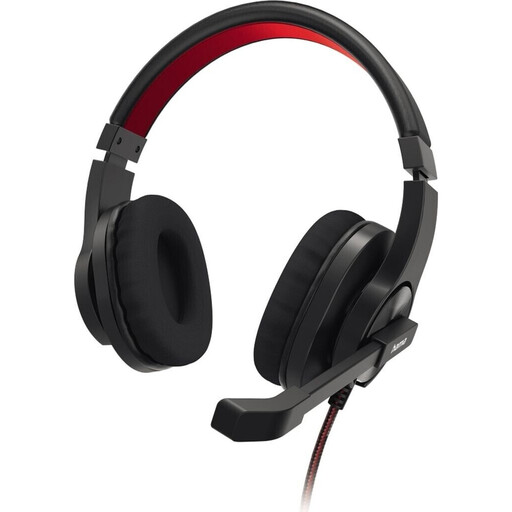
HS-USB400 V2 stereo headset
The flexible microphone boom and in-line mute button are useful features for computer-based lessons.
USB-A connection; stereo; cushioned earcups and mesh headband. Listed weight: 243 g.
View at Joybuy
 No image available
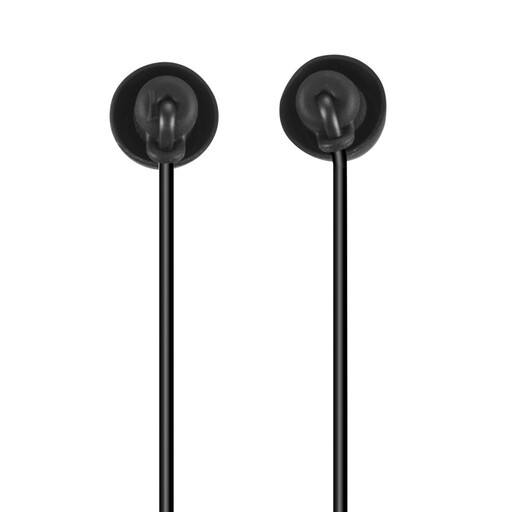
Calm USB-C in-ear headphones with microphone
This wired in-ear option may suit lessons on a device with USB-C audio output.
The product description lists an integrated microphone and passive noise reduction from the fit of the silicone eartips. A USB-C audio output is required.
View at Joybuy
 No image available
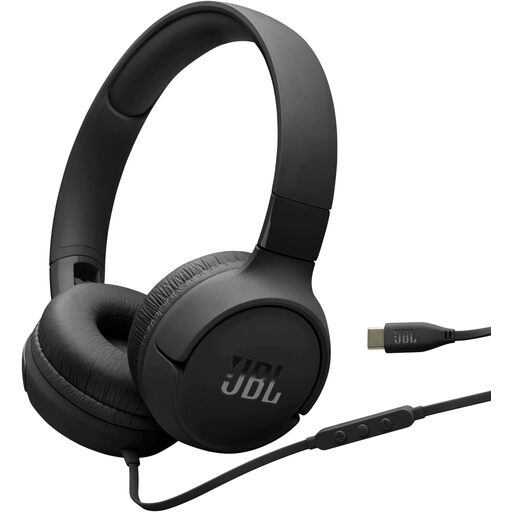
JBL Tune 520C USB-C
This wired on-ear option has an integrated microphone and may suit a computer with USB-C audio output.
The remote has a microphone and buttons for music and volume. A USB-C connection is required.
View at Joybuy
 No image available
Logitech H540 USB headset
The adjustable microphone and mute control are useful features if you take an active part in lessons.
USB-A connection; the product description lists a noise-cancelling microphone, volume control and mute indicator.
View at Joybuy
 No image available
Logitech 960 USB stereo headset
For switching between speaking and listening, the product description lists an adjustable microphone boom and in-line volume and mute controls.
USB connection; 2.4 m cable; soft ear cushions.
View at Joybuy
Frequently asked questions
Is ANC the same as a noise-cancelling microphone?
No. EPOS describes the IMPACT 860 ANC as having active noise cancellation for listening; Logitech describes the H390 as having noise reduction on the microphone. If both matter to you, check for each feature separately.
How should I set up my headset before my first lesson?
First, check the USB connection and whether you need an adapter. Then select the headset as your microphone and speaker in your lesson software. Make a short recording with typical office noise in the background and practise using the mute control. Connections and controls vary by model.
Who is responsible for the legal guarantee if my headset is faulty?
The seller named in your purchase contract is responsible for the legal guarantee. The EU’s Your Europe information states a minimum period of two years; an additional manufacturer’s warranty doesn’t replace these statutory rights.
What should I know about CE marking and disposal?
The CE mark is the manufacturer’s declaration that the applicable EU requirements have been met; the rules that apply depend on the product. As Germany’s Federal Environment Ministry explains, end-of-life electrical equipment must be collected separately at authorised sites and must not be put in household waste.


