Tutors who do most of the talking
If you explain things for long stretches, an adjustable microphone and an easy-to-reach mute button are useful, especially when other people are talking in your shared flat.


If you do most of the talking, look for an adjustable boom microphone, microphone noise cancellation and an easy-to-reach mute button. If you often need to hear quiet questions, stereo earcups with passive noise isolation or ANC for playback may be more important; neither replaces microphone filtering. Also check the USB connection and, if possible, test how your voice comes through with the typical sounds of your shared flat in the background.
If you explain things for long stretches, an adjustable microphone and an easy-to-reach mute button are useful, especially when other people are talking in your shared flat.
If you often switch between explaining and listening, consider how clearly you can hear the participants with your chosen headset style when there’s background noise in the room.
For longer tutorials, a comfortable fit, easy-to-reach controls and a USB connection that suits your workspace all matter.
First, distinguish between filtering noise from your voice and blocking it out while listening. If you’ll mainly be explaining things, check the microphone and mute button. If noise from your shared flat distracts you while listening, compare mono and stereo designs, and consider ANC if you need it.
| What you need | What to check | Who will find this particularly important? |
|---|---|---|
| Make sure your voice comes through clearly | Adjustable microphone boom, clearly specified microphone noise cancellation and a mute button; test it with the typical sounds of your shared flat. | If I do a lot of explaining, I want my voice to remain clear even when people are talking in the shared flat. Around 37% of consumers put speech clarity first. |
| Hear questions clearly | Mono or stereo design, how the ear cushions fit and, if needed, clearly specified ANC for playback. | If I don’t want to miss quiet questions, listening clearly matters more to me than strong noise isolation. Around 27% of consumers prioritise being able to hear questions. |
| Wear it comfortably for longer | Check the adjustability, ear cushions and whether the specific model’s mono or stereo design suits you. | If my tutorial runs for a while, I want a headset that feels comfortable to wear. Around 18% of consumers put comfort first. |
| Connection and controls | Check the USB connection on your computer, whether an adapter is included and whether the controls are easy to reach. | If I’m connecting the headset to my computer and want to mute quickly when interrupted, ease of use matters to me. Around 18% of consumers prioritise connection and controls. |
ANC for playback affects what you hear. A noise-cancelling microphone, on the other hand, affects the voice you transmit.
Check both features on the exact model and test how your voice sounds with the typical background noise in your shared flat.
A model may come with different connectors, mono or stereo designs, and UC or Teams versions. Jabra lists the Evolve2 30 and Evolve2 30 SE as separate model names.
Before buying, compare the full model name, connection and version that suits your application.
The term “noise cancelling” alone doesn’t tell you whether a feature filters your voice as you speak or the sound you hear.
Check the specifications for the exact model and make sure they meet your actual needs.
The Evolve2 30 range includes wired office headsets in a range of USB and UC or Teams versions.
The range runs from the basic 960 USB headset to models with extra features for noisy working environments.
According to HP, the wired Blackwire 5200 series comes in mono and stereo versions.
The IMPACT 100 UC Stereo USB-C+A is a wired version designed for conversation-heavy use.
This selection features wired USB headsets for computer-based tutorials, including stereo models and one mono version. Consider whether you want both ears covered or one ear free to hear what’s happening in your shared flat, and compare the microphone controls and connection.
 No image available
For computer-based tutorials, it has an adjustable noise-cancelling microphone, plus volume and mute controls on the headset.
USB-A connection, stereo and on-ear design.
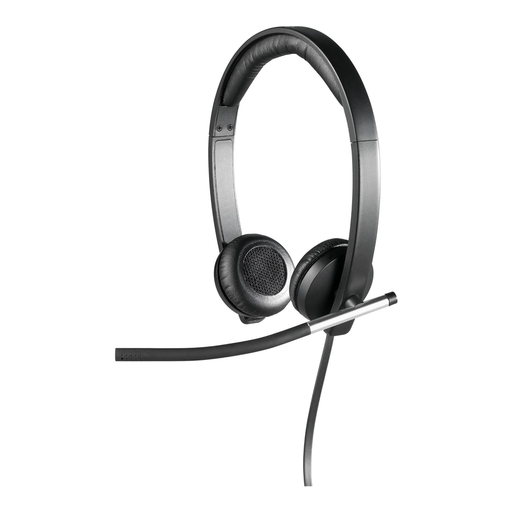 No image available
If you want to listen in stereo during your tutorial, this model has a rotating microphone boom and in-line controls.
Over-ear design; the ear cushions and headband are padded.
 No image available
For explaining things on your computer, it has an adjustable noise-cancelling microphone and an in-line mute button.
Stereo, USB connection and a 2.4 m cable; the controls also let you adjust the volume.
 No image available
If you want to keep one ear free to hear what’s happening in the room during your tutorial, the mono design could be a good option; you’re more likely to hear background noise from your shared flat while listening.
USB-A connection, microphone boom and in-line mute button with LED indicator. The headband is adjustable and the ear cushions are replaceable.
 No image available
For tutorials where you often switch between speaking and listening, the stereo version has in-line controls, including a mute button.
USB-A connection, two built-in microphones and memory foam ear cushions.
Connect the right USB version and select the headset as your audio input and output device on your computer and in the tutorial app. Record a short voice test, position the microphone boom close to your mouth and check the mute button.
No. Logitech lists ANC for listening and noise-cancelling microphones as separate features on the Zone Wired 2. If room noise bothers you when listening and speaking, check both features independently.
You generally have the right to cancel an online purchase. The consumer advice centre states that the usual cancellation period is 14 days and notes that you must notify the retailer that you wish to cancel. Check the cancellation information and any return costs for your order; a voluntary returns policy may have its own conditions.
No. The German Environment Agency explains that waste electrical equipment should be collected separately. Local collection points accept it free of charge, and some retailers also offer return options.