For a reading group in a busy shared flat, look for a microphone you can position to suit you. Also consider whether background noise matters when you’re speaking, listening or both. A mono headset leaves one ear free so you can hear what’s happening around you, while stereo or explicitly specified ANC may be better suited to listening. Then check the USB connection, mute controls and how comfortable it feels at your desk.
Which headset is right for you?
Leading discussions alongside flatmate chatter
If you speak frequently, a well-positioned microphone and an easy-to-reach mute button are important things to look for. Logitech and Trust describe relevant microphone and control features, while Jabra specifies a flexible microphone boom.
For focused listening
If you want to follow longer contributions and quieter comments, check whether a model offers passive noise isolation or explicitly specified ANC. Jabra describes passive noise isolation, while Logitech specifies ANC on the listening side for the Zone Wired 2 for Business.
Leading discussions while keeping an ear on the room
If you want to keep track of what’s happening in the shared flat as well as following the discussion, a mono headset could be worth considering. Jabra offers the Evolve2 40 SE in both mono and stereo versions.
What should you look for when buying?
Mono USB headset
A good fit if: you want to keep one ear free to hear people and other sounds in the room while leading the discussion.
The trade-off: With one ear uncovered, you’ll have less protection from noise in the shared flat. Check the connection and platform version.
Stereo with passive noise isolation
A good fit if: hearing comments from further away matters more to you than keeping an ear on the room.
The trade-off: Passive noise isolation isn’t active noise cancellation. Fit and perceived performance vary from person to person.
Stereo with specified ANC
A good fit if: noise from the shared flat is particularly distracting when you’re listening.
The trade-off: ANC for listening and microphone noise cancellation affect different signal directions. Also check whether the specific version is for Teams or UC.
| What to consider |
What to look for |
Who is it especially important for? |
| Making your voice easy to understand |
Check the microphone position, microphone boom, mute control and details of the microphone’s noise cancellation. |
If I lead discussions frequently, I want people joining remotely to understand me despite voices in the room. Roughly 31% of consumers list having their own voice clearly understood as their main requirement. |
| Hearing comments over the noise in a shared flat |
Compare mono and stereo, as well as fit and ear cushions. Look for explicitly specified ANC if needed. |
If I need to follow quiet or lengthy contributions, I want to take distractions while listening into account. Roughly 25% of consumers put listening without distractions first. |
| Connection and version |
Check that USB-A or USB-C, any adapter, mono or stereo, and, where relevant, the Teams or UC version meet your needs. |
If I want to connect the headset directly to my computer, choosing the right version is essential. Roughly 19% of consumers prioritise the connection and version. |
| Controls and fit |
Check that the mute control is easy to reach and that the headset feels comfortable for the length of time you plan to use it. |
If I need to switch between speaking and listening to others, I want to be able to mute quickly and find a comfortable fit. Roughly 13% of consumers say controls and comfort are their main concerns. |
| Upfront cost |
Compare specific versions only once you’ve found one with the right connection, microphone and fit for your needs. |
If I only need the headset for the occasional reading group, I want to avoid paying for features I don’t need. Roughly 12% of consumers put a low upfront cost first. |
Common buying mistakes
-
“Noise cancelling” doesn’t tell you exactly what’s being reduced
Noise cancellation on the microphone affects how your voice is transmitted; passive noise isolation or ANC on the listening side affects what you hear. These features aren’t interchangeable.
Check the details for the microphone and listening side separately, rather than relying on the general term “noise cancelling”.
-
Assuming similarly named versions are identical
Models within the same range can differ in connection, mono or stereo format, and platform version. For example, Logitech lists separate Teams and UC versions of the Zone Wired 2 for Business.
Check the full model name, connection and what’s included against your needs.
-
Assuming the manufacturer’s comfort claims mean it will fit you
Ear cushions and controls vary, and comfort claims don’t prove that a model will fit everyone equally well.
Check that the fit and position of the mute control work for the length of time you plan to use it.
Key brands at a glance
Jabra
The Evolve2 40 SE range includes specified mono and stereo options, as well as USB and platform versions.
- Jabra describes passive noise isolation, a flexible microphone boom and multiple microphones.
- Passive noise isolation isn’t ANC, and the manufacturer’s information doesn’t provide comparative proof of performance in a shared flat reading group.
Logitech
Zone Wired is a wired headset with in-line controls. Zone Wired 2 for Business is a separate model with specified ANC on the listening side.
- Logitech describes a dual-microphone system for the Zone Wired and adaptive hybrid ANC for the Zone Wired 2.
- These features belong to different models. The Zone Wired 2 is available in separate Teams and UC versions. The manufacturer’s information isn’t an independent test under the kind of noise you’d find in a shared flat.
HP Poly
The Blackwire 5220 is a stereo option with USB-C, a USB-A adapter and an additional 3.5 mm connection for version 8X231AA.
- For this version, HP describes a noise-cancelling microphone, ear cushions and in-line controls.
- The HP shop page checked lists version 8X231AA as out of stock. This doesn’t tell you about availability from other retailers or of other Poly models.
Trust
Ayda Max USB-ENC is an over-ear USB option with on-headset controls and a USB-C-to-A adapter included.
- Trust describes a dual microphone with noise cancellation and a flip-up mute function.
- This doesn’t independently confirm how well it performs with the specific noises you might hear in a shared flat.
USB headsets at Joybuy
This selection from Joybuy includes wired USB headsets for leading discussions at your computer, from mono options that leave one ear free to stereo models.
 No image available
Logitech 960 Stereo Headset
A repositionable microphone boom and in-line mute control are specified for leading discussions at your computer.
Wired USB stereo headset with a 2.4 m cable; volume and microphone mute controls on the cable.
Joybuy
 No image available
Logitech G PRO X gaming headset, USB
The detachable microphone and in-line mute control may be useful when leading discussions.
The description mentions an external USB sound card and interchangeable ear cushions. According to the description, advanced Blue VO!CE and surround sound features require a PC, USB sound card and G HUB. A 3.5 mm cable is provided for consoles or mobile devices.
Joybuy
 No image available
Logitech H570e mono headset, USB-A
The mono design leaves one ear free, so you can stay aware of what’s happening in the shared flat while leading the discussion.
USB-A connection; in-line controls for volume, mute and call management, with an LED indicator.
Joybuy
 No image available
Jabra Evolve 20 SE mono headset, USB-C/A
The mono design leaves one ear free, and an external controller is specified for managing calls.
Wired headset with USB-C and USB-A connections, plus passive noise isolation.
Joybuy
 No image available
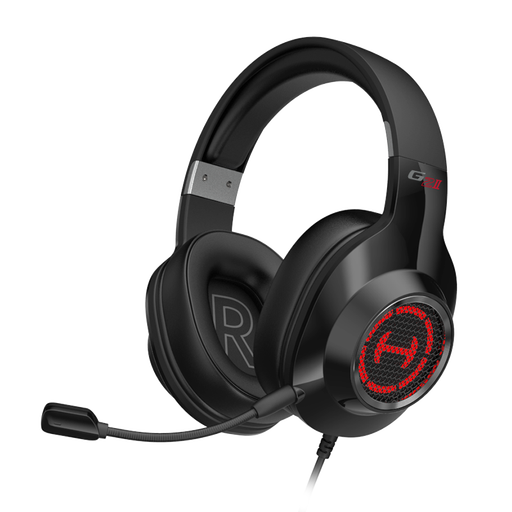
EDIFIER G2II USB headset
A rotatable microphone is specified, so you can adjust its position when leading discussions.
Wired USB headset; the description lists compatibility with PC, PS4 and Mac, as well as adjustable ear cups.
Joybuy
Frequently asked questions
Is a noise-cancelling microphone enough if I can’t hear the others clearly?
Not necessarily. Noise cancellation on the microphone affects the signal you send; passive noise isolation or explicitly specified ANC on the listening side affects what you hear. Check both separately.
How do I set up my headset before the reading group?
First, check that the USB plug on the version you’ve chosen matches your computer. Then select the headset as the input and output device in your calling app. Test the microphone position and mute control. For the Evolve2 40 SE, Jabra recommends positioning the microphone close to your mouth.
What should I do if the headset is faulty or an online purchase doesn’t fit?
If there’s a fault, distinguish your statutory rights against the seller from any voluntary guarantee. The first step may be to ask the seller to put things right by repairing or replacing the item. According to the Verbraucherzentrale, online orders generally come with a 14-day cancellation period from delivery. Check the details of your specific purchase and the returns conditions.


