Who is a USB headset suitable for?

Hosts with online attendees

If you’ll be presenting the design on your computer yourself, a microphone that can be positioned close to your mouth and an easy-to-reach mute control can be useful. Logitech lists these features for the 960, while Jabra specifies a two-microphone system for the Evolve2 30. These details come from the manufacturers.

Group discussions around a table

If several people in a small room need to speak to online attendees, first check how voices in the room will be picked up. Microsoft Learn recommends activating only one microphone at a time for coordinated meetings; HP Germany lists speakerphones as a separate product category.

Hosts who need to hear questions in the room

If you need to hear spontaneous comments from people around the table during the discussion, the headset style matters: HP Poly describes mono as an option that leaves one ear free, while stereo covers both ears. Check the specific model and consider how you want to hear people in the room and remote attendees.

What should you look for when choosing one?

What you need What to check before buying Who is this important for?
Everyone in the group to be heard Check the number of speakers and the seating arrangement. If several people don’t have their own headsets, consider a room microphone and speaker system. If several people around the table need to speak to remote attendees, I need a solution for the group rather than a microphone just for the person leading the discussion. Around 31% of consumers put picking up several voices first.
Your own contributions Check the microphone boom and mute control on the specific model, and test voice transmission in a typical conversation. If I’m presenting the design myself, online attendees need to understand what I’m saying, and I want to be able to mute the microphone quickly during pauses. Around 25% of consumers prioritise transmitting their own voice.
Questions from people in the room Compare mono and stereo models to suit the flow of the conversation; don’t decide based on microphone specifications alone. If I need to follow online contributions while also hearing spontaneous questions around the table, keeping one ear free matters to me. Around 19% of consumers prioritise hearing what’s happening in the room.
Connection and controls Check that the computer’s USB port, the plug or any included adapter, and the position of the mute control are suitable. If I want to use the headset with a particular computer and mute it quickly during the meeting, the connection needs to be compatible and the controls easy to reach. Around 13% of consumers prioritise straightforward connections and controls.
Comfort during longer conversations Check the padding, adjustability and whether the specific model is mono or stereo. If the design review runs for a while, I want a headset that feels comfortable to wear. Around 12% of consumers put comfort during longer conversations first.

Common buying mistakes

  • Expecting a personal headset to pick up everyone in the room

    A microphone positioned close to the mouth is designed to pick up the wearer’s voice. That doesn’t prove it will pick up everyone else around the table.

    First, work out who will be speaking and how many people need to hear the remote attendees. Then choose between a personal headset and an audio system designed for the room.

  • Confusing microphone noise reduction with being able to hear clearly

    Microphone processing specifications relate to the voice being transmitted. They don’t tell you how well you’ll hear questions from people in the room.

    Consider speaking and listening separately. Factor in comments from around the table when choosing between mono and stereo.

  • Buying based on the range name rather than the specific model

    Jabra Evolve2 30 SE models differ in several ways, including their connection, mono or stereo design, and UC or MS version.

    Before deciding, check the full model number, USB plug, what’s included and, where applicable, the platform version.

Key brands to consider

Logitech

The 960 is a wired USB-A stereo headset for calls on a PC or Mac. Logitech lists an adjustable microphone boom, in-line controls and a 2.40 m cable.

  • The microphone boom and in-line controls may be useful for someone leading a meeting from their computer.
  • The 960 described here is not listed as having a direct USB-C connection. Noise cancellation is a manufacturer claim, not the result of an independent test in a meeting room.

Jabra

According to its technical data sheet, the Evolve2 30 SE is available in mono or stereo, UC or MS versions, with different USB connections.

  • You can choose between versions based on whether you want one ear free, the connection and the conferencing platform.
  • According to Jabra, Teams certification depends on the specific version. Check the Evolve2 30 SE and other model names carefully.

HP Poly

The Blackwire 3200 series includes wired USB headsets in mono and stereo styles.

  • A mono version may be suitable if you want to keep one ear free to hear questions from people in the room.
  • Check the connection and features of the specific model; comfort and sound quality claims on the series page come from the manufacturer.

EPOS

The IMPACT 100 series includes wired mono and stereo headsets. The technical data sheet lists USB-C and an included USB-C to USB-A adapter.

  • An adapter and in-line controls may be useful if you work at different desks.
  • Claims about the low weight and microphone quality come from the manufacturer. Check the features of the specific model.

USB headsets at Joybuy

This selection includes wired USB mono and stereo headsets for one person leading meetings on a computer. A personal headset is not specified as a room microphone for several people.

Logitech H570e mono headset

Logitech H570e mono headset

The mono design leaves one ear free and may suit you if you want to hear questions from people in the room while leading a meeting.

USB-A connection, microphone boom and in-line volume and mute controls with LED indicator.

View at Joybuy

Jabra Evolve 20 SE mono headset

Jabra Evolve 20 SE mono headset

The mono version may suit someone leading a meeting who wants to keep one ear free during an online conversation.

Wired USB-C/A headset with microphone and an external controller for answering, muting and ending calls; specified for VoIP and softphone use.

View at Joybuy
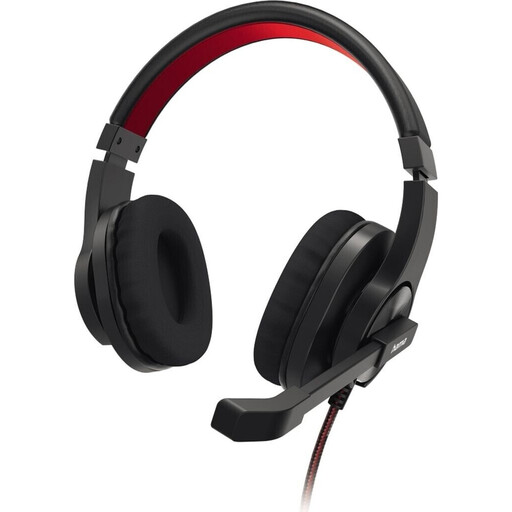
HS-USB400 V2 PC Office stereo headset

HS-USB400 V2 PC Office stereo headset

The stereo version may suit you if you mainly want to listen to remote attendees during a meeting on your computer; you may find spontaneous questions in the room harder to hear.

Wired USB-A headset with microphone boom, mute function and in-line controls.

View at Joybuy

Logitech 960 stereo headset

Logitech 960 stereo headset

The stereo design may suit calls on your computer when remote voices are your main focus while listening.

USB connection, 2.4 m cable, adjustable microphone boom, and volume and mute controls.

View at Joybuy

Jabra Evolve2 30 SE stereo headset

Jabra Evolve2 30 SE stereo headset

The stereo version may suit you if you want to hear remote contributions through both ears during a meeting on your computer.

USB-A connection, two built-in microphones and in-line controls for volume, answering and muting.

View at Joybuy

Frequently asked questions

Can one USB headset pick up everyone around the table?

Don’t assume it will work as a room microphone without checking: the headset microphones described are designed to pick up the wearer’s voice. If several people need to speak without their own headsets, consider an audio system designed for the room.

How do I check the audio setup before a meeting?

Select and test your microphone and speakers in the conferencing app you’re using. Zoom explains how to test your microphone by playing back a recording. If several devices are connected in the room, only one microphone should be active at a time to avoid echo and feedback; Microsoft Learn advises this for coordinated meetings.

What should I do if the headset is faulty or the ear cushions are worn?

For a consumer purchase in the EU, you generally have a statutory legal guarantee of at least two years from the date you receive the goods, provided by the seller. This is separate from any voluntary manufacturer’s warranty. When buying replacement cushions, check the specific model and which replacement part fits it.

How should I dispose of an old USB headset in Germany?

Electrical equipment must not be disposed of with household waste, packaging waste, bulky waste or scrap metal. The German Environment Agency specifically lists these as unsuitable disposal routes; check with your local collection point to find out whether it accepts waste electrical equipment.