For a mini PC on a small desk, first make sure the adapter is compatible with the available USB-A or USB-C port and the operating system version installed. A Gigabit adapter is enough for a Gigabit network; 2.5GbE is worth considering if your other devices and cabling also support that data rate. If you’re short of ports, a USB-C hub can bring them together, but it takes up more space and needs to be compatible with your host device.
Who are USB LAN adapters for?
Mini PC users with a spare USB port
If you want to add a missing RJ45 port, check that the USB connector type and operating system version are compatible. TP-Link Deutschland specifies that some older systems need an additional driver for the UE300C.
Users with a fast local network
When transferring files, for example to a NAS, the whole network connection needs to support the data rate you want. Manufacturers specify different RJ45 rated speeds for their models; these aren’t measured speeds for your home network.
Users short on desk space
If you need a spare port and tidy cable routing, consider the adapter’s design and the position of neighbouring ports. A hub can connect more devices, but it also takes up space.
What should you look for when buying?
First check the available USB port and operating system, then match the network data rate, and finally consider the space it will take up and any extra ports you need.
| What to consider |
What to check |
Who should consider this? |
| Port and system |
USB-A or USB-C, and support for your specific operating system version |
If you want to connect your mini PC without an extra adapter, pay particular attention to the port and system compatibility. Around 33% of consumers put compatibility first. |
| Network speed |
The RJ45 rated speed of the adapter and connected devices, plus suitable cabling |
If you transfer large files over a local network, match the adapter’s speed to your router, switch, NAS and cables. Around 27% of consumers prioritise getting the right network speed. |
| Space and cable routing |
Dimensions, the position of the USB port and the direction of the network cable |
If you want to keep protruding hardware to a minimum on a small desk, allow for neighbouring plugs and the cable route too. Around 27% of consumers prioritise space and cable routing. |
| Additional ports |
The data ports you need and whether the host supports USB-C charging |
If you need to connect a LAN cable and other devices at the same time, consider a hub, provided it’s compatible with your host’s ports. Around 13% of consumers prioritise additional ports. |
Common misconceptions to avoid
-
Assuming 2.5 Gbit/s is guaranteed all the way to your NAS or the internet
The adapter’s rated speed doesn’t determine the speed of the rest of your network connection. For the UE302C’s peak performance, TP-Link specifies an Ethernet cable rated Cat5e or higher.
Check the ports on your switch, router and NAS, as well as the cable you’re using, before choosing 2.5GbE.
-
Assuming USB-C passthrough will automatically provide the right power
Charging through the adapter only helps if your mini PC supports charging through that USB-C port. Belkin specifies up to 100 W passthrough for the INC019btBK; that doesn’t mean every host will accept that amount of power.
Check your mini PC’s charging capabilities and power requirements before choosing a charging adapter.
-
Checking only the RJ45 port
USB-A and USB-C models need different host ports. TP-Link also specifies that some older operating systems need an additional driver for the UE300C.
Check that your available USB port and exact operating system version match the requirements for your chosen model.
Key brands at a glance
TP-Link
The models listed include USB-A and USB-C options, with different RJ45 rated speeds.
- TP-Link Deutschland specifies USB 3.0 for the UE300 and USB-C with Gigabit RJ45 for the UE300C.
- TP-Link specifies that some older operating system versions need an additional driver for the UE300C; requirements vary by model.
StarTech.com
According to the manufacturer, the US2GA30 and US2GC30 offer 2.5GbE via USB-A and USB-C respectively.
- StarTech.com specifies multi-gigabit support and backwards compatibility with Gigabit LAN for each model.
- Port and operating system requirements vary by model, so check that they’re compatible with your mini PC.
Belkin
According to Belkin, the INC019btBK combines USB-C Gigabit Ethernet with a USB-C charging port.
- Belkin specifies up to 100 W USB-C passthrough for this model.
- Charging requires a compatible host; this specification applies to this model, not every product from the brand.
Joybuy products for mini PCs
The products below are designed for mini PCs with a spare USB-C port, ranging from standalone Ethernet adapters to hubs for extra peripherals. Before choosing, check which ports your host supports and which features you actually need.
 No image available
HOCO UA37 Type-C Ethernet adapter (1000 Mbps)
An option for mini PCs with a spare USB-C port when a single RJ45 connection is all you need.
The product name specifies 1000 Mbps. According to the product information, Android devices need OTG support.
View at Joybuy
 No image available
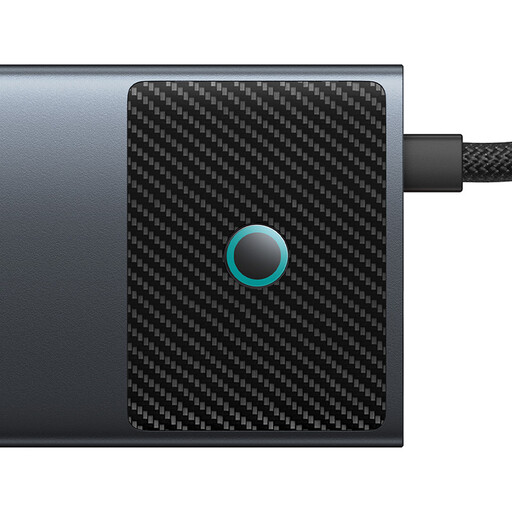
BASEUS Metal Gleam Series II 10-in-1 USB-C hub
For a USB-C host when you need Ethernet as well as several other ports.
The product name lists RJ45, HDMI, USB-A, USB-C, SD/TF and USB-C-PD among its ports. Check which of these you’ll actually be able to use at your desk.
View at Joybuy
 No image available
WOZINSKY 14-in-1 USB-C hub
A hub option if you need Ethernet and other peripherals through a compatible USB-C port.
The product name lists RJ45, USB-A, HDMI, 3.5 mm audio, and SD and TF card readers among its features. The host needs a compatible USB-C port.
View at Joybuy
 No image available
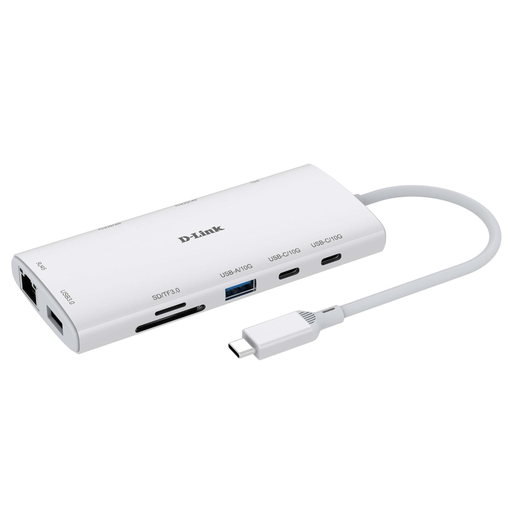
D-Link 10-in-1 USB-C hub
For mini PC users who want to add Ethernet and other ports through a USB-C port.
The product name identifies this model as a 10-in-1 USB-C hub. Before buying, check that the features you need are compatible with your host and desk setup.
View at Joybuy
 No image available
D-Link DUB-E130 USB Type-C network adapter
A standalone adapter for a spare USB-C port when you need an RJ45 connection but don’t need extra hub ports.
The product name specifies USB 3.0 and Gigabit Ethernet at 10/100/1000 Mbps. Windows and macOS are listed as compatible operating systems.
View at Joybuy
Frequently asked questions
How do I set up a USB LAN adapter with a mini PC?
Connect the compatible USB plug to your mini PC, then use a network cable to connect the RJ45 port to your network. First, check that your operating system version is supported: TP-Link specifies that some older versions need an additional driver for the UE300C.
Will a 2.5GbE adapter automatically make my internet connection faster?
No. The adapter’s rated speed doesn’t guarantee the speed of your internet connection or the entire network link. For the UE302C’s peak performance, TP-Link also specifies an Ethernet cable rated Cat5e or higher; the other devices along the network connection need to support the speed you want too.
Do I need an extra power supply for USB-C Ethernet with a charging port?
It depends on the model and the host. Belkin specifies up to 100 W passthrough for the INC019btBK; charging is only useful if your mini PC supports charging through that USB-C port. According to the manufacturer, the Belkin INC001 doesn’t come with a power supply.
How should I dispose of an old network adapter in Germany?
Take a retired electrical adapter to a separate collection point rather than putting it in your household waste. The German Environment Agency explains in its guidance on disposing of electrical appliances that you can use suitable collection points, such as recycling centres.


