For a single character voice with a fan running, a directional dynamic USB microphone that you can position close to your mouth is a sensible starting point, provided you can keep it in a stable position. If your volume varies considerably or you want easy-to-reach controls, a model with level control or a USB condenser microphone may be a better fit. Neither a polar pattern nor a noise reducer guarantees a recording free of fan noise, so testing it at your own desk is essential.
Who this guide is for
Solo speakers recording with a fan running
If you record character lines on your own at a PC and can position the microphone close to your mouth and keep it steady, it’s essential to listen to a test recording with the fan actually running. RØDE recommends a model-specific speaking distance of around 5–10 cm for the PodMic USB; Audio-Technica lists fan hum as a potential use case for the AT2040USB.
Speakers with wide volume variations
If your role switches between quiet and loud passages, look for ways to control the level and listen back to both extremes. Shure describes Auto-Level and an adjustable noise reducer for the MV6 Gen 2; Sennheiser lists a gain control on the Profile.
Beginners recording at a desk
If you want to record over USB, the microphone, mount and headphones need to suit your setup. RØDE and Sennheiser list different connections and in-the-box contents depending on the model, so check the exact variant and how you plan to position it.
What to look for when buying
First, check whether you can position the microphone close to you and keep it steady. Then decide how you want to control the recording level and headphone mix.
The percentages refer to consumers choosing a USB microphone for recording a single character voice with a fan running.
| Priority |
What to check when buying |
Who it matters most to |
| Separate your voice from the fan |
Check the polar pattern and the side you need to speak into. Listen to a quiet line and a pause while the fan is running. RØDE recommends a distance of around 5–10 cm for the PodMic USB. |
When I’m speaking on my own at a PC, I want to pick up as little of the fan as possible during pauses and can position the microphone close to my mouth. Around 36% of consumers would prioritise separating the voice from the fan. |
| Control quiet and loud passages |
Check the level controls and adjustment options for the exact model. Record and listen back to a whisper and a loud exclamation. Shure describes Auto-Level for the MV6 Gen 2. |
When switching between whispers and exclamations, I want to keep both volume levels under control. Around 29% of consumers would prioritise managing these level changes. |
| Monitor your recording as you go |
Check whether it has a headphone output and the mix control you need. According to the manufacturer, the Sennheiser Profile has a headphone output, as well as gain, mix and headphone volume controls. |
If I want to spot recording problems straight away, I need to be able to monitor my voice while recording. Around 21% of consumers would prioritise this direct monitoring. |
| Choose a USB connection and setup that suit you |
Check the connection, cable and what’s included with the specific variant. The desk stand or arm needs to let you position the microphone where you want it. Sennheiser Profile set contents vary. |
If my desk has limited space, I need a mount and connection that fit my setup. Around 14% of consumers would prioritise an easy connection and a suitable setup. |
Common mistakes
-
Assuming a noise reducer guarantees a recording without fan noise
A COMPUTER BILD test of the original Shure MV6 found that background noise was still audible. Shure’s description of noise-reducer and Auto-Level settings applies to the separately named MV6 Gen 2 and does not prove that it completely removes fan noise.
Compare processed and unprocessed test recordings on the specific microphone with the fan running. Record quiet passages as well as loud lines, and listen for any changes to the sound of your voice.
If you’re not happy with the result, you may need to take additional recording or editing steps.
-
Assuming similarly named models or sets are identical
The Shure MV6 and MV6 Gen 2, and the RØDE PodMic USB and NT-USB Mini, are different models. The Sennheiser Profile Set and Profile Streaming Set also differ in what’s included, including the desk stand or arm and the cable.
Check the full model name, connection and included accessories for your chosen variant against your planned setup.
Depending on the variant, you may need an additional arm, desk stand or different cable, which can make setup more difficult.
-
Accidentally choosing an omnidirectional setting for a single voice
The omnidirectional pattern on the CHERRY UM 6.0 ADVANCED is designed to pick up sound from multiple directions. It’s therefore not an obvious starting setting for recording solo with a fan running.
Start with the cardioid setting on this model, then assess the fan noise in a test recording at your own desk.
Microphone brands to consider
Shure
The original MV6 is a dynamic USB gaming microphone. The separately named MV6 Gen 2 is also aimed at gaming and streaming.
- Shure describes adjustable noise reduction and Auto-Level for the MV6 Gen 2.
- A COMPUTER BILD test of the original MV6 found that background noise was still audible; this was not a test of the MV6 Gen 2.
RØDE
The dynamic PodMic USB offers USB-C and XLR, while the NT-USB Mini is a separate, compact USB condenser microphone.
- For the PodMic USB, RØDE recommends a model-specific distance of around 5–10 cm and explains which direction to speak into.
- The mounting for the PodMic USB needs to suit your desk or arm. An independent test reported noticeable popping on the NT-USB Mini.
Audio-Technica
The AT2040USB is a dynamic USB microphone with a hypercardioid pattern for recording a single voice directionally.
- USB-C, a headphone connection and a mute function are documented features of the AT2040USB.
- The claim that its polar pattern can help with computer fan hum comes from Audio-Technica; it is not a measurement for every recording setup.
Sennheiser
The Profile USB Microphone is a condenser alternative with a cardioid pattern and easy-to-reach controls.
- Sennheiser lists gain, mix and headphone volume controls for the Profile.
- According to the manufacturer, the Profile Set and Profile Streaming Set differ in whether they include a desk stand or arm, as well as in the cable. Check what’s included with your chosen variant.
CHERRY
The UM 6.0 ADVANCED is a USB desk microphone with switchable cardioid and omnidirectional patterns.
- CHERRY lists a desk stand, shock absorption, gain control, mute function and headphone connection.
- A COMPUTER BILD test praised the low level of unwanted background noise on its sample, but noted that voices sounded slightly muffled. A test recording with your own fan is still essential.
Microphones at Joybuy
This selection ranges from dynamic USB/XLR desk microphones and USB-C wireless lavalier models to an omnidirectional USB gaming microphone. In particular, check that the setup and polar pattern suit a single voice recorded with a fan running.
 No image available
FIFINE K688CTW dynamic USB/XLR microphone with boom arm, white
For recording a single voice at a PC if you want to position a dynamic microphone close to your mouth and use a boom arm.
The product description lists a unidirectional polar pattern, USB-C and XLR, as well as a gain control and headphone monitoring. According to the description, mute and control functions are active in USB mode; an XLR cable is not included.
View at Joybuy
 No image available
FIFINE AM8 dynamic USB/XLR microphone
For recording speech at a desk if you want to connect the microphone via USB and monitor your voice as you speak.
The description lists a unidirectional polar pattern, gain control and headphone connection for USB recording, as well as a desktop stand. According to the description, RGB lighting and function buttons are inactive over XLR; an XLR cable is not included.
View at Joybuy
 No image available
SYNCO P1XT wireless USB-C lavalier microphone
A lavalier alternative if you’re considering a body-worn system instead of a desk microphone. Check compatibility with your recording device before buying.
The product description lists a USB-C receiver, real-time monitoring and noise reduction activated at the touch of a button. This feature claim does not prove that fan noise will disappear in your setup.
View at Joybuy
 No image available
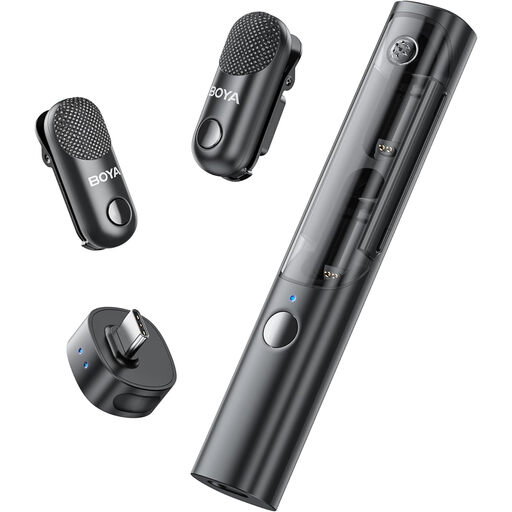
BOYA Magic-05 USB-C wireless lavalier microphone system, 2 TX + 1 RX + charging case
For a lavalier setup instead of a desk microphone; the product information lists desktop devices as a use case.
The title lists two transmitters, one receiver and a charging case. The description lists AI noise reduction as a feature, not as measured proof that it removes fan noise.
View at Joybuy
 No image available
uRage Stream 410 HD gaming microphone
For recording speech over USB if a desktop tripod and pop filter suit your setup.
The product description lists a mute function and an omnidirectional polar pattern, which picks up sound from all directions. This is an important drawback to consider in a test recording if you’re recording a single voice with a fan running.
View at Joybuy
Frequently asked questions
Is a tight polar pattern enough to stop the microphone picking up the fan?
No. A tight polar pattern alone cannot guarantee a recording free of fan noise. Point the microphone towards your mouth, keep to the distance recommended for the model and listen to a test recording with the fan running. RØDE recommends around 5–10 cm for the PodMic USB; COMPUTER BILD found that background noise was still audible on its test of the original Shure MV6.
What should I set up before recording my first character lines?
Select the microphone as your audio input, check which side to speak into, then record a quiet line and a loud one. According to RØDE, you should speak into the front of the microphone grille on the PodMic USB; for the NT-USB Mini, RØDE explains how to select it as an input and output device.
What accessories and consumer rights should I consider when buying?
First check whether your chosen variant includes the right desk stand or arm and the cable you need; the Sennheiser Profile sets differ in what’s included. According to the Verbraucherzentrale, online purchases in Germany generally come with a 14-day right of withdrawal, subject to the conditions and exceptions that apply to the specific purchase. Statutory rights relating to faulty goods generally apply against the seller and are separate from any voluntary guarantee.


