For solo narration, a directional dynamic USB microphone is a sensible starting point if you can speak close to it and keep your position fairly consistent. For interviews or greater distance, a directional USB condenser microphone may be more practical; however, make a test recording in the actual location to see how clearly the fan can be heard. No microphone type can guarantee that fan noise will disappear.
Who are the different microphone types suited to?
Solo storytellers recording with a fan running
If you record longer sections of a story from a fixed position, speaking close to the microphone and pointing it in the right direction can help bring your voice forward over sound coming from the sides or behind. However, a cardioid pickup pattern does not guarantee a recording free of fan noise.
Interviewers speaking with eyewitnesses
Think in advance about whether both people can speak separately and close to microphones, or whether you need a shared recording position. Greater distance can make conversation easier, but you should test it with the fan running.
Podcast beginners looking for a simple setup
A USB connection can let you record directly on a compatible computer without a separate audio interface. Also check that you have a stand, cable and headphones suitable for your planned setup.
What should you look for when buying?
First decide whether you’ll mainly speak alone from a fixed position or record interviews from further away. Then compare the monitoring features, controls and what’s included with the specific version.
| Priority |
What to check when buying |
Who it matters most to |
| Record a clear voice despite fan noise |
USB connection, polar pattern and speaking direction; test your voice and the fan together in the intended location. |
If I record long solo sections with the fan running, I want to keep my voice clear without constantly changing position. Consumers with this priority account for around 40%. |
| Keep an eye on long recordings |
Headphone output and direct monitoring, plus accessible gain and headphone controls. |
During longer narration, I want to hear the levels and how much fan noise is coming through as I record, rather than discovering problems later. Around 30% of consumers prioritise this recording control. |
| Interviews rather than a fixed speaking position |
Check whether separate microphones and recording channels are planned; test a shared microphone with both seating positions and the fan running. |
When I interview guests, I need a solution for changing or multiple voices and can’t always rely on a single close speaking position. Consumers who prioritise interviews account for around 20%. |
| A simple setup without unexpected extras |
Check what’s included with the exact version, the computer connection and whether it can be mounted as needed on your desk. |
If I want to get started directly on my computer, I make sure the connection and any included accessories suit my setup. Around 10% of consumers prioritise getting started simply. |
Common misconceptions when buying a microphone
-
A cardioid pattern or dynamic capsule means complete silence
Even a directional microphone can pick up fan noise, for example if you’re speaking from a distance or the microphone is pointing the wrong way.
Make a test recording from your planned seat with the fan running, then listen back through headphones.
If the results are distracting, you may need to record again or edit the audio afterwards.
-
A microphone designed for close-up speaking automatically suits two people
The short distance that can help with a single voice isn’t easy for two people to maintain at the same time when sharing one microphone.
Plan your seating positions before buying and test a shared microphone in the actual room, with the fan running.
Depending on your interview setup, you may need additional microphones or recording equipment.
-
USB/XLR connections mean you have a complete recording kit
Connections and included accessories are two different things; stands, cables and other accessories vary by model and version.
Compare what’s included with the exact version against your computer and planned recording location.
You’ll need suitable additional hardware for future XLR use; some versions may also be missing a mount.
Key brands at a glance
Audio-Technica
The ATR2100x-USB is a dynamic cardioid microphone with USB and XLR connections, as well as direct headphone monitoring.
- Audio-Technica says this model comes with a desktop tripod stand and USB cable.
- The cardioid pickup pattern can reduce sound coming from the sides and rear, but it doesn’t guarantee a recording free of fan noise.
Shure
The MV7+ combines USB-C and XLR connections with a headphone socket and adjustable signal processing, making it suited to a fixed podcasting position.
- Shure promotes Voice Isolation and a real-time denoiser; test how well they handle fan noise by recording in your own space.
- The version shown on the manufacturer’s website doesn’t include a stand, so you’ll need to plan for a suitable mount separately.
RØDE
The dynamic PodMic USB offers USB-C and XLR connections, headphone monitoring and signal processing for close-up voice recording.
- RØDE recommends speaking from around 5–10 cm away and pointing the top of the microphone towards your mouth.
- RØDE says a pop filter is included; a desktop stand isn’t part of the standard setup described.
Sennheiser
The Profile USB Microphone is a condenser alternative with a cardioid pickup pattern and gain, mix and volume controls.
- Sennheiser says the version with a desktop stand includes a stand and USB-C cable.
- Check whether you can hear more fan noise in your own room at the distance you plan to speak from.
Samson
The dynamic Q2U has USB and XLR connections and is described by Samson as a podcasting pack.
- Samson lists a desktop tripod stand, microphone clip, cables and direct headphone monitoring.
- Claims about reducing background noise come from the manufacturer; check the results at your own recording location.
USB microphones at Joybuy
The products below cover USB recording for fixed speaking positions and conversations. Before buying, check that the connections, mounting options and included accessories suit your recording space.
 No image available
FIFINE K688CTW with boom arm
For a fixed, close-up speaking position when podcasting; the title mentions a boom arm.
Dynamic USB/XLR microphone with mute button, volume control and headphone socket. The description says an XLR cable isn’t included.
View at Joybuy
 No image available
FIFINE AM8
For recording at your desk when you want to use USB recording and adjustable level controls.
Dynamic USB/XLR microphone with desktop stand, gain control, mute and headphone monitoring.
View at Joybuy
 No image available
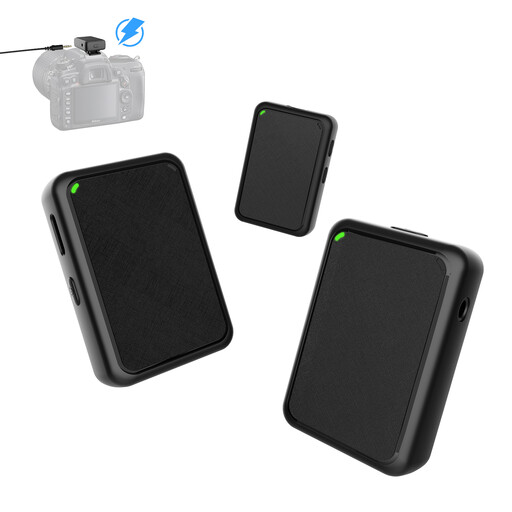
Moman MB1X(M) lavalier microphone system
For conversations where a lavalier system with two transmitters and one receiver suits your planned setup.
USB plug and play; described as a system with 2TX and 1RX. Test your voice and the fan together from the planned seating positions.
View at Joybuy
 No image available
JBL Quantum Stream Studio
For USB recording when you want to choose from several polar patterns for solo or conversation recording.
USB-C condenser microphone with four selectable polar patterns, including cardioid and bidirectional recording, as well as direct monitoring and software noise reduction.
View at Joybuy
Frequently asked questions
Is noise reduction enough to make the fan inaudible?
No, you shouldn’t rely on it. Audacity explains that steady background sounds such as fan noise may be reduced, but warns that the results may be unsatisfactory if the noise is loud or changes over time, or if there’s little separation between the voice and unwanted sound. Start by recording with the fan running; for editing afterwards, it helps to have a section where only the unwanted noise can be heard.
How do I set up a dynamic microphone for close-up speaking?
Point the intended speaking side towards your mouth and try to keep your position consistent during the test. For the PodMic USB, RØDE recommends a distance of around 5–10 cm; this applies to that model and isn’t a general guideline for other microphones.
Can I use one microphone for an interview?
It may work if both voices are picked up clearly enough from the intended positions and the fan isn’t too noticeable in your test recording. Test both seating positions with the fan running; if you use separate microphones, you’ll need a suitable recording setup.
Can I record a private conversation without consent?
Section 201 of the German Criminal Code (StGB) makes it a criminal offence to record another person’s non-public speech without authorisation. Before the interview, make sure you’re authorised to record and use the recording as intended; the microphone you use doesn’t change this.
Can I use historical music in my podcast without any further checks?
No. A work’s age or historical significance alone doesn’t prove that you have permission to use it. GEMA describes a podcast tariff for works in its repertoire. Before publishing, check the rights for the specific work and recording.


