If you can record your quiet recipe voice-over close to the microphone in a calm room, a directional USB condenser microphone with headphone monitoring could be a good option. When there’s kitchen noise, distance, positioning and a test recording matter more than promises of noise reduction. A dynamic microphone designed for close-miking is another option if you can stay comfortably close to it while speaking. Shure points out that microphones can’t reliably distinguish between wanted and unwanted sounds on their own.
Which setup is right for you?
Quiet solo voice
If you record the recipe instructions separately from the cooking, you can focus on keeping your speaking position consistent and choosing a quiet setting. Look for a suitable microphone position and make sure you can monitor your voice as you record.
Recording near the kitchen
If you’re speaking at the filming location or near running appliances, check how easily you can position the microphone towards your voice. A test recording in the place you plan to record will show which sounds are picked up alongside your voice.
Recording by yourself for the first time
If you’re setting up the recording and monitoring on your own, easy-to-reach level controls and direct headphone monitoring can make it easier to stay in control. RØDE describes the monitoring features of the NT-USB Mini; check the controls and connection options for the specific model you’re considering.
What should you look for when buying?
First decide whether you can record close to the microphone in a quiet spot or whether kitchen noise will be part of the recording. Then consider monitoring and a practical setup.
| What matters |
What to check before buying |
Who it matters most to |
| Clarity of a quiet voice |
Microphone distance and consistent positioning; adjust the level and listen to a short voice test. |
When I record the recipe steps quietly, I want every word to be clear without blindly turning up the level. Around 36% of consumers put voice clarity first. |
| Kitchen and room noise |
Polar pattern and positioning; test it where you plan to record, with the appliances you’ll actually be using. |
When I record near the kitchen, I want to hear how much noise from fans, crockery or other voices gets into the recording. Around 29% of consumers put control of this kind of noise first. |
| Monitoring while recording |
Headphone socket and direct monitoring; check whether a pop filter is included or needed. |
When recording on my own, I want to spot problems before I’ve recorded the whole script. Around 21% of consumers prioritise monitoring. |
| Connection and setup |
Check that the USB connection and cable work with your recording device; make sure a desk stand or microphone arm will suit your recording space. |
When I set up the microphone myself, I want to be able to position and use it without unexpected connection problems. Around 14% of consumers put ease of setup first. |
Common mistakes when buying a microphone
-
Assuming noise reduction means a noise-free kitchen
Shure is clear about the limitations of the MV7+ Real-time Denoiser: it won’t reliably remove changing sounds such as clattering or background voices.
Test the microphone with the sounds you’ll actually encounter at your planned filming location, and check the distance and positioning first.
-
Automatically choosing an omnidirectional mode for a quiet solo voice
The CHERRY UM 6.0 ADVANCED’s omnidirectional mode picks up sound from more directions. For a single voice-over, it’s best to try the directional mode first.
Use omnidirectional recording only if you plan to record several people in the same room.
-
Confusing the microphone model with the accessories included
Stands, cables and pop filters vary by model. Audio-Technica lists the AT8455 shock mount for the AT2020USB-X as an optional accessory.
Check the exact contents against your recording device and planned microphone position.
Depending on the model, you may also need an arm, adapter or shock mount.
Brands to consider
RØDE
The NT-USB Mini and NT-USB+ are USB models with different monitoring and accessory features.
- RØDE describes headphone monitoring for both models; the manufacturer lists a detachable pop filter for the NT-USB+.
- Cable requirements and included accessories vary by model. These features don’t prove general superiority for quiet voices.
Shure
The MV7+ is a dynamic USB/XLR model designed for close-miking, with digital features that vary by model.
- Shure lists Auto Level Mode and Real-time Denoiser for the MV7+.
- Shure Support points out that changing sounds and background voices won’t be removed reliably. The person speaking should be able to stay comfortably close to the microphone.
CHERRY
The UM 6.0 ADVANCED has model-specific controls, a headphone socket and switchable polar patterns.
- CHERRY lists a gain control and modes for directional solo voices and omnidirectional recording.
- Omnidirectional mode also picks up sound from more directions, so it isn’t automatically the right choice for a single quiet voice.
Audio-Technica
The AT2020USB-X is a USB condenser microphone with a cardioid polar pattern and a monitoring mix control.
- Audio-Technica describes direct monitoring and a mix control.
- Audio-Technica lists the AT8455 shock mount as an optional accessory, not as part of the stated contents.
Razer
The Seiren V3 Chroma is a USB condenser microphone with a supercardioid polar pattern and a mute function.
- Razer lists directional recording and a built-in shock absorber.
- In COMPUTER BILD’s test on 21 October 2026, background noise was clearly audible with this model. The test wasn’t specifically about quiet recipe voice-overs.
Joybuy products for voice recording
This selection includes USB microphones for desk setups and a wireless lavalier microphone for camera recording. Before buying, check that the connection, positioning and controls suit your recipe setup.
 No image available
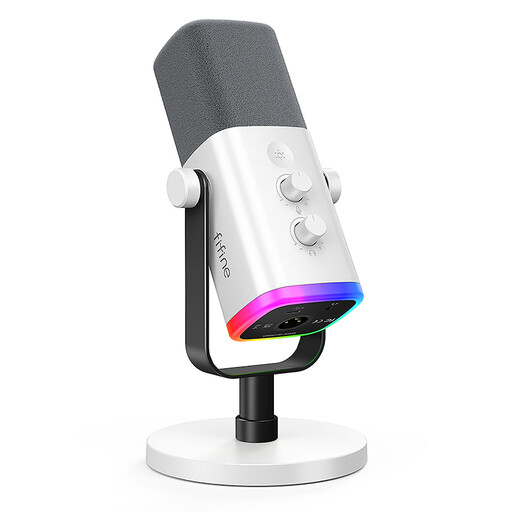
FIFINE AM8 White USB/XLR Microphone
Could be a good fit if you can keep the microphone at a consistent, close distance while recording.
Dynamic microphone with USB and XLR connections.
View at Joybuy
 No image available
Razer Seiren V3 Mini White
An option for a compact USB setup if you can position the microphone where you plan to record.
USB microphone with tap-to-mute.
View at Joybuy
 No image available
Dynamic USB/XLR microphone set with RGB
Could be suitable for recording voice at a desk if the connections on offer work with your recording device.
Features listed in the product name: gain control, echo and mute functions, and desk stand.
View at Joybuy
 No image available
USB microphone with RGB and Type-C adapter, 7-piece set
Check that the USB connection and included adapter work with your recording device.
Features listed in the product name: condenser microphone, mute button and 7-piece set.
View at Joybuy
 No image available
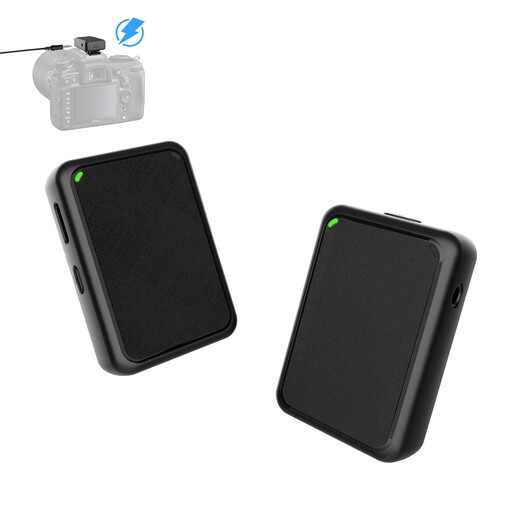
Moman MB1(M) Wireless Lavalier Microphone for Camera, 1TX&1RX
A possible option if you’re looking for a lavalier microphone for recording a recipe with a camera; check that it connects to your camera.
Wireless lavalier microphone; listed in the product name as 1TX&1RX.
View at Joybuy
Frequently asked questions
Should I simply turn the gain all the way up for a very quiet voice?
No, not as your only solution. First, speak from a consistent, comfortable distance and check your voice and the background noise in a test recording. Gain controls and automatic level features vary by model.
How do I set up a USB microphone on my computer?
Select the microphone as the input device in your sound settings. RØDE also explains how to select the NT-USB Mini as the output device for its headphone socket. Check that the connection and operating system are compatible with your chosen model first.
What should I bear in mind when using a microphone near the kitchen?
Position the microphone so your voice stays close without getting in the way while you work. Keep the device away from moisture; Shure’s MV7+ guide specifically recommends using and storing it in a dry place.
Which accessories should I check before buying?
Check whether a stand, cable and pop filter are included and suit your recording space and device, and see if you’ll need any adapters. Audio-Technica lists the AT8455 shock mount for the AT2020USB-X as an optional accessory; warranty and returns terms depend on the specific offer.
Can I simply record other people in the room while filming a recipe?
No, not in every case: § 201 StGB covers unauthorised recording of another person’s non-public spoken words, as well as certain uses of such recordings. Before making a recording like this, check that you’re authorised to do so. Processing personal data also requires an appropriate legal basis under the GDPR; buying a microphone alone doesn’t resolve the specific circumstances.


