For recording a spoken training diary at your desk, a USB microphone with a cardioid pickup pattern, positioned towards your mouth, is a good starting point. The key is finding a comfortable speaking distance and a stable position. If room echo or background noise is a concern and you can speak close to the mic, a dynamic model may be worth considering. In a quieter room, a condenser model gives you more flexibility with placement, but it will also pick up some of the room sound. Headphone monitoring and easy-to-reach controls are especially useful if you want to catch mistakes as you record.
Which setup is right for you?
Recording alone in a noisy room
You regularly record at the same desk and can position the microphone close to you. If room noise is your main concern, pay particular attention to its direction and distance from you. Audio-Technica recommends positioning a dynamic microphone close to the speaker and pointing it directly at them.
Getting started with a simple diary
You want to record entries on your computer without a separate audio interface, and position the microphone to suit your notes. Check that the connection and supplied cable are compatible with your computer.
Recording with hands-on control
You want to monitor your voice through headphones as you speak, or adjust the level and mute the mic using on-device controls. Check the features of the specific model: Audio-Technica, CHERRY and Sennheiser list relevant controls or headphone sockets on some models.
What should you look for when buying?
For a spoken training diary at your desk, the main things to consider are clear speech, a straightforward connection and a position that suits the way you sit.
| What matters |
What to check before buying |
Who is it most relevant to? |
| Clear speech in a noisy room |
Check the pickup pattern, capsule type and achievable speaking distance. For the dynamic set-up described, Audio-Technica recommends a distance of no more than 200 mm. |
If my room isn’t quiet, I want to record my voice clearly and can move closer to the microphone to do so. Around 40% of consumers prioritise reducing room noise. |
| Getting started without hassle |
Check the computer connection, supported operating system and the cable supplied with the exact model. |
I want to start recording on my computer without a separate audio interface, so I need a compatible connection and cable. Around 30% of consumers put ease of getting started first. |
| Control while recording |
Check whether the specific model has a headphone socket and easy-to-reach level and mute controls. |
If I’m recording longer entries, I want to notice any level issues or accidental muting straight away. Around 20% of consumers prioritise control while recording. |
| Free desk space |
Check the dimensions, tilt adjustment and stand. If you’re using a microphone arm, check that the mounting is compatible too. |
I need space for my notes and keyboard without having to move the microphone out of reach. Around 10% of consumers prioritise having more free desk space. |
Common buying and set-up mistakes
-
Assuming a cardioid pickup pattern blocks all background noise
A cardioid pattern is no substitute for the right speaking distance and positioning. Room sound and background noise may still be audible in your recording.
If you’re recording in a noisy room and can speak close to the mic, consider a dynamic model and test the position with a short sample entry.
-
Assuming a built-in pop shield will eliminate plosives
RØDE lists an integrated pop shield for the NT-USB Mini. However, COMPUTER BILD’s test found that plosive sounds were still clearly audible with this model.
Before recording a longer entry, read a short passage containing words with ‘p’ and ‘b’ sounds, then listen back.
-
Checking only the USB connection on the microphone
You also need to make sure your computer port, the cable actually supplied and your preferred desk or arm mounting are all compatible with the version you choose.
Check these details against the exact product variant before choosing a model.
Brands to consider
Audio-Technica
The ATR2100x-USB and ATR2500x-USB offer different USB options for recording speech at your desk.
- Audio-Technica says the dynamic ATR2100x-USB has a cardioid pickup pattern, headphone monitoring and a desk stand. It has USB and XLR outputs.
- You’ll need to be comfortable speaking close to the dynamic model while reading your notes. According to the manufacturer, the ATR2500x-USB is a USB condenser microphone with a cardioid pickup pattern.
CHERRY
According to CHERRY, the UM 6.0 ADVANCED has a Cardioid mode for speaking at a desk and an Omni mode for picking up sound from several directions.
- CHERRY lists a gain control, headphone socket, touch-to-mute function and shock-absorbing stand.
- Omni mode also picks up sound from outside the speaker’s position. This extra mode may not be necessary for a solo diary recording.
RØDE
The NT-USB Mini is a compact USB condenser option for recording one person at a computer.
- RØDE lists a cardioid pickup pattern, an integrated pop shield and latency-free headphone monitoring.
- In COMPUTER BILD’s test, plosive sounds were clearly audible despite the integrated pop shield. It therefore doesn’t guarantee a recording free from plosives.
Shure
The MV6 is aimed at buyers interested in automatic level adjustment and software-assisted voice features.
- Shure lists Auto-Level, a digital pop filter and a real-time denoiser among the model’s features.
- These manufacturer features don’t guarantee a noise-free recording; COMPUTER BILD’s test found that background sounds were still audible.
Sennheiser
The Profile USB Microphone pairs a cardioid condenser capsule with easy-to-reach controls for recording speech at your desk.
- Sennheiser lists gain, mix and headphone volume controls, as well as an adjustable angle.
- The position needs to suit the way you sit. Also check whether the desk stand or microphone arm and the cable you need are included with the specific version.
USB microphones at Joybuy
The Joybuy products below are worth considering for seated voice recordings at your desk. This selection includes dynamic and condenser models, as well as options with hands-on controls.
 No image available
FIFINE AM8 dynamic USB/XLR microphone
An option for recording one person at a desk if you want to speak close to the microphone and monitor your voice through headphones.
USB and XLR connections, dynamic microphone, headphone socket, mute button and desk stand.
View at Joybuy
 No image available
Razer Seiren V3 Mini White
A compact USB option if you want to position the microphone to suit the way you sit and control mute directly at your desk.
Ultra-compact USB microphone with touch-to-mute control.
View at Joybuy
 No image available
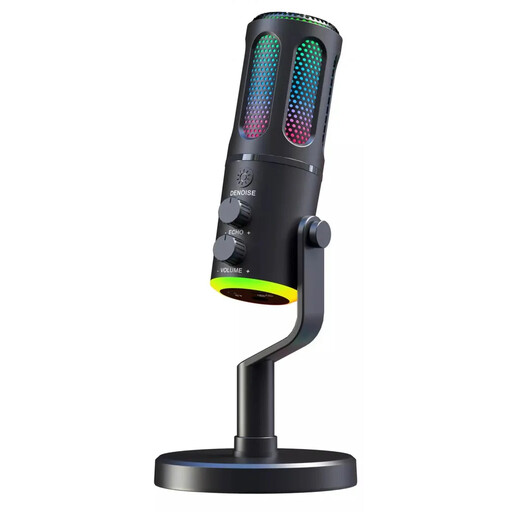
The G-Lab K-MIC-NEON
An option for recording one person at your desk if you want to monitor your voice through headphones as you speak.
Wired gaming microphone with cardioid pickup pattern, RGB and ENC.
View at Joybuy
 No image available
Dynamic USB/XLR microphone set with RGB
An option for recording speech on your computer if you want to adjust the level and mute directly, while monitoring your voice as you speak.
Dynamic USB/XLR microphone with gain control, echo function, mute and desk stand.
View at Joybuy
 No image available
USB condenser microphone with cardioid pickup pattern
An option for recording one person on your computer if you want to monitor your voice directly while recording.
Condenser microphone with USB, cardioid pickup pattern and latency-free monitoring.
View at Joybuy
Frequently asked questions
Do I need an audio interface for a single USB microphone?
You don’t need a separate audio interface to record over USB on a compatible computer: the USB connection provides the digital link. If you later want to use the XLR output on a hybrid model, that’s a different type of connection.
How should I position the microphone when speaking at my desk?
With a cardioid pickup pattern, point the front of the microphone towards your mouth. For a dynamic model, Audio-Technica recommends speaking close to the mic. Try a short sample entry to check that you can still read your notes comfortably.
What should I check after recording?
Listen to a short section and check that your speech is clear, that there are no distracting plosive sounds and that you haven’t accidentally muted the microphone. On compatible models, a headphone output on the microphone also lets you monitor your voice as you record.
Can my spoken training diary include other people’s voices?
Don’t record other people’s private conversations without permission. Section 201 of the German Criminal Code (StGB) covers the unauthorised recording and use or sharing of such recordings. If colleagues or other people are going to speak, make sure you have permission before recording; choosing a microphone does not give you permission to record.


