If you’re reading alone in a booth where room sound is audible and can stay close to the microphone, a directional dynamic USB microphone is a sensible starting point. In a quiet, acoustically suitable booth, a directional USB condenser microphone may also work well. Test the final position with quiet and especially loud passages: directionality and automatic level control guarantee neither a noise-free recording nor that your intended dynamics will be preserved.
Which setup is right for you?
Solo voice in a booth where room sound is audible
If you’re reading alone and want to minimise room reflections or background noise in your recording, consider positioning a directional microphone close to you. Audio-Technica and RØDE highlight microphone orientation and distance as important factors when recording speech.
Readers with wide dynamic swings
If you switch between whispers and exclamations, check the recording level at the loudest planned point. The Audacity Manual notes that turning down the volume later won’t undo clipping.
Readers with limited recording space
If your microphone, script and headphones all need to fit in a small booth, consider the stand, connections and how easy the controls are to reach. Sennheiser and RØDE list features such as desktop stands, controls and headphone monitoring for specific models.
What should you look for when buying?
Directional dynamic USB microphone
A good fit if: you’re reading alone, can stay close to the microphone and can hear the booth in your recordings.
Consider: close positioning may limit your freedom to move; with directional microphones, the bass can change when you’re very close.
Directional USB condenser microphone
A good fit if: a test recording shows that the booth sounds quiet and the setup works for you.
Consider: a greater distance may make more room sound audible; a cardioid pickup pattern won’t eliminate it.
USB microphone with an additional XLR output
A good fit if: you want to record via USB now and may want to use a compatible analogue setup later.
Consider: XLR isn’t needed for your current USB recording; a future XLR setup will require other compatible equipment.
| What matters |
What to check before buying |
Who is it important to? |
| Voice and room sound |
Check the pickup pattern, the side you speak into and the possible distance; listen to a test recording made in your actual space. |
If I’m reading alone, I want my voice to be clear even when the booth’s sound is audible. Around 33% of consumers say room sound is their main concern. |
| Levels and plosives |
Check the gain or automatic level control, pop filter and level meter; test quiet and especially loud passages. |
If my reading switches between whispers and exclamations, I want to control clipping and distracting plosive sounds. Around 27% of consumers prioritise controlling these dynamic swings. |
| Monitoring while recording |
Check for a headphone output and accessible gain or headphone controls; confirm USB compatibility with your recording device. |
If I’m reading for a long time, I want to monitor my voice and levels while I record. Around 20% of consumers say this is their main concern. |
| Space and mounting |
Check the available desk space, stand or boom arm, mounting options and cable routing; compare what’s included with the specific version. |
If I need room for my script as well as the microphone, I want to choose a setup that suits my booth. Around 20% of consumers focus on space requirements. |
Common buying and recording mistakes
-
“Directional” or “dynamic” doesn’t mean soundproof
Distance and positioning affect how clearly your voice and the room sound come through in a recording. Even the Shure MV6, tested by COMPUTER BILD, picked up audible background sound.
Record a test in your final position and listen to the silence, quiet speech and louder sections.
-
Setting the level using only quiet passages
A loud exclamation can cause the recording level to clip. You can’t simply fix a clipped passage afterwards by turning it down.
Check the level using your loudest planned passage, then check the quiet sections too.
A clipped passage may mean you have to record it again.
-
Not checking the stand and cables before buying
The microphone, script and cables all need to fit together in your intended speaking position. What’s included can vary between models and kits.
Measure your available space and compare the connections and contents of the specific version.
Depending on the kit, you may also need a microphone boom arm, a stand or a compatible cable.
Key brands at a glance
Audio-Technica
The dynamic ATR2100x-USB combines USB and XLR connectivity and is designed for speech recording with the microphone positioned close to you.
- Audio-Technica lists a cardioid pickup pattern, direct headphone monitoring, and included cables and desktop tripod for this model.
- The close speaking position needs to suit how you move while reading; these features don’t automatically apply to other models from the brand.
RØDE
The PodMic USB is a dynamic USB/XLR model for close-miked speech, while the NT-USB Mini is a compact, directional USB condenser microphone.
- RØDE lists an included pop filter and a model-specific close speaking position for the PodMic USB. For the NT-USB Mini, the manufacturer describes a detachable desktop stand and headphone monitoring.
- These different features don’t establish that one model will sound better in a particular booth.
Sennheiser
The Profile USB is a directional condenser microphone with on-device controls for speech recording.
- Sennheiser lists gain, mix and volume controls, a headphone output and a desktop stand in the basic kit.
- Test how much room sound your booth picks up, and check what’s included in other kits.
Shure
The MV6 is a dynamic USB microphone for speech, with Auto Level and a headphone output; the MV7+ is part of a separate USB/XLR range.
- Shure describes Auto Level and digital processing as features of the MV6.
- These features don’t guarantee that room sound won’t be audible. In COMPUTER BILD’s test, the original MV6 picked up background sound; different model generations shouldn’t be treated as identical.
CHERRY
The UM 6.0 ADVANCED is a USB desktop microphone with switchable cardioid and omnidirectional pickup patterns.
- CHERRY lists a gain control, a headphone socket and a shock-absorbing tripod stand.
- For a solo reading, the directional setting is an obvious choice. According to CHERRY, omnidirectional mode picks up sound from all sides and won’t counteract the sound of your booth.
Related products at Joybuy
The models below include USB/XLR desktop microphones and USB-C wireless lavalier microphones. For a reading in a booth where room sound is audible, pay particular attention to the pickup pattern, speaking position and whether the setup will fit your space.
 No image available
FIFINE K688CTW
Its stated unidirectional pickup pattern and boom arm may suit a solo voice when you want to position the microphone precisely.
Dynamic USB/XLR microphone; listed features include a gain control, headphone monitoring, mute function and windscreen. According to the description, the C-clamp only fits desks less than 2 inches thick.
View at Joybuy
 No image available
Razer Seiren V3 Mini White
Its stated supercardioid pickup pattern is designed for focused speech recording; check how it works in your booth.
USB condenser microphone with an adjustable tilting stand, built-in shock mount and tap-to-mute function with LED indicator. It’s described as having an ultra-compact design.
View at Joybuy
 No image available
SYNCO P1XT
The lavalier format is described as suitable for portable speech recording; check that it works for your fixed reading position.
USB-C wireless lavalier microphone for vlogging, streaming and YouTube. The description lists a monitoring socket on the receiver and the ability to charge while using the receiver.
View at Joybuy
 No image available
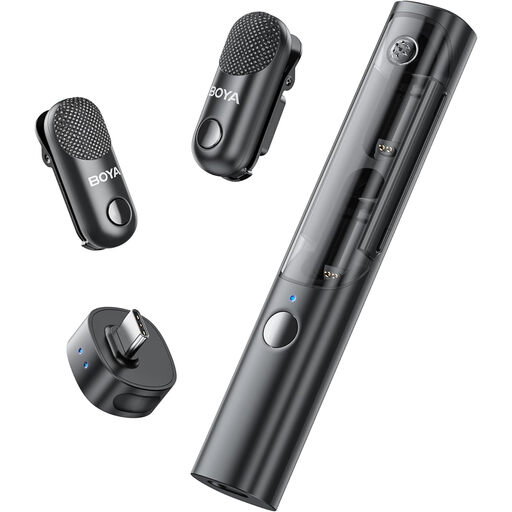
BOYA Magic-05, 2 TX + 1 RX
The USB-C wireless lavalier system is described as suitable for speech recording; check that the transmitter configuration works for your reading.
According to the product name, the set includes two transmitters and one receiver with a charging case. The description lists USB-C connections and desktop computers among compatible devices.
View at Joybuy
 No image available
Moman M1CT, 1 TX + 1 RX
The compact lavalier format is described as suitable for speech recording. Its omnidirectional pickup pattern isn’t designed for directional recording of a solo voice.
USB-C wireless lavalier microphone with one transmitter and one receiver; the stated battery life is up to 6 hours.
View at Joybuy
Frequently asked questions
How do I check the levels before an expressive reading?
Try saying your loudest planned line and watch the input meter as you do. If the level reaches the top, turn it down and record again; you can’t simply fix a clipped recording by turning it down afterwards.
Do I need an audio interface for a USB microphone?
Generally, no, if you’re recording directly via USB and the microphone is compatible with your recording device. Check the connection type, the cable supplied and whether the specific model is compatible with your device.
What should I do if my microphone is faulty, and how should I dispose of an old one?
If you buy from a business seller in Germany, you have statutory consumer rights against the seller; the European Union’s consumer information states that these rights apply for at least two years from receipt of the goods. Electrical waste shouldn’t go in household rubbish; take it to an appropriate collection point instead.
Can I publish a dramatic reading of someone else’s text online?
Not simply because you made the recording yourself. The German Patent and Trade Mark Office notes that literary works and translations may be protected by copyright, and making them available to the public online is one of the rights covered. For the specific text and intended use, check whether you have the appropriate permission or whether the text is in the public domain.


