For recording one seated person telling a story, a directional USB microphone positioned in front of them is a sensible starting point. If several family members are speaking around the table, a microphone with a selectable omnidirectional mode can pick up voices from more directions, but it will also capture room noise. Make a test recording first. For private conversations in Germany, establish who will be recorded and whether you have permission to record them; section 201 of the German Criminal Code (StGB) covers the unauthorised recording of privately spoken words.
Which setup is right for you?
Family interviewers
If you want to record one seated person telling a story clearly, you can position the microphone in front of them. Audio-Technica describes the ATR2100x-USB as having a cardioid polar pattern, while the Library of Congress recommends testing recording equipment before an interview.
Round-table conversations
If several family members are contributing to a conversation, consider whether you want one voice to stand out or the microphone to pick up sound from several directions. CHERRY lists cardioid and omnidirectional polar patterns as selectable options on the UM 6.0 ADVANCED.
A simple recording setup
If you want to get started without lots of extra equipment, check that the computer connection is right for your setup, position the microphone appropriately and make sure you can listen back to a test recording. Samson lists a desktop tripod and USB and XLR cables among the Q2U’s accessories.
What should you look for when buying?
First decide whether you’ll mainly be recording one person or a group. The Library of Congress also recommends testing your equipment and choosing a quiet place to record interviews.
| What matters |
What to check before buying |
Who is it important to? |
| Clear storytelling |
Check the polar pattern and microphone position; listen to a test recording with both voices in their actual seating positions. Audio-Technica and Samson describe the ATR2100x-USB and Q2U respectively as having a cardioid pattern. |
If I mainly want to capture the storyteller clearly, I make sure the microphone is positioned appropriately in front of them; around 36% of consumers put clarity first. |
| Convenient positioning |
Consider the stand and the space available on your actual table; make your test recording while seated as you normally would be. |
If the storyteller should be able to stay seated without constantly holding a microphone, a comfortable position matters to me; around 29% of consumers focus on positioning. |
| Connection and monitoring |
Check that the USB connection and cable work with your computer, then listen to a short recording through headphones. |
If I want to make sure the computer and recording are working before the conversation, an easy test is important; around 21% of consumers prioritise a simple connection and monitoring. |
| Multiple voices |
Decide in advance whether you’ll be recording one person or a group. An omnidirectional pattern picks up sound from other directions, including room noise. |
If I want several family members to be heard equally clearly, capturing sound from different directions is essential; around 14% of consumers put multiple voices first. |
Common mistakes
-
Automatically choosing omnidirectional mode for every family recording
According to the manufacturer, the CHERRY UM 6.0 ADVANCED picks up sound from all directions in omnidirectional mode. This can also make unwanted room noise audible in your recording.
If one person will be doing most of the talking, try a directional recording first. Switch to omnidirectional mode only if the group conversation calls for it.
-
Assuming a published test ranking will reflect your seating arrangement
COMPUTER BILD’s USB microphone test assesses models under its own test conditions. A model’s position in that test doesn’t automatically tell you how clearly it will pick up someone sitting to the side in your room.
Check the polar pattern and seating positions, and make a test recording rather than basing your decision on the test ranking alone.
-
Planning to use both USB and XLR for a simple computer recording
On a hybrid microphone, USB and XLR are different connection options. The analogue XLR connection may require a suitable audio interface or mixer.
If you want to record directly to your computer, check whether USB is all your setup needs and what accessories are actually included.
Switching to XLR later may require extra audio equipment and a more involved setup.
Key brands at a glance
CHERRY
The UM 6.0 ADVANCED is worth considering for recording either one voice or a round-table conversation.
- CHERRY lists cardioid and omnidirectional modes, a desktop stand, shock absorption and a headphone socket.
- Omnidirectional mode picks up sound from several directions. COMPUTER BILD describes this model’s vocal sound as a little muffled.
Shure
The MV6 is a USB option for capturing one voice directly.
- Shure lists USB-C and a headphone socket for monitoring recordings on the MV6.
- COMPUTER BILD describes the recording as clear, but also notes audible background noise and the lack of a volume control on the microphone.
RØDE
According to the manufacturer, the PodMic USB combines USB-C and XLR for different connection options.
- RØDE lists a headphone output with monitoring and a built-in pop filter for this model.
- If you’re recording several people sitting in different places, test the microphone with your actual seating arrangement.
Audio-Technica
The ATR2100x-USB is a directional handheld USB/XLR microphone supplied with a desktop tripod.
- Audio-Technica Germany lists a cardioid polar pattern, a headphone socket, cables and a desktop tripod.
- If someone asking questions will be sitting to the side, try recording them in your planned seating arrangement.
Samson
The Q2U is a dynamic USB/XLR microphone with accessories for tabletop use.
- Samson lists a desktop tripod, windscreen, USB and XLR cables, and direct headphone monitoring.
- Test the room’s suitability with a recording; manufacturer specifications are no substitute for trying the microphone in your own surroundings.
Joybuy products
This selection includes USB desktop microphones for recording one voice, plus a wireless lavalier set for two people. The key question is whether you’ll be recording the storyteller at the table or capturing several people separately.
 No image available
FIFINE AM8 USB/XLR dynamic microphone
An option for recording one seated speaker if you’re considering a desktop microphone with USB and XLR connections. The product name also lists a desktop stand, mute button and headphone socket.
View at Joybuy
 No image available
Razer SEIRÉN V3 MINI White
For recording one voice at the table, if you’re looking for a compact USB microphone with tap-to-mute functionality. The product name specifies the white version.
View at Joybuy
 No image available
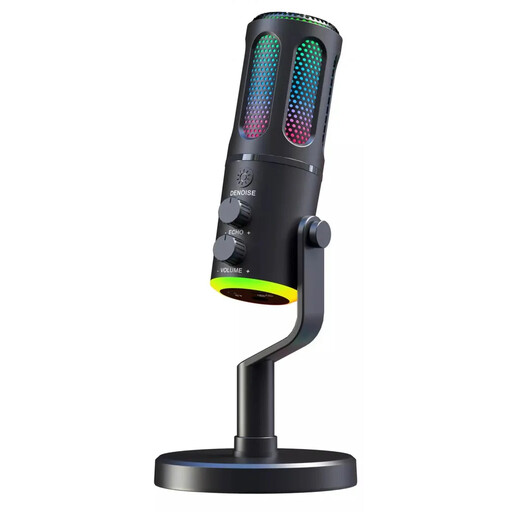
The G-Lab K-MIC-NEON
For recording one voice at the table if you’re looking for a wired USB microphone with a cardioid polar pattern. The product name also mentions RGB lighting.
View at Joybuy
 No image available
USB microphone with RGB lighting, 7-piece set
A possible desktop microphone option for USB recording on a PC. The product name lists a USB-C adapter, mute button and seven-piece set.
View at Joybuy
 No image available
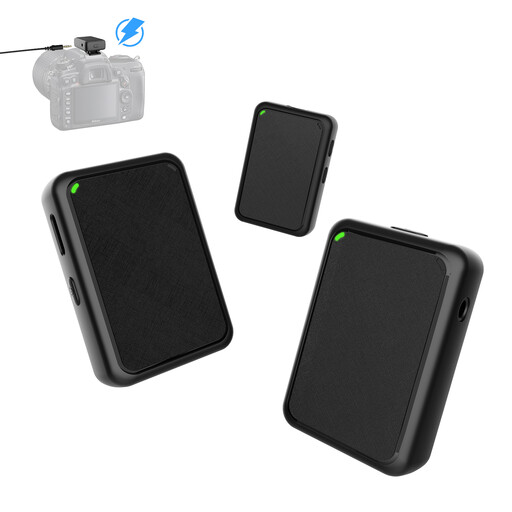
Moman MB1X(M) wireless lavalier microphone set (2TX&1RX)
For an interview with two people, if you’re considering lavalier microphones instead of one shared desktop microphone. The product name lists two transmitters, one receiver and USB plug-and-play.
View at Joybuy
Frequently asked questions
Do I need an omnidirectional microphone to record one seated person telling a story?
Not necessarily. If one person will do most of the talking, try a directional recording first. An omnidirectional pattern may be more suitable when contributions from several directions matter, but it will also pick up sounds in the room.
What should I do to check the equipment before the conversation?
Connect the microphone where you plan to use it, make a short recording while speaking normally, then listen back. The Library of Congress recommends testing your equipment and choosing a quiet place to record interviews.
What accessories should I check before buying?
Check that the computer connection is compatible with your device, and see whether a stand, cables and the headphone socket you want are included. Audio-Technica lists a desktop tripod and cables with the ATR2100x-USB; Samson lists the same accessories for the Q2U.
Can I secretly record a family conversation in Germany?
Section 201 of the German Criminal Code (StGB) makes it an offence to record another person’s privately spoken words without authorisation. Before you start, check with everyone who will be heard that you have permission to record them. A private family setting does not automatically give you permission to make secret recordings or share them.


