What should you look for when buying?
First decide whether one person will speak close to the microphone, each interviewee will have their own microphone, or a desktop microphone will capture both voices together. Then test your recording setup with the fan running.
| Priority |
What to check when buying |
Who is it for? |
| Voice with fan noise |
Pickup pattern and microphone type; suitable positioning and a headphone socket. |
If I want to record a nearby voice clearly over a running fan, direction and distance are crucial. Around 36% of consumers prioritise a focused voice. |
| Two voices in conversation |
Seating positions, USB ports, software support for the specific model and separate level control. |
If we’re sitting in fixed positions, I want to be able to control both voices rather than rely on a microphone placed further away. Around 29% of consumers prioritise separate control of both voices. |
| Voices and room ambience |
Switchable pickup pattern; short comparison recordings from the planned seating position. |
If I want to capture the character of the neighbourhood, I need to consider how much fan noise will also be audible. Around 21% of consumers prioritise room ambience. |
| Easy setup on location |
Connection to the recording device, what’s included and the mount required. |
When interviewing in different locations, I want to be able to set up and connect the microphone easily without losing sight of where the second speaker is positioned. Around 14% of consumers mainly look for an easy setup in changing locations. |
USB microphones at Joybuy
This selection includes desktop, handheld and lavalier microphones for interviews with one or two voices. Check that the microphone type suits your seating arrangement and recording device.
 No image available
JBL Quantum Stream Studio USB-C
A bidirectional recording option is listed for a face-to-face conversation between two people. With the fan running, check whether the amount of room sound suits your interview.
Wired USB-C condenser microphone with a flexible tube design, mute function, LED indicator and monitoring mode.
View at Joybuy
 No image available
FIFINE K688CTW with boom arm, USB/XLR, white
The included boom arm can help you position the dynamic microphone close to the person speaking. You’ll still need to position it carefully if you want to pick up a second, more distant voice.
USB-C and XLR, headphone socket, mute button and volume control. A separate XLR cable is required for XLR use; according to the product description, it isn’t included.
View at Joybuy
 No image available
Moman M1CXT USB-C, 2 transmitters and 1 receiver
This set is designed for interviews with two people, with each voice recorded through its own transmitter. Check that your recording device is compatible with the specified USB-C Android version.
Wireless lavalier microphone set with 2 transmitters and 1 receiver.
View at Joybuy
 No image available
SYNCO P1XT USB-C Wireless Microphone
The wireless lavalier design may suit interviews where you need to move around. Test the sound with the fan running at the actual recording location.
USB-C connection. The product description lists switchable noise reduction, but this doesn’t prove that it will eliminate fan noise.
View at Joybuy
 No image available
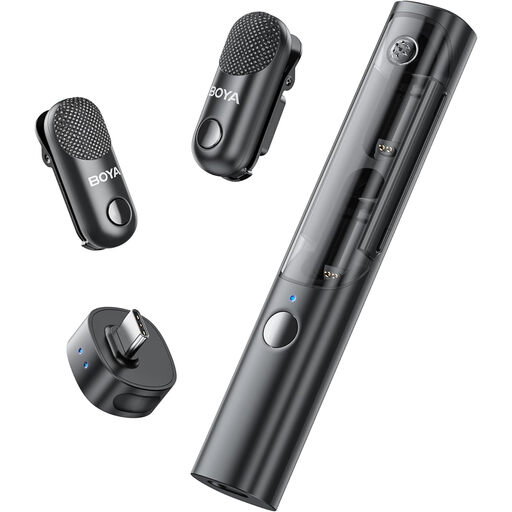
BOYA Magic-05 USB-C, 2 transmitters and 1 receiver with charging case
The two transmitters are designed for interviews with two people. Before buying, check that the USB-C receiver is compatible with your recording device.
Wireless lavalier microphone set with 2 transmitters, 1 receiver and charging case.
View at Joybuy
Frequently asked questions
Can a USB microphone completely eliminate fan noise?
You can’t guarantee that based on the microphone type or advertised noise-processing features. Point a directional microphone towards the nearby speaker, record a test with the fan running, and listen back from the planned seating positions.
Can I connect any two USB microphones at the same time?
Not simply because you have two spare USB ports. Check whether your recording software supports both specific models; RØDE Connect’s guide lists the models it supports for multi-microphone recording.
What should I test before the interview?
Check the microphone’s direction, both voices and the fan with a short recording, then listen back through headphones. For close speech, RØDE recommends a distance of around 5–10 cm for the PodMic USB.
Who should I contact if my microphone is faulty?
For a consumer purchase in Germany, the seller is generally responsible for the statutory warranty, not the manufacturer. The Verbraucherzentrale states that this generally lasts for two years from delivery; a voluntary manufacturer’s guarantee is separate.
Can I record a conversation about changes in the neighbourhood without asking first?
Not as a general rule: Section 201 of the German Criminal Code (StGB) makes it an offence to record another person’s non-public spoken words without authorisation. Discuss the recording with everyone involved beforehand, and check that you have an appropriate legal basis for any further processing of personal data. Special data-protection rules may apply to journalistic and editorial work; whether they do depends on the specific project.


