What should you look for when buying?
Dynamic cardioid microphone
A good fit if: mainly one person will be speaking and the microphone can be placed close to them.
Consider: The distance needs to be comfortable for the storyteller; Audio-Technica’s selection guide recommends no more than 200 mm.
Cardioid condenser microphone
A good fit if: you need greater speaking distance or more freedom to move in a quiet room.
Consider: Depending on the room, background noise may be more noticeable.
Microphone with a switchable pickup pattern
A good fit if: you want to use the same desk microphone for one speaker and, at other times, several people.
Consider: Omnidirectional mode also picks up sound from the surroundings. For one main speaker, cardioid mode is more focused.
For anyone choosing a USB microphone for an interview with someone seated, the table below highlights the most important consideration for each setup.
| Priority |
What to check when buying |
Who is it most relevant to? |
| Clear recording of one voice |
Check for a cardioid pickup pattern, a suitable stand and a comfortable close-up position. |
When I’m sitting with someone in a summerhouse, I want their voice to remain clear despite the room sound; around 40% of consumers are likely to have this as their main priority. |
| Room and background noise |
Check the pickup pattern and whether it can be switched; listen to a test recording at the intended recording location. |
If the recording location changes or background noise is a concern, I want to be able to choose a suitable pickup pattern; around 30% of consumers are likely to prioritise this. |
| Distance or additional voices |
Agree on the speaking direction and microphone position for a joint test recording. |
If the storyteller shouldn’t have to stay close to the microphone, or someone may occasionally join in, I need flexibility over distance and recording; around 20% of consumers are likely to see this as their main priority. |
| Connection and monitoring |
Check that the USB connection and cable work with your computer; check the headphone socket and recording device in your software. |
If I want to monitor a longer conversation reliably beforehand, I’ll check the connection and monitoring options; around 10% of consumers are likely to have this as their priority. |
USB microphones at Joybuy
This selection includes USB microphones for recording one person seated at a desk, including dynamic and condenser models. Some product details also list recording modes for additional voices.
 No image available
FIFINE AM8 USB/XLR microphone
For recording one person seated at a fixed desk position; the product information recommends a distance of 2 to 6 inches.
USB/XLR connection, desk stand and headphone socket. The product information says an XLR cable isn’t included.
Joybuy
 No image available
Razer Seiren V3 Mini White
Its compact design may suit a fixed desk position for recording one person seated; check the microphone’s orientation before you start talking.
USB microphone with tap-to-mute and a white finish.
Joybuy
 No image available
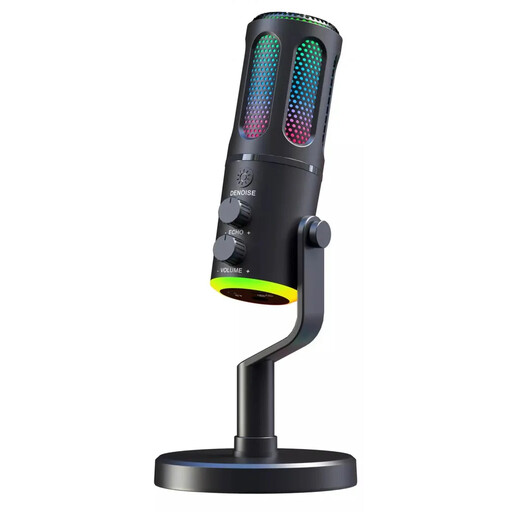
The G-Lab K-MIC-NEON
The product name specifies a cardioid pickup pattern; check the microphone’s orientation if one person will be doing most of the talking.
Wired cardioid microphone with RGB and ENC, according to the product name.
Joybuy
 No image available
USB condenser microphone with Type-C adapter, 7-piece set
For USB recording on a computer; check first that the connection is compatible with your computer.
The product name lists a Type-C adapter, mute button and headphone socket; available as a 7-piece set.
Joybuy
 No image available
JBL Quantum Stream Studio USB-C
If other people may occasionally join in, check the recording modes listed in the product details and find a suitable position at the table.
USB-C microphone with a flexible tube design, mute function, LED indicator and monitoring mode.
For one main speaker, the cardioid pickup pattern listed in the product details is more focused; in omnidirectional mode, the microphone picks up sound from every direction.
Joybuy
Frequently asked questions
How do I set up the microphone for someone telling their story while seated?
Point the cardioid pickup pattern towards the speaker and check the distance while they’re sitting in their usual position. For a dynamic microphone, Audio-Technica’s own selection guide recommends placing it directly in front of the speaker, within 200 mm; this isn’t a general recommendation for every model. Select the connected microphone in your recording software and listen back to a short test recording.
What’s best for the occasional conversation with several people?
A microphone with a switchable pickup pattern can be useful for different types of conversation, provided everyone is positioned appropriately around the table. CHERRY says the UM 6.0 ADVANCED has an omnidirectional mode for picking up sound from every direction; this also captures background noise. Test the setup with everyone in their intended speaking positions.
Do I need an audio interface for a USB microphone?
You don’t need a separate XLR audio interface to record over USB with the USB models described here. Check that the connection and cable are compatible with your computer, then select the microphone as the recording device in your software.
Can I record club members in Germany without asking?
Under section 201 of the German Criminal Code (StGB), recording another person’s words spoken in private without authorisation is prohibited. So, before the conversation, make sure you’re authorised to record it; discuss any plans to share or publish the recording separately. If consent is used as the legal basis for processing personal data, the Federal Commissioner for Data Protection and Freedom of Information says it must be informed and freely given.
What accessories and consumer rights should I consider when buying?
Before buying, check whether a cable, desk stand, headphones and any necessary adapters are included. Your Europe explains that consumer purchases from business sellers in the EU are generally covered by a minimum two-year legal guarantee for faulty goods. Online distance contracts generally also come with a 14-day right to cancel. This is separate from any voluntary manufacturer’s warranty.


