Gamers with limited desk space
You need a stand that fits alongside your keyboard and monitor, and a speaking position you can reach comfortably. A compact design alone isn’t enough.


On a small desk, the first thing to consider is whether the stand and the side-address design will fit neatly alongside your monitor and keyboard. For the Wave Neo, Elgato recommends speaking into the side from a distance of around 8–12 cm. To manage keyboard noise, you’ll need to get both the microphone position and your voice chat settings right. Razer’s claims about noise reduction are no substitute for testing it at your own desk.
You need a stand that fits alongside your keyboard and monitor, and a speaking position you can reach comfortably. A compact design alone isn’t enough.
You want your teammates to hear mainly your voice, and you’re happy to test the microphone position and voice chat settings rather than relying solely on noise-reduction claims.
You want to be able to mute yourself easily in lobby chat. A status light or direct headphone monitoring may matter more than having as few controls as possible.
First, check that the stand, speaking side and cable work with your desk setup. Then consider the mute function, device settings and any extra monitoring controls.
| What matters | What to look for | Who is this important for? |
|---|---|---|
| Space and microphone position | Check the stand’s footprint, available height and whether you can reach the speaking side at your desk. | If space is limited, I want to position the microphone without obstructing my mouse movements or view of the monitor. Around 36% of consumers put space at the top of their buying priorities. |
| Clarity next to the keyboard | Pay attention to the microphone’s direction and test the voice chat settings while typing as you normally would. | If my keyboard is audible in open voice chat, I want my voice to come through clearly without relying solely on the polar pattern. Around 29% of consumers put keyboard noise first. |
| Setup and muting | Check the USB connection, supported platforms and mute method for the specific model. | If I’m joining a lobby at short notice, I want to select the right input device quickly and be able to see whether I’m muted. Around 21% of consumers put easy lobby controls at the top of their priorities. |
| Monitoring and controls | Check the headphone socket, monitoring features and easily accessible level controls. | If I want to monitor my voice directly or adjust the level on the device, I need the right connections and controls. Around 14% of consumers prioritise monitoring or direct controls above all else. |
Even a small microphone needs a clear spot on your desk and a speaking position that works for your voice.
Measure the space available and first check how the included stand positions the microphone.
A microphone arm may require extra mounting accessories and a suitable desk edge.
How much keyboard noise gets picked up also depends on the microphone’s orientation, its distance from your voice and your voice chat settings. Manufacturer claims aren’t a test of your own setup.
Try the position while typing as you normally would, and check the available microphone test and voice chat settings before rearranging your setup.
The original HyperX SoloCast and the SoloCast 2 are different models. The Sennheiser Profile desk version and Streaming Set may also differ in what’s included.
Check the full model name and confirm which stand, arm and other mounting accessories are included with the specific listing.
The Seiren V3 Mini is aimed at people looking for a compact USB desktop microphone for PC voice chat.
The original SoloCast comes with a desktop stand and can also be mounted on a microphone arm.
The Wave Neo’s height extension can raise the microphone to a higher speaking position.
The NT-USB Mini is an option if you want a removable desktop stand and direct headphone monitoring.
The Profile USB may appeal if you want to adjust the level and headphone mix directly on the microphone.
This Joybuy selection features USB desktop microphones, including models with direct mute controls, dials or alternative mounting options.
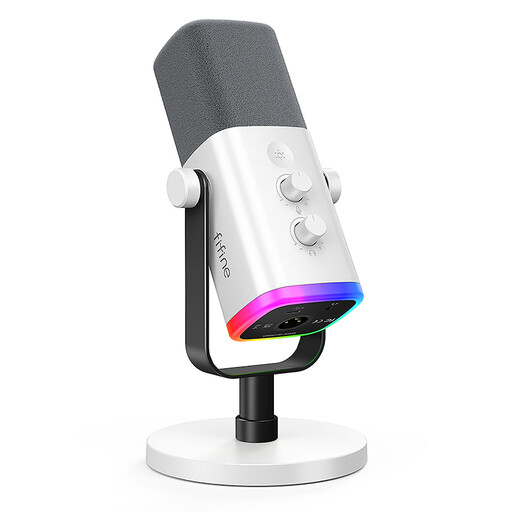 No image available
A desktop option for lobby chat if you want to control mute and gain directly on the microphone.
The product name lists USB and XLR connections, a gain control, a mute button and a headphone socket. According to the description, the controls work only in USB mode; an XLR cable is not included.
 No image available
The included microphone arm may be a good fit if you want to keep desk space clear.
The kit is described as including a microphone arm and desk clamp. According to the description, the clamp fits desks less than 2 inches thick. USB/XLR, a mute button, a headphone socket and a gain control are listed in the product name; the controls work only in USB mode, and an XLR cable is not included.
 No image available
This compact USB model may suit a small desk if having a mute control on the device itself is important to you.
For the Seiren V3 Mini, Razer lists a supercardioid polar pattern, a tilting stand and an LED mute indicator. The manufacturer’s noise-reduction claim isn’t proof of how it will perform at your desk.
 No image available
The listed mute control and monitoring features may suit you if you want to make adjustments directly on the microphone during a chat.
The product name lists USB-C, mute control, an LED indicator and a monitoring mode. The stated footprint is 9 × 9 cm; check that the flexible mount leaves enough room to move around at your desk.
 No image available
This USB gaming microphone is described as a plug-and-play model with touch-to-mute; check that it fits your desk before buying.
Its polar pattern is omnidirectional, so according to the description it picks up sound from all directions. The stated footprint is 18 × 18 cm, which means it may not fit easily on every small desk.
Select the right input device in your voice chat app and run a microphone test. Discord offers this test on desktop or in a browser; during a test in a voice channel, you’ll be temporarily muted there.
No. A supercardioid polar pattern doesn’t guarantee that keyboard noise will disappear from your setup. Point the speaking side towards your voice and test it while typing. In Discord, you can check input sensitivity, push-to-talk and noise suppression separately.
Not necessarily. Elgato says the Wave Neo and RØDE says the NT-USB Mini work over USB without additional software installation. An arm is an alternative to a desktop stand; first check that the desk edge, mount and included accessories are suitable for the specific model.
Online purchases generally come with a 14-day right to cancel. Your statutory rights if the item is faulty are separate and apply against the seller. The Verbraucherzentrale explains the difference; check the deadlines and any exceptions that apply to your specific purchase.
For market surveillance, the Bundesnetzagentur lists requirements including correct CE marking, product traceability and manufacturer details. A CE mark is not a rating of sound quality. Old electrical equipment must not go in household rubbish; take it to a suitable electrical waste collection point instead.