For a compelling theatre trailer voice-over, the first thing to consider is whether your room suits close, directional recording from a fixed speaking position, or is quiet enough to give you more freedom to move. Before you buy, record quiet and loud passages and listen back to how the levels, room sound and plosives come across. Automatic features can help during testing, but they’re no substitute for it.
Who is this selection for?
Speakers with big changes in volume
If you switch between quiet moments of suspense and powerful exclamations, test the levels with both extremes before recording. Shure lists automatic level adjustment for the MV7+, while Sennheiser documents gain controls on the Profile USB.
Speakers in a noticeably echoey room
For a solo voice recorded at home, a close position and careful direction can help. A listening test in your actual recording spot will show whether room sound or background noise is a problem. RØDE recommends a distance of around 5–10 cm for the PodMic USB.
Speakers with a quiet recording space
If your room sounds quiet during a test and you’d like to move around a little while speaking, a USB condenser microphone could also be worth considering. Audio-Technica describes the ATR2100x-USB as suitable for voice-over work, and Sennheiser documents an adjustable orientation for the Profile USB.
What should you look for when buying?
Start by checking your room and possible speaking positions, then look at level control and monitoring. Only then decide whether extra automation or flexible positioning matters for your recording.
| Buying priority |
What to look for |
Who it matters most to |
| Reliable levels |
Record your quietest and loudest lines; check for a gain control or automation specifically documented for the model, and listen back through headphones. |
If I want to record a quiet opening and a powerful exclamation without distracting jumps in level, I test both passages together. Around 33% of consumers make level reliability their top priority. |
| Room sound |
Test the microphone in your intended recording spot; consider the speaking side, distance and polar pattern. A directional capsule doesn’t replace checking the room. |
In a noticeably echoey room, I want to capture my voice as directionally as possible while still judging the effect of reflections and background noise. Around 27% of consumers put intelligibility in the room first. |
| Vocal nuance and freedom of movement |
Record quiet and emphasised passages from the speaking position you can actually use; compare distance and orientation as you listen back. |
If my performance involves moving around in front of the microphone, I want to preserve vocal nuance without being tied to an uncomfortable close-up position. Around 27% of consumers prioritise this combination of vocal nuance and freedom of movement. |
| Setup and accessories |
Check the computer connection, cable, headphone socket, and whether the desk stand or microphone arm is included in the specific set. |
For a straightforward recording setup, I want to know whether the microphone and accessories I need will work with my computer and suit my preferred position. Around 13% of consumers put ease of setup first. |
Common buying mistakes
-
Assuming automatic level adjustment will suit your performance
Shure documents Auto-Level for the MV7+. That doesn’t mean every quiet or loud passage will sound the way you want it to.
Record both ends of your volume range and listen critically to the settings.
Comparing recordings and making any necessary edits can take extra time.
-
Assuming a directional or dynamic microphone means you don’t need to check the room
Reflections and background noise can still be audible, even with directional recording. A fixed, close position can also limit your performance; RØDE recommends around 5–10 cm for the PodMic USB.
Test the microphone in your intended recording spot with the actual sources of noise before settling on a particular type.
Finding a different position or adding measures to improve the room may take more preparation.
-
Assuming similarly named microphones or set options are identical
The Sennheiser Profile desk stand and boom arm sets come with different accessories; the set you choose also affects your positioning options.
Check the full model name, set option and contents of the specific offer.
If you need a microphone arm, cable or headphones for your preferred setup, check in advance whether they’re included in the set.
Key brands to consider
Shure
The MV7+ is a USB-C and XLR option for solo voice recording, with model-specific DSP and Auto-Level features.
- Shure lists headphone monitoring, Auto-Level and plosive editing for the MV7+.
- Noise-removal claims come from the manufacturer and don’t independently demonstrate how the feature will affect a particular performance. The MOTIV Mix app has its own system requirements.
RØDE
The dynamic PodMic USB offers USB-C and an additional XLR output, and is also described as suitable for voice-over work.
- RØDE documents a headphone output, pop filter and close speaking position of around 5–10 cm for this model.
- A close position only works if you can maintain it while performing; make sure your stand or arm is compatible with the mounting.
Audio-Technica
The dynamic ATR2100x-USB is a USB/XLR option for voice-over work; USB condenser models take a different approach to recording.
- The ATR2100x-USB is documented as having a direct headphone connection, cardioid polar pattern and included cables.
- These features apply to the model named here and not necessarily to every microphone from the brand.
Sennheiser
The Profile USB is a condenser option for voice-over work, with easily accessible gain, mix and headphone controls.
- The model is documented as having controls and an adjustable orientation.
- A listening test is the only way to tell whether your recording space produces too much room sound. The desk stand and boom arm come with different sets.
CHERRY
The UM 6.0 ADVANCED is a USB desktop microphone with cardioid and omnidirectional modes.
- CHERRY lists a gain control, headphone socket, touch mute and included desk stand.
- For a single trailer voice, the cardioid mode is an obvious feature to try. According to CHERRY, the omnidirectional mode picks up sound from all directions and doesn’t replace checking the room.
Joybuy microphones for voice recording
The following Joybuy models offer different options for voice recording, including USB and USB/XLR connections, as well as direct headphone monitoring.
 No image available
FIFINE AM8 USB/XLR microphone, boom arm set
For a solo voice with changing volume, the gain control and direct headphone monitoring are useful features to check.
Dynamic USB/XLR microphone with directional recording and a headphone socket. The set doesn’t include an XLR cable; according to the description, the C-clamp is designed for desks under 2 inches thick.
Joybuy
 No image available
FIFINE K688CT USB/XLR dynamic microphone with boom arm
For voice-over practice, try comparing quiet and powerful lines through the headphone socket.
The description lists a cardioid polar pattern, gain control and headphone monitoring. An XLR cable isn’t included.
Joybuy
 No image available
Razer Seiren V3 Mini White
For a solo voice, check whether the USB condenser design and compact desktop setup suit your speaking position.
The description lists USB-C, a supercardioid polar pattern, touch mute and an adjustable tilt stand.
Joybuy
 No image available
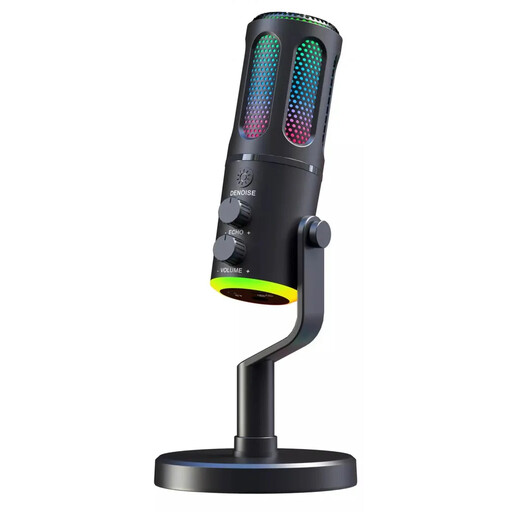
The G-Lab K-MIC-NEON
If you want to monitor a solo voice directly, the listed cardioid polar pattern and headphone socket are useful features to check.
The product name describes a wired microphone with RGB and ENC; voice-over work is listed as a suitable use.
Joybuy
 No image available
JBL Quantum Stream Studio
For quiet and powerful passages, try assessing the listed dynamic range compressor in a test recording.
USB-C condenser microphone with cardioid mode and direct monitoring; the description also lists several polar patterns.
Joybuy
Frequently asked questions
How should I set up a microphone for a trailer voice-over?
Point the speaking side towards your usual position and record your quietest and loudest lines before you record the trailer. RØDE recommends a distance of around 5–10 cm for the PodMic USB; don’t assume this distance will suit other models without testing it.
Do I need a separate audio interface for a USB microphone?
You generally don’t need a separate audio interface to make a compatible USB recording on a computer. An additional XLR output may be useful if you plan to use an analogue interface or mixer later; check the connections and what’s included with the specific model.
What are my rights if my microphone is faulty?
In Germany, faulty goods are generally covered by the statutory warranty against the retailer; the German government states that this lasts for two years. Whether a specific fault is covered depends on the circumstances. A manufacturer’s guarantee is a separate matter.
Can I record someone else’s text or music for a theatre trailer that will be published?
Recording your own voice doesn’t automatically mean you can use other people’s work without permission. The German Patent and Trade Mark Office explains moral rights and exploitation rights; for protected music in audiovisual productions, GEMA describes a separate process for obtaining rights. You’ll need to check which rights are required for the text, music and planned publication of your specific trailer.
How should I dispose of an old USB microphone in Germany?
An old microphone is electrical waste and must not go in your household rubbish. The German Environment Agency lists recycling centres and suitable retail take-back points, among other options. If it still works, you could also pass it on to someone else.


