Solo commentators in a separate room
If you’re commentating on a tournament by yourself, clear speech and a test recording with your computer running can help you assess room and computer noise where you’ll be sitting.


If you’re commentating solo and can hear room or computer noise, start with a directional microphone that you can position close to you, then make a test recording in your usual setup. In a quiet room, a USB condenser microphone with easy-to-reach controls may also be a good fit. For live use, you’ll also want control over the mic level and mute, as well as a way to monitor your voice and game audio. No microphone type can replace careful positioning and level control in your streaming software.
If you’re commentating on a tournament by yourself, clear speech and a test recording with your computer running can help you assess room and computer noise where you’ll be sitting.
When you switch between calm analysis and sudden, loud reactions, easy-to-reach level and mute controls can help. Also check how your voice and game audio work together in the streaming mix.
If a second person sometimes needs to speak from the same table, seating position and pickup pattern become important. Test both voices together in a recording rather than assuming a setting designed for solo commentary will work.
First, check how your voice sounds from your usual position. Then choose the controls and setup that suit your live mix.
| What you need | What to check before buying | Who is this important for? |
|---|---|---|
| Clear solo voice | The model’s pickup pattern and speaking side; space for a desk stand or microphone arm. | If I’m commentating alone in a separate room, I want to hear how much room and computer noise is picked up from my usual speaking position. This is a concern for around 36% of consumers whose main worry is room sound. |
| Control over voice and game audio | A headphone socket, easy-to-reach gain and mix controls, and mute; test with both quiet and loud speech in your streaming software. | If my voice shifts between analysis and louder reactions, I want to be able to check the microphone level and its balance with the game audio. Around 28% of consumers put live level control first. |
| USB setup and mounting | A compatible USB connection and cable; check what’s included with the specific desk stand or arm set. | If I want to record at my desk without a separate audio interface, the connection and mount need to suit my computer and setup. Around 22% of consumers say a straightforward setup is their main concern. |
| An occasional second voice | Switchable pickup patterns; seating positions and how clearly both voices come through in a test recording. | If a guest will occasionally be speaking from the same table, I want to check that the chosen setup picks up both voices clearly. Around 14% of consumers prioritise a second voice. |
Positioning and distance still affect the signal picked up where you’re recording. A feature or pickup pattern alone can’t tell you how your voice will sound in a separate room.
Test from your usual seat with the computer running, and listen to the gaps between sentences too.
Direct monitoring through the microphone isn’t the same as the mix that’s actually sent out. Game audio and other sources are also controlled in your streaming mixer.
Check the level meters and mix in your streaming software. The OBS Project Audio Mixer Guide recommends keeping an eye on the level meters.
Bundles can come with different mounts, and the cables and connections need to work with your computer too.
Compare the full model name, USB connection and what’s included with your desk and computer.
For the RØDE NT-USB+, a USB-C to USB-A cable is listed as an extra purchase for computers with USB-A ports only. The mount supplied with the Sennheiser Profile depends on whether you choose the desk stand or streaming set.
According to RØDE, the PodMic USB combines USB-C with an additional XLR connection. The NT-USB+ is a USB condenser microphone with a desk stand, pop filter, and headphone and mix controls.
The Profile USB is designed for a single-user setup with easy-to-use controls, while the Profile Streaming Set adds a microphone arm. Sennheiser’s guide highlights positioning and distance as factors that affect the input signal.
The MV7+ offers USB-C and XLR. The MV6 Gen 2 is a separate USB gaming model with a desk stand; the models and sets are not interchangeable.
According to HyperX, the QuadCast 2 offers switchable pickup patterns and on-mic controls for streaming setups.
The AT2020USB-X is a USB condenser microphone for a fixed speaking position. Audio-Technica lists headphone and mix functions.
This selection includes USB microphones for a single commentary position, including dynamic USB and USB/XLR models, as well as models with multiple pickup patterns.
 No image available
For a single commentary position, with easy-to-use level and headphone controls when connected via USB.
Dynamic USB/XLR microphone with desk stand, headphone socket, gain control and mute. According to the product description, the controls are active only over USB; an XLR cable is not included. Recommended speaking distance: 2 to 6 inches.
 No image available
For a commentary position where a microphone arm suits your preferred desk setup.
Dynamic USB/XLR microphone set with microphone arm, headphone socket, gain control and mute. According to the product description, the controls are active only over USB; an XLR cable is not included. Recommended speaking distance: 2 to 6 inches.
 No image available
For a desk setup where USB/XLR connectivity and on-mic controls matter.
Dynamic USB/XLR microphone with cardioid pickup pattern, desk stand, gain control, mute and headphone monitoring.
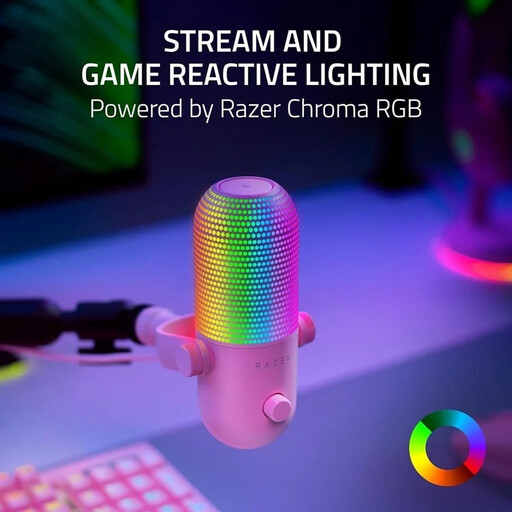 No image available
For a single streaming position, with USB connectivity and easy-to-reach controls.
USB streaming microphone with supercardioid pickup pattern, mute, volume control and real-time headphone monitoring. The product description also mentions mounting it on a compatible microphone arm.
 No image available
For a streaming setup where you want to try different recording situations.
USB-C condenser microphone with four selectable pickup patterns, including cardioid and bidirectional. Direct monitoring and mute are also listed.
You don’t need a separate audio interface to connect directly to a compatible computer via USB. The XLR connection on the RØDE PodMic USB is an additional option for a different setup, not a requirement for USB use.
Record some calm analysis and a loud reaction, then check the levels for your voice and game audio in the OBS mixer. Listen to the mix as it will actually be produced too, as monitoring through the microphone alone won’t necessarily show you the balance in the stream.
Whether you can use particular footage or music depends on the specific content and the usage rights that apply to it. Check the rights for each item before including it in your recap; you can’t assume that general permission applies.
The Bundesnetzagentur lists the CE marking and the ability to identify the product and manufacturer among the points checked during market surveillance. The CE marking is not an independent quality mark.