What should you look for when buying?
First, check how your voice sounds in the room where you’ll be recording. Then consider the saved test file, how easy the microphone is to use at your desk and whether you might switch to XLR later on.
| What matters |
What to look for when buying |
Who it matters to most |
| Clear voice in the room |
Polar pattern and orientation; check your speaking distance and position with a test recording. |
If I’m recording alone in an echoey room, I want to be able to assess my voice from my usual position without assuming background noise will disappear. Around 36% of consumers put the sound of the room first. |
| Mixing voice and PC audio |
Monitor both audio sources in your recording software and test the saved file. |
If I need the walkthrough audio alongside my voice, I want to make sure both are actually included in the file. Around 29% of consumers prioritise mixing voice and computer audio. |
| Easy setup |
Check the USB connection and system requirements; see whether a desk stand or boom arm is included. |
I want to get started at my desk without unnecessary extra setup, and need a position that suits where I speak. Around 21% of consumers prioritise a simple setup. |
| Switching connections later |
Check the USB and XLR connections, as well as the cables and additional audio equipment you’ll need. |
If I want to start recording over USB and might use XLR later, I want to plan for the signal path I’ll need. Around 14% of consumers prioritise this connection flexibility. |
Joybuy products for walkthroughs
This selection includes USB microphones for a fixed recording position, including dynamic USB/XLR models and USB microphones with onboard controls and headphone monitoring.
 No image available
FIFINE K688CTW USB/XLR microphone, white
For a single voice in a fixed position: this dynamic, unidirectional microphone can be positioned using the included boom arm.
USB and XLR connections, a gain control, mute function and headphone socket are listed. According to the product information, the XLR cable is not included; the function buttons work only in USB mode.
View at Joybuy
 No image available
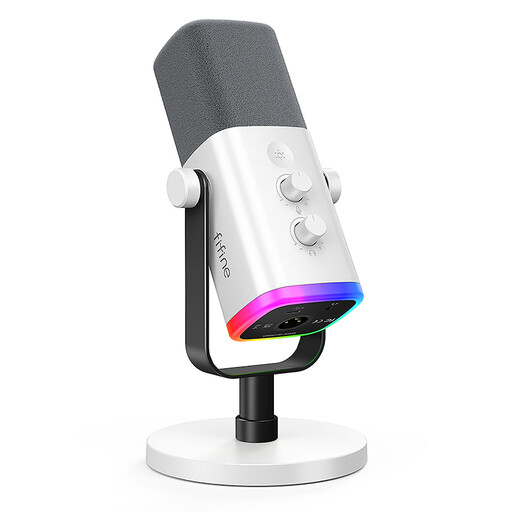
FIFINE AM8 White USB/XLR microphone
For solo recording at your desk: its listed cardioid polar pattern and desk stand let you position it in front of the speaker.
This dynamic model has USB and XLR connections, a gain control, mute function and headphone monitoring. According to the product information, the XLR cable is not included; the RGB lighting and function buttons work only in USB mode.
View at Joybuy
 No image available
Razer SEIRÉN V3 MINI White
For a fixed position at your desk: its listed supercardioid polar pattern is designed to pick up a single voice in front of the microphone.
According to the product description, this compact USB microphone has an adjustable tilt stand and a tap-to-mute function with an LED indicator.
View at Joybuy
 No image available
Cardioid USB condenser microphone
For a fixed recording position where you can use a scissor arm to position the microphone in front of your voice.
The product description lists a gain control, mute function, headphone socket and desk stand. Check which mount you’d like to use for your preferred position.
View at Joybuy
 No image available
JBL Quantum Stream Studio USB-C
For a computer-based walkthrough where you want to monitor your voice directly and mute the microphone.
According to the product description, this condenser microphone offers several polar patterns, including cardioid, as well as monitoring and a mute button.
View at Joybuy
Frequently asked questions
How can I check that my voice and computer audio will be saved before making a long recording?
Make a short test recording and check the levels and tracks for the sources you need in your recording software. For OBS, OBS Project notes that standard video players usually play back only one audio track. If you don’t plan to edit afterwards, make sure the sources you need are also on a track that can be played back together.
Do I need an audio interface for a USB microphone?
You generally don’t need a separate audio interface to record directly over USB on a compatible computer. If you later want to use a hybrid model’s XLR output with your computer, you’ll need to plan for a suitable XLR signal path.
What should I check about positioning and controls?
Point the front of a cardioid microphone towards your speaking position, then listen back to a saved test recording made in the room where you’ll be recording. Also check whether the desk stand or arm lets you position the microphone as you want, and whether a control adjusts the input level or only the headphone volume.
What rights apply when buying a microphone online in Germany?
Consumers who buy online generally have a 14-day right to cancel. For goods, the period usually starts when they’re received and the required information has been provided correctly. This is separate from statutory rights relating to faulty goods against the business seller; for new goods, claims generally become time-barred two years after receipt. A voluntary manufacturer’s guarantee is different. This information reflects guidance from the Baden-Württemberg consumer portal for the circumstances described.
Could I accidentally record other people talking in the room?
§ 201 StGB makes it a criminal offence to record another person’s non-public speech without authorisation. If other people might be audible in your recording, discuss it with them beforehand; this does not mean you’re prohibited from recording your own voice alone.


