For checking multiple nibs at your stall, a USB microscope with a securely adjustable stand, a useful field of view at lower magnification and adjustable incident light is a natural choice. Before buying, check that the working distance, connections and software suit your set-up. For a quick visual check without a screen, a lighted magnifier may be enough. Manufacturer and retailer information is no substitute for a comparative test using fountain pen nibs.
Who checks fountain pen nibs at a stall?
Exhibitors with lots of nibs
If you want to show nib tips from a similar angle each time, pay particular attention to the field of view, positioning and adjustable lighting. The Goulet Pen Company describes aligning the nib tines as part of a visual inspection.
Anyone inspecting shiny nibs
With shiny nibs, adjustable lighting and viewing angles are important to stop reflections from obscuring the view. The Goulet Pen Company explains what to look for when examining the nib tines.
Anyone giving demonstrations with a laptop
If you want to display or save an image of the nib on a computer you already own, check the operating system, connection and space available against the specific device. BRESSER and Celestron each list the requirements and features of their USB microscopes.
What should you look for when choosing one?
First decide whether a direct view through a magnifier is enough, or whether you want to display or save the image on a computer. If you choose a USB microscope, check its positioning, lighting and compatibility with the computer you use at your stall.
| What you need |
What to look for when buying |
Who is this particularly important to? |
| A steady view of the nib tip |
Check the starting magnification, working distance and stand using a nib of a similar size. |
If I want to show several nibs one after another, I need a steady field of view that captures the tip and the nib tines. For around 33% of consumers, this repeatable view of the nib comes first. |
| Controlling reflections |
Test the adjustable lighting and viewing angle on a shiny nib. |
With shiny nibs, I want to be able to change the light and viewing angle so the nib tines remain visible. Around 27% of consumers prioritise being able to control reflections. |
| Connecting a computer at the stall |
Check the USB connection, operating system, software and space required. |
If I use a computer I already own, the device needs to work with its connections and operating system, and fit on the table. A straightforward computer set-up is a priority for around 20% of consumers. |
| Showing and saving views |
Check photo or video recording and the software on the computer you plan to use. |
If I want to show or save views, I need a steady position and suitable software. Around 20% of consumers prioritise being able to share image records. |
Common selection mistakes
-
Making the highest advertised magnification your main criterion
Magnification figures can be based on different monitor sizes. The stated effective magnification for the Carson MM-500 also includes digital zoom. The field of view and working distance matter too when inspecting a nib.
Only compare figures based on the same criteria, and first check that the lower settings are useful.
-
Assuming a USB connection means the device is compatible
Supported operating systems vary by model. Tablets are explicitly excluded for the Carson MM-500.
Before buying, check the operating system, connection and software available for that exact model. Depending on your set-up, you may need a different computer or suitable accessories.
-
Trying to fix a visible irregularity by altering the nib straight away
An unusual-looking image alone does not show what is causing a writing problem. Attempting adjustments yourself could damage the nib.
Use the microscope to observe the nib first, and look into possible causes before working on it.
Relevant brands and product ranges
BRESSER
The DST-1028 5MP could suit a permanent demonstration set-up if you want an adjustable working distance and dimmable LED incident lighting.
- BRESSER states that magnification is 10x to 280x on a 27-inch monitor. The manufacturer gives a working distance of 110 mm at 10x and 10 mm at 280x.
- BRESSER lists PC software and support for Windows 10 and 11.
- These details do not prove that it will suit every nib shape or work with a Mac or tablet.
Celestron
According to Celestron, the Handheld Digital Microscope Pro, model 44308, combines USB live viewing with an adjustable stand.
- Celestron lists 20x to 200x magnification, a 5-MP sensor and adjustable LED lighting.
- The manufacturer says the final magnification depends on the monitor size.
- Before buying, check the operating system version and the specific product variant on offer.
Carson
The compact zOrb MM-500 could suit occasional computer-based viewing and a set-up with limited space.
- Carson describes this model as a USB microscope with LED lighting.
- The stated effective magnification of 81x is based on a 32-inch monitor and includes digital zoom.
- Tablets are explicitly excluded for this model. Also check whether you can position the device to get repeatable side views.
Plugable
Plugable describes the USB2-MICRO-250X as a portable USB microscope with a flexible arm.
- Plugable lists approximately 60x to 250x magnification, 2 MP, an adjustable LED ring and USB and USB-C connections.
- The manufacturer says magnification depends on distance and focus. Check that the specific variant is compatible with your computer.
Optical magnifiers at Joybuy
This selection at Joybuy features lighted optical magnifiers for direct visual inspection, not USB microscopes with a digital live view.
 No image available
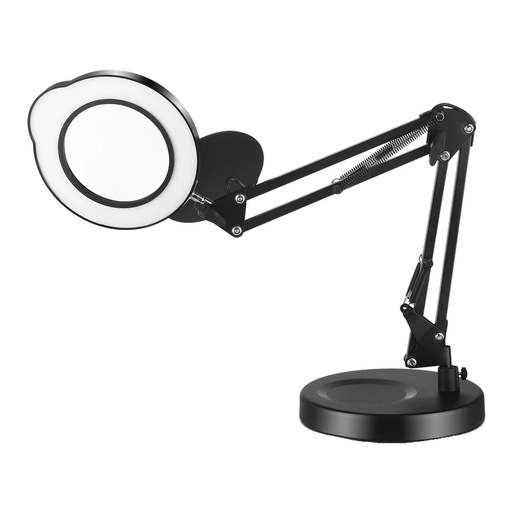
LED magnifying lamp with stepless brightness control and flexible swivel arms
Suitable if a direct visual inspection without a digital live view on screen is enough.
Stepless brightness control and flexible swivel arms.
View at Joybuy
 No image available
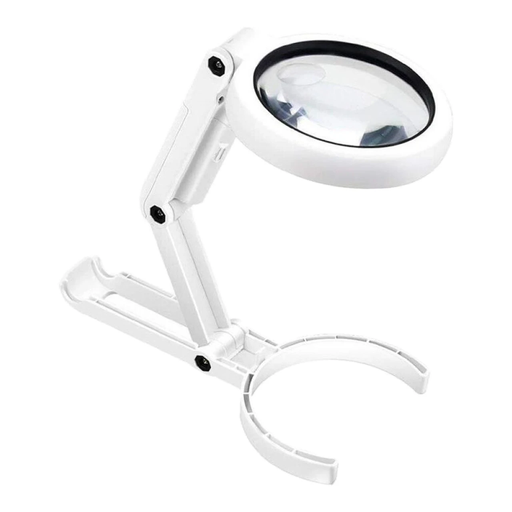
Folding magnifier, 5x/10x, with 8 LEDs and a stand
An option for direct visual inspection if you don't need a digital live view on a computer.
USB-rechargeable; ABS frame, acrylic lens and dimensions of 190x90x26mm at 120g.
View at Joybuy
Frequently asked questions
How do I start inspecting a fountain pen nib?
Look at a clean nib from the writing-surface side and check the alignment of the tines. If reflections get in the way, adjust the light and viewing angle. An unusual-looking image alone does not prove that the nib is causing a writing problem. The Goulet Pen Company recommends also checking cleaning, ink and paper as possible causes.
Can I use any USB microscope with a tablet?
No, you can't tell from the USB connection alone. Tablets are explicitly excluded for the Carson MM-500, while BRESSER lists Windows 10 and 11 for the DST-1028. Before buying, check support for the specific device you plan to use.
What should I do if the product is faulty after purchase?
For a consumer purchase in Germany, statutory rights against the seller may generally apply to faulty new goods for up to two years from receipt. The Verbraucherzentrale points to this period; a voluntary guarantee is separate. If you made the purchase as a business, check the applicable contractual terms separately.
What should I look for on the labelling of an electric microscope?
For the electrical and electronic products it covers, the Bundesnetzagentur lists criteria including CE marking, identifiable manufacturer details and German-language instructions. The EU rules that apply to a specific device variant depend on the product; a CE mark is not an independent endorsement of image quality.


